TotalHealDeviceSphereUnified Endpoint Management (UEM)
Enrol, configure, update and secure every laptop, phone and tablet from one console.
Trial: 30 days, up to 25 devices. You sign in to the TotalHeal console with a Sttiz account and activate DeviceSphere UEM. No card.
Organisations run a mix of Windows and Mac laptops, Linux machines, iPhones, iPads and Android phones. IT needs to know what each device is, keep it configured and encrypted, deploy apps, and lock or wipe a lost device — usually with several separate tools.
One device record, one console, one policy engine and one signed command channel for Windows, macOS, Linux, iPhone, iPad and Android.

See DeviceSphere in action.
A sales manager leaves a laptop in a taxi. On it, the customer list, the price book, and a saved login to everything.
What happens, how DeviceSphere stops it, the steps to roll it out, pricing and deployment — in about 6 minutes. English, with captions.
DeviceSphere UEM, feature by feature.
Enrolment your way
Token, QR code or link, with corporate, BYOD and server profiles, groups, tags, expiry and maximum uses. Command-line enrolment for bulk rollout.
Hardware and software inventory
Model, serial, CPU, RAM, disks, battery, OS and patch level, installed software, users, network, encryption, firewall and Secure Boot.
Signed configuration policies
Password and screen lock, disk encryption, firewall, OS auto-update, USB control, remote-login services, Wi-Fi rules and settings lock — versioned, with “simulate on device” before rollout.
Compliance rules
Compliant, non-compliant and grace states that feed Zero Trust posture and reports.
Apps and updates
An app catalogue deployed through winget, Homebrew/.pkg, apt and dnf, required or self-service, with allow and block rules on the device. OS and third-party updates with patch rings.
Remote actions with a second approver
Lock, restart, sync, message, collect diagnostics, locate (opt-in) and retire. Destructive actions need a typed confirmation and a second human approver — never AI.
Recovery-key escrow
BitLocker and FileVault keys sealed per organisation. Viewing one needs an admin role, a reason and a fresh two-step code; the key is then rotated.
iPhone, iPad and Android
Apple MDM with Declarative Device Management, User Enrolment and Apple Business Manager. An Android device-policy app for fully managed, work profile and kiosk devices, with hardware key attestation.
Reports and a tamper-evident trail
Fleet compliance and patch reports as PDF, HTML or CSV, scheduled by e-mail, and a hash-chained audit trail you can verify.
How DeviceSphere UEM works.
DeviceSphere UEM manages Windows, macOS and Linux computers, iPhones, iPads and Android devices from one console. Every policy and command is signed, destructive actions need a second person, and recovery keys are sealed per organisation — so device management stops being one more way in.
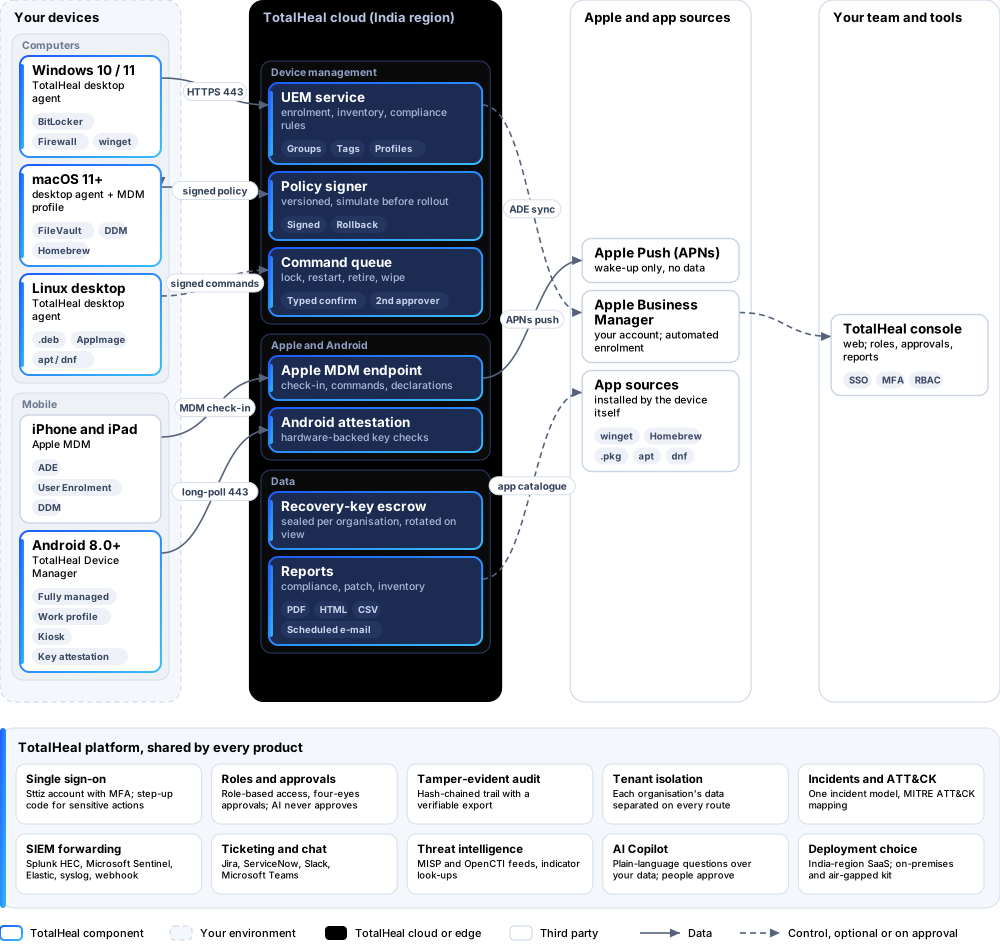
- EnrolDevices enrol with a token, QR code or link into corporate, BYOD or server profiles.
- InventoryHardware, software, encryption, firewall and patch level are reported and kept current.
- ConfigureSigned, versioned policies are simulated on a device first, then rolled out.
- ComplyCompliance rules set compliant, grace or non-compliant states that feed Zero Trust and reports.
- ActLock, retire or wipe with typed confirmation and a second approver.
Android and Apple devices, in the same console.
One device record for laptops, phones and tablets — the same policies, compliance rules and reports.
Android — TotalHeal Device Manager Available
A device-policy app for fully managed, work-profile and kiosk devices, with managed apps, Wi-Fi and network settings and hardware key attestation. Android 8.0 and later, provisioned by QR code or NFC; device-owner modes need a factory-reset device.
Not yet: Managed Google Play and Android zero-touch.
iPhone, iPad and Mac — Apple MDM Available
Apple MDM with Declarative Device Management, User Enrolment for personal devices, and Automated Device Enrolment through Apple Business or School Manager. Needs your Apple Push certificate.
A factory reset is possible on MDM-managed iPhone and iPad and on fully managed Android.
Platforms and deployment
Platforms
| Platform | How it is covered |
|---|---|
| macOS 11 and later | TotalHeal desktop agent |
| Windows 10 and 11 (x64) | TotalHeal desktop agent |
| Linux desktop (.deb, AppImage) | TotalHeal desktop agent — a few actions are macOS/Windows only |
| iPhone and iPad | Apple MDM — needs your Apple Push certificate; ADE needs Apple Business or School Manager |
| Android 8.0 and later | TotalHeal Device Manager, provisioned by QR code or NFC |
Deployment
| Profile | Status |
|---|---|
| SaaS (TotalHeal cloud) | Available |
| On-premises | AvailableDelivered with our team from the on-premises kit. |
| Air-gapped | AvailableAndroid works over the local network; iPhone and iPad management uses Apple Push. |
Unit and tiers.
Priced per managed device per year. Counted: active enrolled devices: desktops, Apple MDM and Android devices. List prices are not published yet — our team quotes per unit and term.
| Business | Enterprise | |
|---|---|---|
| Enrolment, inventory, policies, apps, compliance rules, remote actions, scripts, Apple MDM, Android, reports | Included | Included |
| ADE at scale, recovery-key escrow, multi-site, four-eyes policy change | Planned for Enterprise | Included |
| Windows Autopilot | Roadmap | Roadmap |
| Price | Contact sales | Contact sales |
The Business/Enterprise split is the commercial plan; until it is enforced, both tiers get the full product.
Government profile. Government is a profile, not a separate tier or price list: the Elite tier with Government defaults switched on — data residency in India, four-eyes approval of policy changes, a distinct approver for every approval-level action, retention of at least 180 days, and the CERT-In and DPDP reporting clocks.
What you need
- HTTPS from devices to the TotalHeal cloud
- Apple Push certificate for iPhone/iPad
- Android: a factory-reset device for device-owner modes
- A Sttiz account for each console user
Procurement documents for DeviceSphere UEM
The datasheet is public. The full dossier is sent on request, so we can match it to your tender.
- Datasheet. What the product does, platforms, deployment profiles, tiers and honest limits.
- Compliance matrix. Each requirement marked comply, partial or no, with an evidence reference — CERT-In directions, DPDP, ISO 27001 controls touched, accessibility of the console, data residency.
- Bill of materials. SKUs per sizing, the unit and quantity formula, customer-side components and services.
- Architecture and hardening. How the product is deployed and the hardening guidance for each component.
- SLA. Support tiers, response targets the team can meet, update cadence and end-of-life policy.
- OEM authorisation letter. A MAF template for resellers and system integrators, with product names exactly as on the SKU.
Works well with
Part of TotalHeal Endpoint Operations and TotalHeal Endpoint Defense suites and of Complete — each product is still licensed on its own.
TotalHealPatchPilot
Patch Management
See what is missing on every computer and roll updates out in waves — with proof afterwards.
TotalHealRemoteLink
Remote Access & Support
Consented, recorded remote support for Macs and Windows PCs, and audited shells on Linux servers.
TotalHealVulnSight
Vulnerability Management
Know which installed software carries a known, exploited vulnerability — without a scanner appliance.
TotalHealZeroGate
Zero Trust Network Access (ZTNA)
Access to named apps and servers only, re-checked continuously — not the whole subnet.
Get a quote for DeviceSphere UEM.
Tell us how many managed devices you need and how you want to deploy. We reply with a quote and the procurement documents you ask for.
Or email business@totalhealsecurity.com.