TotalHealPrivilegeVaultPrivileged Access Management (PAM)
Vault admin passwords, broker sessions without revealing them, record everything and rotate afterwards.
Trial: 30 days. You sign in to the TotalHeal console with a Sttiz account and activate PrivilegeVault PAM. No card.
Shared administrator passwords for servers, Windows machines and databases are known to too many people, never change and leave no record of what was done with them. One leaked admin password is often the whole breach.
A per-organisation encrypted vault, check-out with human approval, SSH/RDP/VNC sessions brokered without showing the password, recordings and automatic rotation.

PrivilegeVault PAM, feature by feature.
Encrypted credential vault
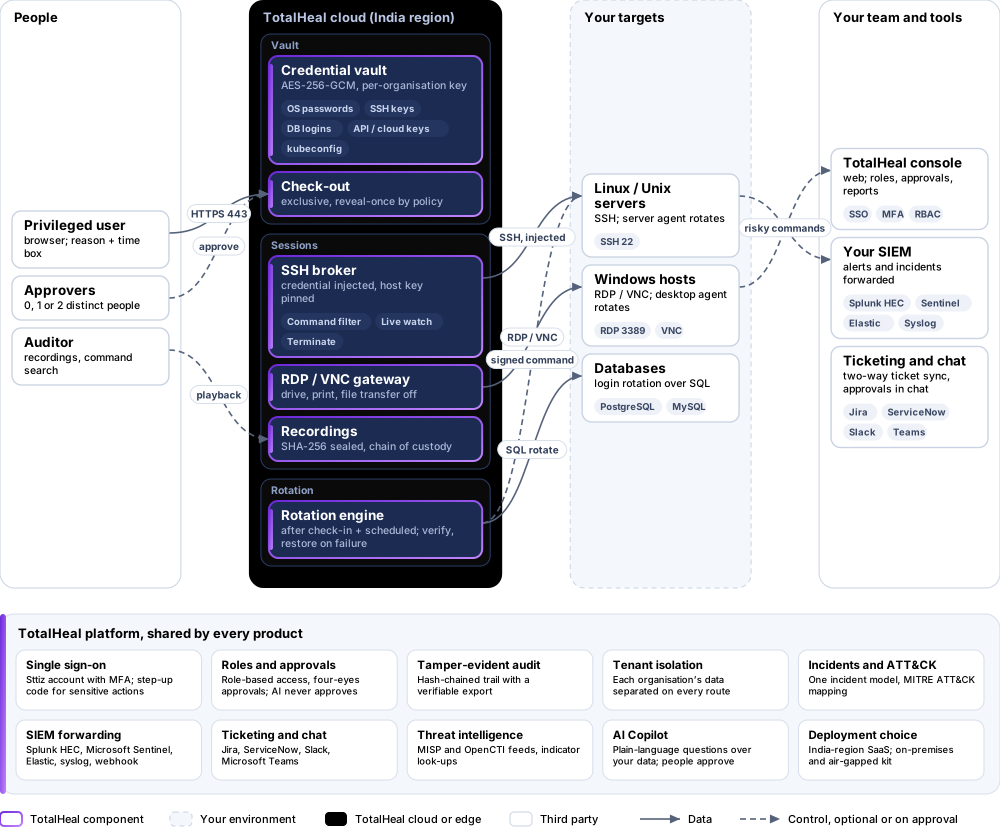
AES-256-GCM with a per-organisation key; each secret version is bound to its organisation, account and version. OS passwords, SSH keys, database logins, API and cloud keys, kubeconfig. Lists never return secrets.
Check-out with dual control
A reason, a time box and 0, 1 or 2 distinct human approvers — the requester can never approve. Exclusive check-out and reveal-once by policy.
Sessions without the password
SSH with the credential injected and the host key pinned; RDP and VNC through a broker with drive, printing and file transfer off.
Recording and playback
SSH and RDP/VNC recordings sealed with SHA-256 at close, registered as evidence with chain of custody, played in the browser.
Command capture and filtering
Every SSH command recorded and searchable; deny/allow lists that block or alert; risky commands raise SOC alerts mapped to ATT&CK.
Live monitoring
Watch a running session and terminate it with a reason; idle timeout and automatic end at the time box, check-in or revoke.
Automatic rotation
After check-in and on a schedule: Linux passwords and SSH keys, Windows local accounts on corporate devices, and PostgreSQL and MySQL logins with verify and restore on failure.
Humans only
AI agents and machine identities can never request, approve, reveal, rotate or open a session.
Tamper-evident audit
Every PAM action in the hash-chained audit with a verified export; risky-command alerts can be forwarded to your SIEM.
How PrivilegeVault PAM works.
PrivilegeVault vaults privileged credentials, brokers SSH, RDP and VNC sessions without revealing them, records everything and rotates the password afterwards. Check-out needs a reason, a time box and human approval, and AI agents can never request, approve or open a session.
- RequestA user asks for an account with a reason and a time box.
- Approve0, 1 or 2 distinct human approvers; never the requester.
- ConnectThe session opens with the credential injected and the host key pinned.
- RecordScreens and SSH commands are recorded; risky commands are blocked or alerted.
- RotateAt check-in the password or key is rotated, verified and restored on failure.
Platforms and deployment
Platforms
| Platform | How it is covered |
|---|---|
| SSH | Linux/Unix servers and any SSH host |
| RDP / VNC | Windows / any VNC server |
| Rotation | Linux (server agent), Windows local accounts (desktop agent), PostgreSQL, MySQL |
| Console | Modern browser |
Deployment
| Profile | Status |
|---|---|
| SaaS (India region) with cloud broker | AvailablePublic targets must be in your allowed networks. |
| Hybrid (private targets) | PartialThrough a Secure Access connector node on your network (a binary today); a dedicated on-site gateway is on the roadmap. |
| On-premises / air-gapped | AvailableOn-premises or fully offline, delivered with our team from one kit. |
Essential, Professional or Elite.
Priced per privileged user per year. Counted: users allowed to check out credentials or open sessions.
| Feature | EssentialUS$240per privileged user per year | ProfessionalUS$420per privileged user per year | EliteUS$660per privileged user per year |
|---|---|---|---|
| Encrypted credential vault (AES-256-GCM, per-organisation key) for OS, SSH and database accounts | |||
| Check-out with dual control: reason, time box, up to two approvers (never the requester), reveal once, check-in | |||
| Automatic rotation after check-in and on a schedule; tamper-evident audit | |||
| Sessions without the password: SSH with the credential injected, RDP and VNC through the broker, command filtering | |||
| Live monitoring: watch a running session and terminate it | |||
| Recording playback sealed with SHA-256 and verified; command search across sessions |
List prices per privileged user per year; minimum 5 privileged users. Each tier includes everything in the tier before it. Volume, multi-product and partner pricing on request.
Organisations that have PrivilegeVault today through Enterprise keep every tier.
Government profile. Government is a profile, not a separate tier or price list: the Elite tier with Government defaults switched on — data residency in India, four-eyes approval of policy changes, a distinct approver for every approval-level action, retention of at least 180 days, and the CERT-In and DPDP reporting clocks.
What you need
- A modern browser
- Network reachability from the broker, or a Secure Access connector
- TotalHeal server agent on Linux targets and desktop agent on Windows targets for rotation
- A database login that can change its own password for database rotation
Procurement documents for PrivilegeVault PAM
The datasheet is public. The full dossier is sent on request, so we can match it to your tender.
- Datasheet. What the product does, platforms, deployment profiles, tiers and honest limits.
- Compliance matrix. Each requirement marked comply, partial or no, with an evidence reference — CERT-In directions, DPDP, ISO 27001 controls touched, accessibility of the console, data residency.
- Bill of materials. SKUs per sizing, the unit and quantity formula, customer-side components and services.
- Architecture and hardening. How the product is deployed and the hardening guidance for each component.
- SLA. Support tiers, response targets the team can meet, update cadence and end-of-life policy.
- OEM authorisation letter. A MAF template for resellers and system integrators, with product names exactly as on the SKU.
Works well with
Part of TotalHeal Secure Access suite and of Complete — each product is still licensed on its own.
TotalHealZeroGate
Zero Trust Network Access (ZTNA)
Access to named apps and servers only, re-checked continuously — not the whole subnet.
TotalHealRemoteLink
Remote Access & Support
Consented, recorded remote support for Macs and Windows PCs, and audited shells on Linux servers.
TotalHealDNSGuard
DNS Firewall & Security
Stop malware, phishing and DNS tunnelling at the lookup — for every device, on site or on the road.
Get a quote for PrivilegeVault PAM.
Tell us how many privileged users you need and how you want to deploy. We reply with a quote and the procurement documents you ask for.
Or email business@totalhealsecurity.com.