TotalHealCyberRecoverCyber Recovery
After ransomware: find the newest clean restore point and roll the server back, with a second person approving.
Trial: 30 days. You sign in to the TotalHeal console with a Sttiz account and activate CyberRecover Cyber Recovery. No card.
After ransomware the hard question is not whether a backup exists but which one is clean. Restore too new and the attacker’s files come back; restore too old and days of work are lost.
CyberRecover turns ransomware alerts into a recovery incident, holds the last known-good restore point, checks restore points for the attacker’s files and rolls the server back with a second person approving.
CyberRecover Cyber Recovery, feature by feature.
Alert to recovery
Ransomware, inhibit-recovery and destruction alerts on a protected server open a recovery incident: the newest committed point before detection minus 15 minutes is held for 90 days and later points are marked suspect.
Clean check by bisection
Up to 30 candidate points are checked by bisection: a file whose hash is an incident indicator makes a point dirty; ransom notes and encrypted copies mark it for review.
False positives never delay recovery
Name-based hints only mark a point for review; they never push recovery further back.
One-step rollback
Roll the server back to the chosen point with a second person approving; files the attacker created are moved aside, never deleted.
Frozen evidence
Changed files are frozen in new backups so evidence survives the clean-up.
How CyberRecover Cyber Recovery works.
CyberRecover turns ransomware alerts into a recovery incident, holds the last known-good restore point, checks restore points by bisection for the attacker’s files and rolls the server back with a second person approving — moving the attacker’s files aside, never deleting them.
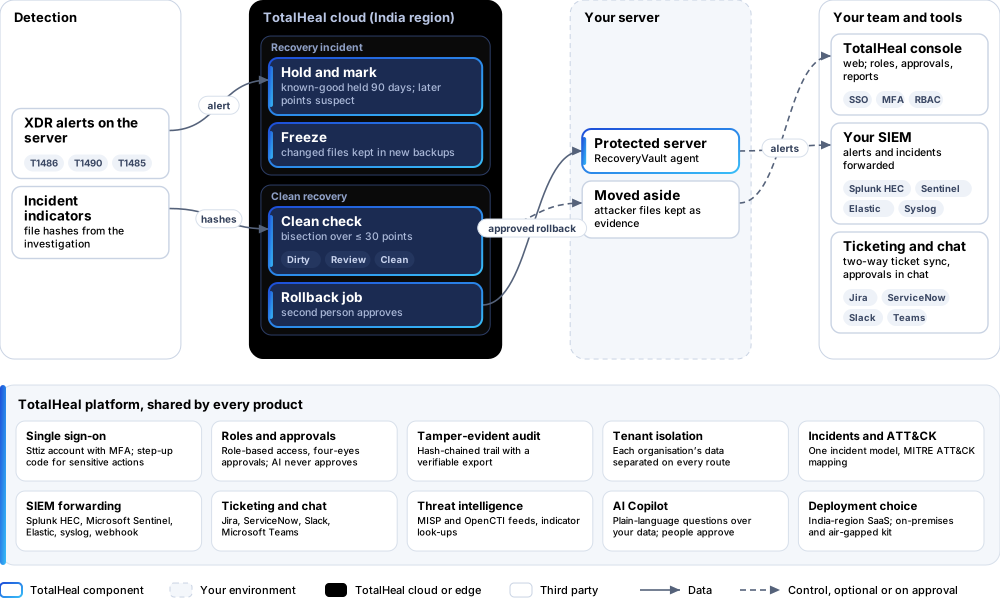
- HoldThe newest point before detection minus 15 minutes is held for 90 days.
- CheckCandidate points are checked by bisection for incident indicators.
- ApproveA second person approves the rollback.
- Roll backFiles restored; the attacker’s files moved aside.
Platforms and deployment
Platforms
| Platform | How it is covered |
|---|---|
| Linux servers | Protected by TotalHeal RecoveryVault |
| Alerts | TotalHeal XDR alerts on the protected server |
Deployment
| Profile | Status |
|---|---|
| SaaS (India region) | AvailableSingle-region service. |
| On-premises control plane | AvailableDelivered with our team from the on-premises kit. |
| Air-gapped | AvailableOffline kit, offline licence file and offline update bundles. |
Unit and tiers.
Priced per protected server per year. Counted: servers with CyberRecover switched on. List prices are not published yet — our team quotes per unit and term.
| Business | Enterprise | |
|---|---|---|
| Recovery incidents, holds, clean check, four-eyes rollback | Included | Included |
| Price | Contact sales | Contact sales |
CyberRecover is sold on its own and needs RecoveryVault.
Government profile. Government is a profile, not a separate tier or price list: the Elite tier with Government defaults switched on — data residency in India, four-eyes approval of policy changes, a distinct approver for every approval-level action, retention of at least 180 days, and the CERT-In and DPDP reporting clocks.
What you need
- TotalHeal RecoveryVault on the servers to recover
Procurement documents for CyberRecover Cyber Recovery
The datasheet is public. The full dossier is sent on request, so we can match it to your tender.
- Datasheet. What the product does, platforms, deployment profiles, tiers and honest limits.
- Compliance matrix. Each requirement marked comply, partial or no, with an evidence reference — CERT-In directions, DPDP, ISO 27001 controls touched, accessibility of the console, data residency.
- Bill of materials. SKUs per sizing, the unit and quantity formula, customer-side components and services.
- Architecture and hardening. How the product is deployed and the hardening guidance for each component.
- SLA. Support tiers, response targets the team can meet, update cadence and end-of-life policy.
- OEM authorisation letter. A MAF template for resellers and system integrators, with product names exactly as on the SKU.
Works well with
Get a quote for CyberRecover Cyber Recovery.
Tell us how many protected servers you need and how you want to deploy. We reply with a quote and the procurement documents you ask for.
Or email business@totalhealsecurity.com.