TotalHealMailShieldEmail Security (Microsoft 365 and Google Workspace)
Catches phishing, malware and business email compromise in Microsoft 365 and Google Workspace mailboxes, and pulls malicious mail out of the inbox automatically — no MX record change.
Trial: 30 days, up to 25 mailboxes. You sign in to the TotalHeal console with a Sttiz account and activate MailShield Email Security. No card.
Most attacks still start in an inbox: a look-alike DocuSign or Microsoft sign-in page, an invoice that builds malware in the browser, a message from the managing director asking for an urgent transfer, a supplier whose bank details suddenly change. Built-in filters let these through because they come from clean, authenticated domains with no attachment to scan.
MailShield reads every new inbox message through the Microsoft 365 and Google Workspace APIs, analyses the sender, its authentication, every link, every attachment and the words of the message, explains each verdict reason by reason, and moves malicious mail to a hidden quarantine before the user acts on it.

MailShield Email Security, feature by feature.
API-based, no MX change
Connects to Microsoft 365 through Microsoft Graph (an app with Mail.ReadWrite and User.Read.All, or keyless with a federated credential) and to Google Workspace through a service account with domain-wide delegation. Mail flow and MX records stay exactly as they are.
Every mailbox, every minute
Every user mailbox of the connection is listed automatically and new inbox mail is read every minute, round robin, with a cursor per mailbox so nothing is analysed twice or skipped.
Sender impersonation
Look-alike sender domains of your own domains, your suppliers and more than 40 global and Indian brands (typos, homoglyphs, extra words: micros0ft-support.com, tata-steeel.com, docusign-notice.net); a brand or one of your executives named in the display name of outside mail; a Reply-To or Return-Path that differs from the sender; a display name that shows a different address; a sender writing to your organisation for the first time.
Authentication
SPF, DKIM and DMARC results as your mail service recorded them; mail that claims your own domain but fails authentication is flagged as spoofed.
Links
Every link checked against TotalHeal threat intelligence and your own indicator feeds (URL and domain); links whose text shows one site but go to another; look-alike, punycode, raw IP-address and URL-shortener links.
Attachments
ClamAV scanning when a ClamAV server is configured; SHA-256 of every attachment checked against known-malicious hashes; HTML smuggling (a page that builds a file in the browser); HTML sign-in forms that post to another site; executables, scripts, disk images and shortcuts from outside; a document extension hiding an executable (invoice.pdf.exe); password-protected archives that cannot be scanned.
Business email compromise
Requests to change bank or payment details, urgent payment and transfer requests, gift-card requests and credential requests (“your password will expire”, “verify your mailbox”, KYC and PAN updates), in English and Indian business phrasing.
A score with every reason
Each message gets a score from 0 to 100 and a verdict — clean, suspicious or malicious — with a category (phishing, malware, business email compromise, impersonation) and every reason listed with its weight.
Automatic quarantine
Malicious mail (or suspicious mail too, if you choose) is moved to a hidden TotalHeal Quarantine folder or label; detect-only mode alerts without moving anything.
Release with four-eyes
Suspicious mail can be released by one person with a reason; releasing malicious mail needs a second person — never the requester, never a service account.
Campaigns
The same message from one sending domain reaching several mailboxes is grouped as a campaign, alerted once it reaches three mailboxes in a day, and quarantined everywhere in one action.
User-reported phishing
Employees forward suspicious mail to your report mailbox; MailShield analyses the original message inside the forward and always sends it to your SOC.
Your policy
Your domains, the executives attackers impersonate, your supplier and partner domains, allow and block lists. Malware is caught even from allowed senders.
Alerts in the same incident queue
Every finding is an alert mapped to MITRE ATT&CK (T1566 phishing, T1684.001 impersonation, T1684.002 email spoofing), correlated with endpoint, identity and cloud alerts, and sent on to your SIEM, ticketing and playbooks.
Privacy by design
Message bodies and attachments are analysed in memory and never stored: MailShield keeps the headers, link hosts, attachment names and hashes, and the verdict. Credentials are sealed per organisation and never shown again.
How MailShield Email Security works.
MailShield analyses every new message in Microsoft 365 and Google Workspace through their APIs — sender, authentication, links, attachments and wording — explains each verdict reason by reason, quarantines malicious mail automatically, groups campaigns across mailboxes, and lets a malicious message out only when a second person agrees.
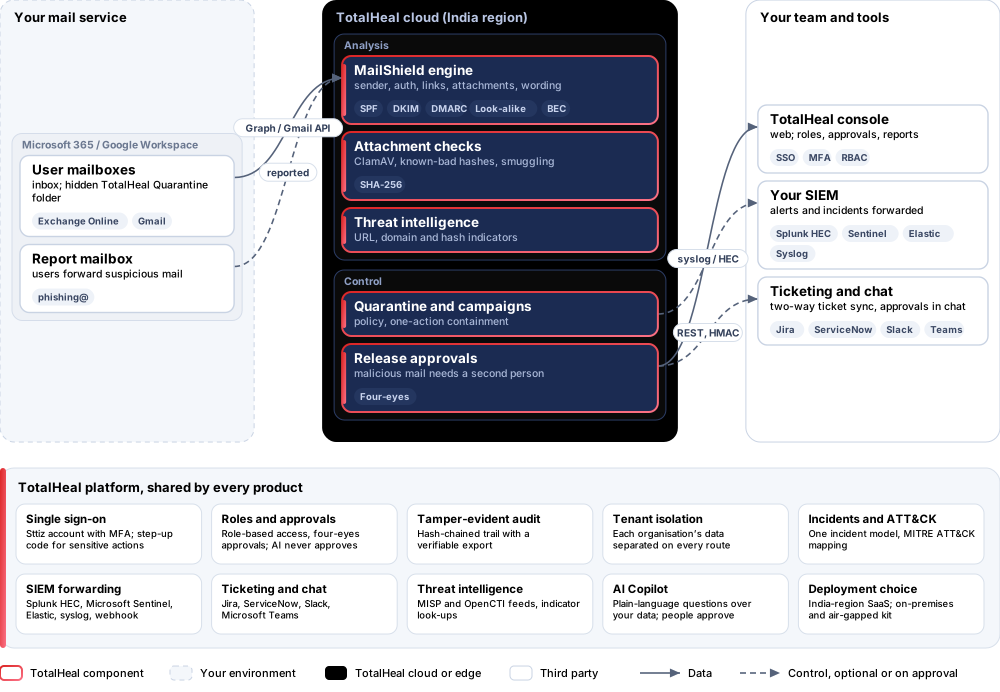
- ConnectGrant MailShield API access to Microsoft 365 or Google Workspace; MX records and mail flow do not change.
- ReadNew inbox mail in every mailbox is read every minute, with a cursor per mailbox.
- AnalyseSender, SPF / DKIM / DMARC, links, attachments and wording are scored; every reason is kept with its weight.
- QuarantineMalicious mail moves to a hidden quarantine folder; campaigns across mailboxes are contained in one action.
- RespondAlerts join the incident queue; releases of malicious mail need a second person.
Platforms and deployment
Platforms
| Platform | How it is covered |
|---|---|
| Microsoft 365 (Exchange Online) | Microsoft Graph — app permissions Mail.ReadWrite, User.Read.All; or keyless (federated credential) |
| Google Workspace (Gmail) | Gmail API and Admin SDK — service account with domain-wide delegation |
| Attachment scanning | ClamAV (clamd) on your TotalHeal installation, plus known-bad hashes from threat intelligence |
| Console | TotalHeal web console |
Deployment
| Profile | Status |
|---|---|
| SaaS (India region) | AvailableSingle-region service. |
| On-premises control plane | AvailableNeeds outbound HTTPS to Microsoft Graph or the Gmail API. |
| Air-gapped | Not applicableMicrosoft 365 and Google Workspace are cloud mail services. |
Unit and tiers.
Priced per mailbox per year. Counted: user mailboxes of the connected tenants. List prices are not published yet — our team quotes per unit and term.
| Business | Enterprise | |
|---|---|---|
| Analysis, automatic quarantine, campaigns, four-eyes release, user reports, policy, alerts | Included | Included |
| Price | Contact sales | Contact sales |
MailShield is sold on its own, outside the editions.
Government profile. Government is a profile, not a separate tier or price list: the Elite tier with Government defaults switched on — data residency in India, four-eyes approval of policy changes, a distinct approver for every approval-level action, retention of at least 180 days, and the CERT-In and DPDP reporting clocks.
What you need
- Microsoft 365: an Entra ID app with Mail.ReadWrite and User.Read.All (admin consent), or a federated credential trusting TotalHeal
- Google Workspace: a service account with domain-wide delegation for gmail.modify and admin.directory.user.readonly
- Optional: a ClamAV server (clamd) for attachment scanning
Procurement documents for MailShield Email Security
The datasheet is public. The full dossier is sent on request, so we can match it to your tender.
- Datasheet. What the product does, platforms, deployment profiles, tiers and honest limits.
- Compliance matrix. Each requirement marked comply, partial or no, with an evidence reference — CERT-In directions, DPDP, ISO 27001 controls touched, accessibility of the console, data residency.
- Bill of materials. SKUs per sizing, the unit and quantity formula, customer-side components and services.
- Architecture and hardening. How the product is deployed and the hardening guidance for each component.
- SLA. Support tiers, response targets the team can meet, update cadence and end-of-life policy.
- OEM authorisation letter. A MAF template for resellers and system integrators, with product names exactly as on the SKU.
Works well with
TotalHealThreatFusion
Extended Detection & Response (XDR)
One incident across endpoint, network, identity, email and cloud — with or without our EDR.
TotalHealCyberAware
Security Awareness Training
Short security courses for every employee, with signed certificates and reports for auditors. Phishing simulation coming.
Get a quote for MailShield Email Security.
Tell us how many mailboxs you need and how you want to deploy. We reply with a quote and the procurement documents you ask for.
Or email business@totalhealsecurity.com.