TotalHealNetWatchNetwork Detection & Response (NDR)
Network detection and response from a passive sensor: beaconing, DNS tunnelling, data leaving, lateral movement and exposed services — no agent on the hosts.
Trial: 30 days. You sign in to the TotalHeal console with a Sttiz account and activate NetWatch NDR. No card.
Printers, cameras, appliances and unmanaged laptops cannot run an agent, and attackers know it. What they do still crosses the network: implants call home on a timer, data leaves in large uploads, and admin protocols move from host to host.
NetWatch runs on the same passive sensor as IndustrialGuard. It reads connection metadata from a SPAN or TAP port, detects command-and-control, exfiltration and lateral movement, learns a host inventory from the traffic and raises alerts in the same incidents as your endpoint, identity and cloud alerts.
NetWatch NDR, feature by feature.
Passive sensor
A Linux host on a SPAN or TAP port; nothing is installed on the hosts it watches.
Command and control
Beaconing (regular call-backs) and DNS tunnelling.
Data leaving
Large uploads to outside addresses.
Lateral movement and scans
Admin services (SMB, RDP, SSH, WinRM) used host to host, and internal scans.
Exposure and weak protocols
Remote administration reached from the internet, clear-text logins and self-signed certificates.
Host inventory from traffic
Names and MAC addresses (DHCP), services and software versions seen on the wire.
Response through your firewall
Blocking goes through the TotalHeal firewall connectors, behind your response policy.
How NetWatch NDR works.
NetWatch reads connection metadata from a passive sensor and detects beaconing, DNS tunnelling, large uploads, lateral movement and exposed services — for every device on the wire, including the ones that can never run an agent.
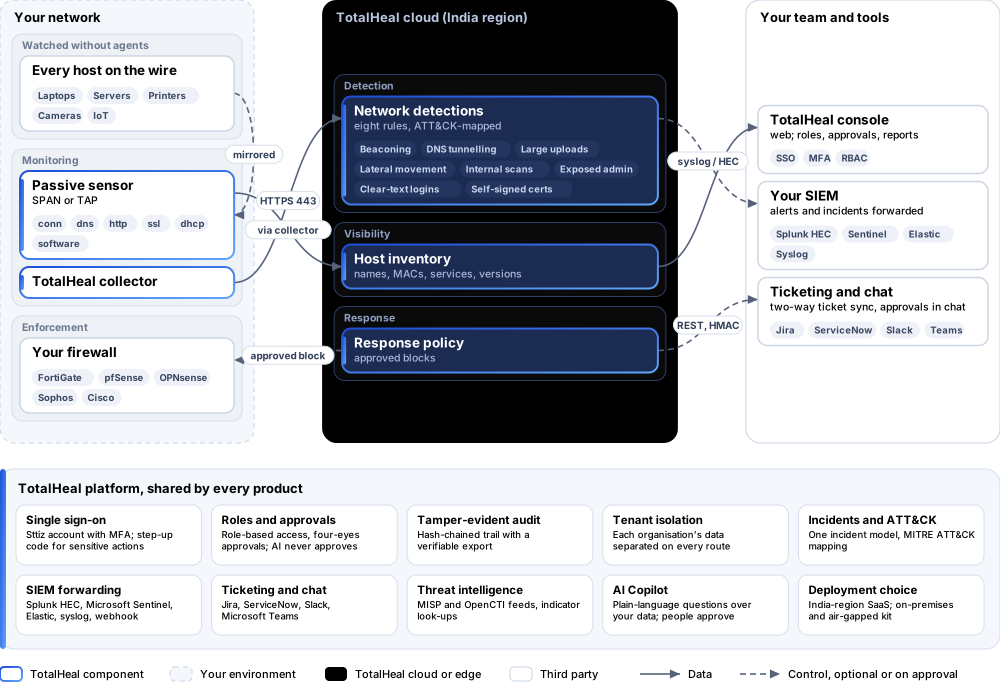
- MirrorConnect the sensor to a SPAN or TAP port.
- LearnHosts, services and software versions from the traffic.
- DetectEight detections for C2, exfiltration, movement and exposure.
- RespondBlock through your firewall, behind approval.
Platforms and deployment
Platforms
| Platform | How it is covered |
|---|---|
| Sensor | Ubuntu, Debian, RHEL-family Linux with a SPAN or TAP port |
| Console | TotalHeal web console |
Deployment
| Profile | Status |
|---|---|
| Sensor at your site, SaaS console (India region) | AvailableEvents go through the TotalHeal collector. |
| On-premises control plane | AvailableDelivered with our team from the on-premises kit. |
| Air-gapped | AvailableOffline kit, offline licence file and offline update bundles. |
Unit and tiers.
Priced per sensor per year. Counted: sensors sending to the organisation. List prices are not published yet — our team quotes per unit and term.
| Business | Enterprise | |
|---|---|---|
| Passive sensor, eight network detections, host inventory, alerts in incidents | Included | Included |
| Price | Contact sales | Contact sales |
NetWatch is sold on its own, outside the editions.
Government profile. Government is a profile, not a separate tier or price list: the Elite tier with Government defaults switched on — data residency in India, four-eyes approval of policy changes, a distinct approver for every approval-level action, retention of at least 180 days, and the CERT-In and DPDP reporting clocks.
What you need
- A Linux host with a SPAN or TAP port
- The TotalHeal collector
Procurement documents for NetWatch NDR
The datasheet is public. The full dossier is sent on request, so we can match it to your tender.
- Datasheet. What the product does, platforms, deployment profiles, tiers and honest limits.
- Compliance matrix. Each requirement marked comply, partial or no, with an evidence reference — CERT-In directions, DPDP, ISO 27001 controls touched, accessibility of the console, data residency.
- Bill of materials. SKUs per sizing, the unit and quantity formula, customer-side components and services.
- Architecture and hardening. How the product is deployed and the hardening guidance for each component.
- SLA. Support tiers, response targets the team can meet, update cadence and end-of-life policy.
- OEM authorisation letter. A MAF template for resellers and system integrators, with product names exactly as on the SKU.
Works well with
TotalHealThreatFusion
Extended Detection & Response (XDR)
One incident across endpoint, network, identity, email and cloud — with or without our EDR.
TotalHealLogIntelligence
SIEM & Log Management
Collect, search and alert on logs from firewalls, DNS servers, servers and identity providers.
Get a quote for NetWatch NDR.
Tell us how many sensors you need and how you want to deploy. We reply with a quote and the procurement documents you ask for.
Or email business@totalhealsecurity.com.