TotalHealThingGuardIoT and unmanaged device security
Finds every camera, printer, phone and building, medical or industrial device on your network, tells you what each one is and why, how risky it is, and where it may go.
Trial: 30 days, up to 100 devices. You sign in to the TotalHeal console with a Sttiz account and activate ThingGuard IoT Security. No card.
Most of what is on a network today cannot run an agent: cameras, printers, IP phones, smart TVs, building controllers, medical modalities, sensors. Nobody has a list of them, half answer on telnet or a default web page, some are reachable from the internet through a forgotten port forward, and they sit on the same VLAN as finance — so one compromised camera is a way in for everyone.
ThingGuard builds one inventory from what TotalHeal already sees on the wire and at the switch port — NetWatch sensors, NetworkGate sessions and UEM — and classifies every device from its manufacturer, host name, software banners and the protocols it answers on, showing the reasons. On the Professional tier it scores each device’s risk, raises alerts when a device starts behaving differently and puts each class of device in its own VLAN or quarantine through NetworkGate.

ThingGuard IoT Security, feature by feature.
One inventory, no agents
Every device NetWatch sensors and NetworkGate see — address, MAC, host name, ports, software, the switch port or SSID it joined through — merged by MAC, with UEM-managed computers marked as managed.
Classified, with the reasons
Camera, printer, VoIP phone, TV and media, building automation, medical, industrial, network equipment, storage, IoT sensor, payment terminal, computer or phone — from the MAC vendor, DHCP host name, software banners and protocols such as RTSP, IPP, SIP, BACnet, DICOM, HL7, Modbus and MQTT. Each class shows the signals behind it and a confidence; a device with no clues stays “not identified”.
You can correct it
Set a device’s class by hand when you know better; the next sweeps keep your choice, and the change is audited.
Risk per device
Admin services reachable from the internet, telnet and FTP, clear-text logins, web admin over plain HTTP only, heavy internet traffic and devices not registered with NetworkGate add to a 0–10 score, each factor listed.
Behaviour alerts
A device that starts reaching dozens of new internet addresses, or whose admin service becomes reachable from the internet, raises an alert in the same incident queue as everything else (MITRE ATT&CK T1041).
Segmentation by class
Choose per class: leave as is, put in a VLAN, or quarantine. ThingGuard registers each device with NetworkGate in its class’s VLAN or quarantines it, and switches that support change of authorisation move it at once.
Quarantine on incidents
On the Elite tier, a device named by an open high or critical alert is quarantined automatically for the classes you choose.
How ThingGuard IoT Security works.
ThingGuard turns what NetWatch and NetworkGate already see into one inventory of every device, classifies each one with its reasons, scores its risk and, through NetworkGate, puts each class of device in its own VLAN or quarantine.
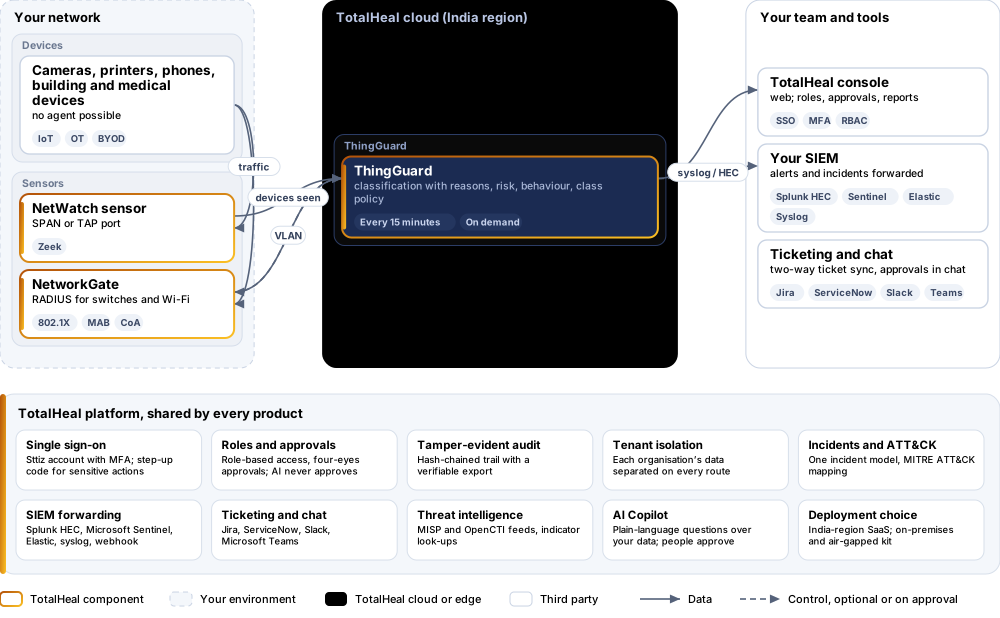
- SeeNetWatch sensors and NetworkGate report every device on the wire and at the switch port.
- ClassifyEach device is classified from its vendor, name, software and protocols, with the reasons shown.
- ScoreInternet-reachable admin services, telnet, clear-text logins and heavy traffic raise its risk.
- SegmentEach class goes to its VLAN or quarantine through NetworkGate.
- WatchUnusual behaviour raises an alert; on Elite a device named by a high alert is quarantined.
Platforms and deployment
Platforms
| Platform | How it is covered |
|---|---|
| Discovery | TotalHeal NetWatch sensor (Zeek) on a SPAN or TAP port; NetworkGate RADIUS sessions; TotalHeal UEM inventory |
| Segmentation | Through NetworkGate: switches and wireless controllers speaking RADIUS (RFC 2865, 3580; change of authorisation RFC 5176) |
| Console | TotalHeal web console |
Deployment
| Profile | Status |
|---|---|
| SaaS (India region) | AvailableClassification and policy run in the TotalHeal cloud; sensors and NetworkGate stay on your network. |
| On-premises control plane | AvailableDelivered with our team from the on-premises kit. |
| Air-gapped | AvailableOffline kit, offline licence file and offline update bundles. |
Essential, Professional or Elite.
Priced per device per year. Counted: devices in the ThingGuard inventory.
| Feature | EssentialUS$9per device per year | ProfessionalUS$18per device per year | EliteUS$27per device per year |
|---|---|---|---|
| One device inventory from NetWatch, NetworkGate and UEM: address, MAC, host name, ports, software, switch port or SSID | |||
| Each device classified (camera, printer, VoIP phone, TV, building, medical, industrial, network, storage, IoT sensor, payment terminal, computer, phone) with its reasons and confidence; class set by hand when you know better | |||
| Risk per device: admin services reachable from the internet, telnet and FTP, clear-text logins, plain-HTTP admin, heavy internet traffic, unregistered on NetworkGate | |||
| Alerts when a device starts reaching many new internet addresses or exposes an admin service | |||
| A VLAN or quarantine per device class, applied through NetworkGate as devices are seen | |||
| Automatic quarantine of a device named by a high or critical alert |
List prices per device per year; minimum 50 devices. Each tier includes everything in the tier before it. Volume, multi-product and partner pricing on request.
ThingGuard is sold on its own, outside the editions. VLANs and quarantine need NetworkGate.
Government profile. Government is a profile, not a separate tier or price list: the Elite tier with Government defaults switched on — data residency in India, four-eyes approval of policy changes, a distinct approver for every approval-level action, retention of at least 180 days, and the CERT-In and DPDP reporting clocks.
What you need
- A TotalHeal NetWatch sensor on a SPAN or TAP port, or NetworkGate on your switches
- NetworkGate for VLANs and quarantine by class
Procurement documents for ThingGuard IoT Security
The datasheet is public. The full dossier is sent on request, so we can match it to your tender.
- Datasheet. What the product does, platforms, deployment profiles, tiers and honest limits.
- Compliance matrix. Each requirement marked comply, partial or no, with an evidence reference — CERT-In directions, DPDP, ISO 27001 controls touched, accessibility of the console, data residency.
- Bill of materials. SKUs per sizing, the unit and quantity formula, customer-side components and services.
- Architecture and hardening. How the product is deployed and the hardening guidance for each component.
- SLA. Support tiers, response targets the team can meet, update cadence and end-of-life policy.
- OEM authorisation letter. A MAF template for resellers and system integrators, with product names exactly as on the SKU.
Works well with
Get a quote for ThingGuard IoT Security.
Tell us how many devices you need and how you want to deploy. We reply with a quote and the procurement documents you ask for.
Or email business@totalhealsecurity.com.