Digital safety for the whole family

Protection
without panic.

TotalHeal keeps your computers, browsing, privacy and family safe — quietly, clearly and without scare tactics. Not just antivirus.

30-day full trialNo card neededNo browsing history collected
The TotalHeal app in its 30-day trial: real-time, web and ransomware protection are on and the device is protected
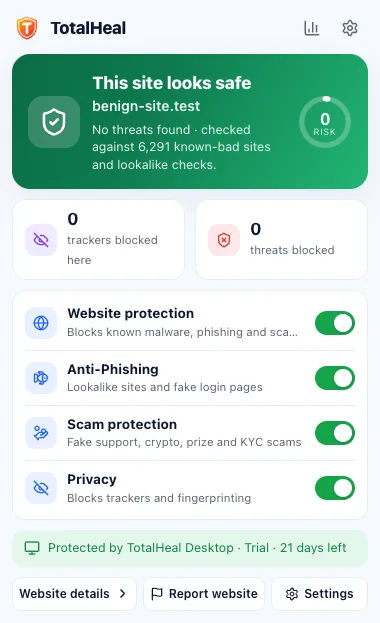
TotalHeal browser extension popup: this site looks safe

Screens from the TotalHeal app (30-day trial) and browser extension. Numbers shown are sample data.

Our promise

Protection without panic — and without tricks.

No scareware. Ever.

No fake alarms, inflated threat counts or “your PC is infected” pop-ups.

No fake countdowns

If something is limited, we show the real number.

Your data stays yours

No browsing history, no ads, nothing sold. Stored in India.

Same price at renewal

No introductory price that quietly doubles next year.

How TotalHeal protects you

On your device first. The cloud only when it helps.

Checked on your device

Files, downloads and sites are checked locally in milliseconds — protection keeps working offline.

Signed updates, many times a day

New threat definitions are cryptographically signed and verified before TotalHeal uses them.

Cloud reputation when needed

Only the site name or file fingerprint being checked is sent — never full addresses or your browsing history.

One app, five layers

Everything that keeps a family safe online — in one calm place.

Device, web, privacy, identity and family protection work together, so you don’t juggle five apps.

Available now

Antivirus and real-time protection

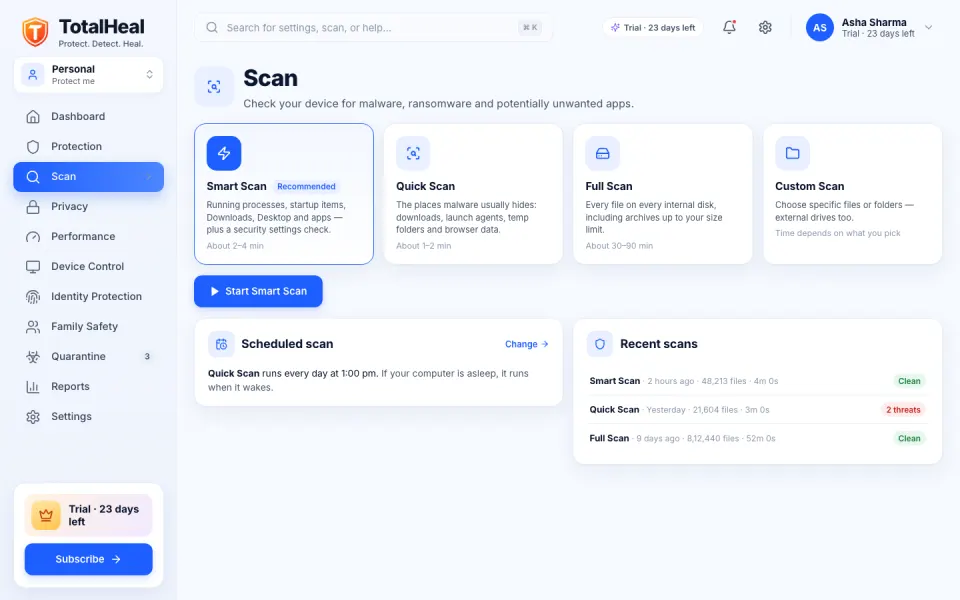
TotalHeal checks files as they are downloaded, written and opened, and scans your computer on a schedule you choose. It tells you plainly what it found and what it did about it.
  • Real-time file shield
  • Several engines, one verdict
  • Smart, quick, full and custom scans
  • Quarantine you can trust
Learn more about antivirus
TotalHeal Scan screen with Smart, Quick, Full and Custom scans
Available now

Ransomware shield

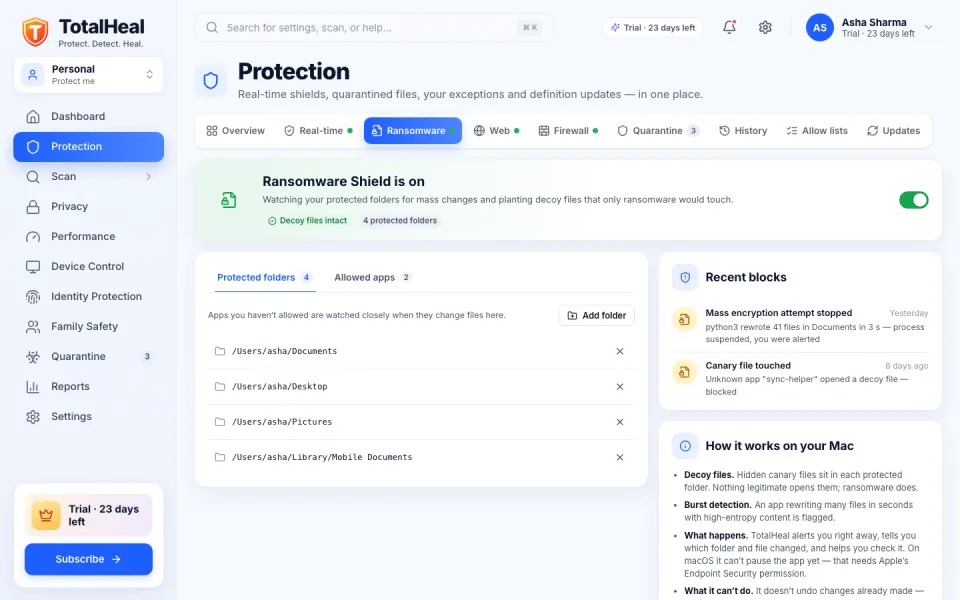
Ransomware tries to lock your photos and documents and then asks for money. TotalHeal watches your important folders and alerts you the moment a program starts rewriting them, naming the app so you can stop it.
  • Decoy files
  • Burst detection
  • Alert and name the app
  • Protected folders and allowed apps
Learn more about ransomware shield
TotalHeal Ransomware Shield with protected folders and recent blocks
Available now

Web and download protection

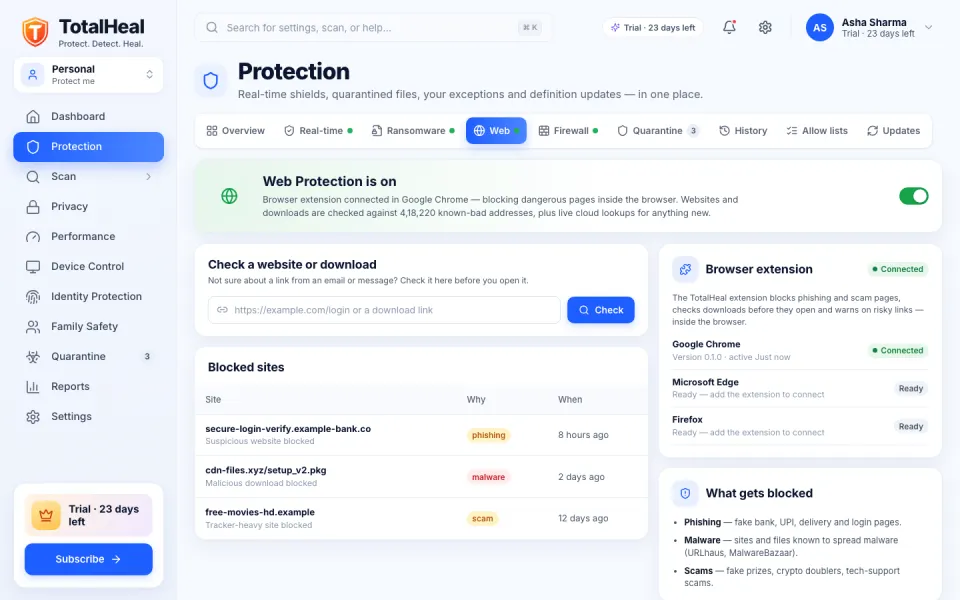
Most attacks start with a link. TotalHeal checks websites and downloads against a constantly updated list of known-bad addresses and spots lookalike domains built to fool you.
  • Known-bad sites blocked
  • Lookalike domains
  • Download checks
  • Check a link yourself
Learn more about web protection
TotalHeal Web Protection screen with a link checker and recently blocked sites
Available now

Privacy protection

TotalHeal shows you, in one place, which apps can see your screen, hear your microphone, use your camera or read your files — and helps you take access away.
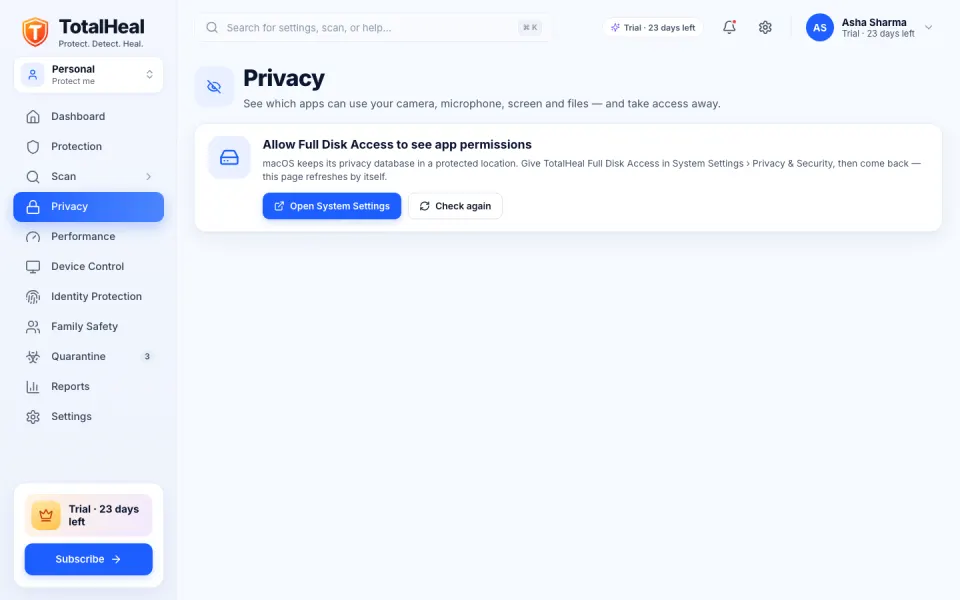
  • App permission audit (macOS)
  • Plain-language risks
  • Tracker blocking in your browser
  • Webcam and microphone alerts (macOS)
Learn more about privacy
TotalHeal Privacy screen listing apps with camera, microphone, screen and file access
Available · more coming

Family protection

Protect everyone’s computers from one account. See at a glance which devices are protected — without spying on the adults in your home.
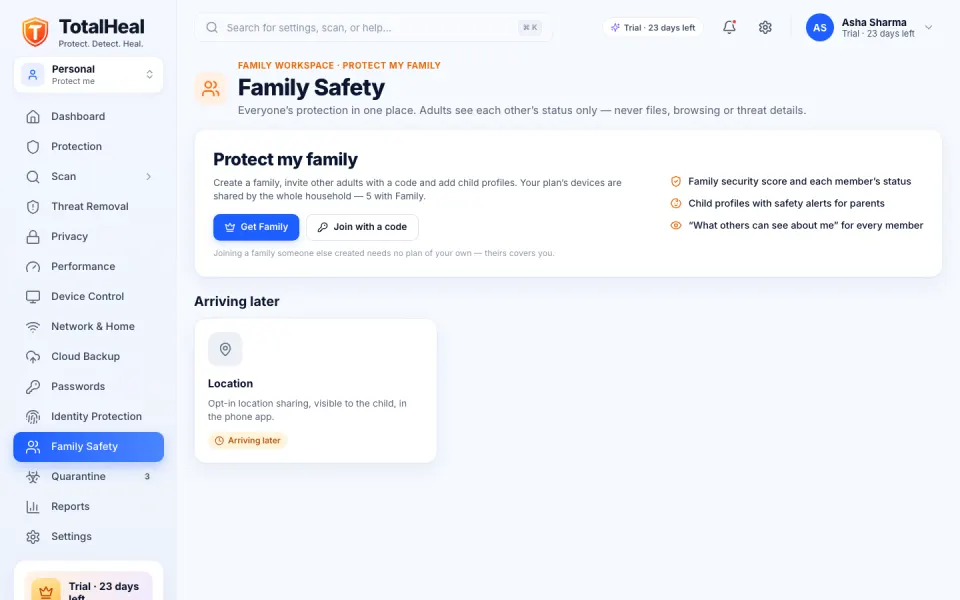
  • Shared device seats
  • Family dashboard
  • Privacy between adults
  • Safe Search for children
Learn more about family
TotalHeal Family Safety screen showing shared device seats and their protection status

Identity protection

Available · more coming

Check today whether your passwords appear in known breaches — privately, with only 5 characters of a hash leaving your device. Breach alerts for your email and dark-web monitoring are being built; until they ship we show no results — we won’t guess or show sample data.

Password breach check · availableEmail breach alerts · comingDark-web monitoring · comingVPN · comingPassword manager · next updateCloud backup · next updatePhone app · coming to stores
Hand holding a phone with a padlock and a hidden password glowing above it
How it works

Protected in three steps. No card, no catch.

Young woman playing a game at a PC lit in blue neon
  1. 1

    Download and install

    Get TotalHeal for your computer. Setup takes a couple of minutes and runs a quick first scan.

  2. 2

    Your trial starts automatically

    Every new install gets 30 days of everything — everything unlocked. No card, no account needed to start.

  3. 3

    Subscribe when you’re sure

    Choose a plan or activate a product key. If you don’t, protection pauses on day 30 — your quarantined files always stay accessible.

“Your TotalHeal trial has ended. Protection is paused — subscribe to turn it back on.”

  • Real-time protectionPaused
  • Scans & definition updatesPaused
  • Your quarantined filesAlways accessible
  • History, settings & product keysAvailable
  • Turn protection back onSubscribe or activate a key
Browser extension

A second pair of eyes before you click, type or pay.

The TotalHeal extension spots fake login pages, scam shops and dangerous downloads in Chrome, Edge and Brave — and explains what it found in plain words.
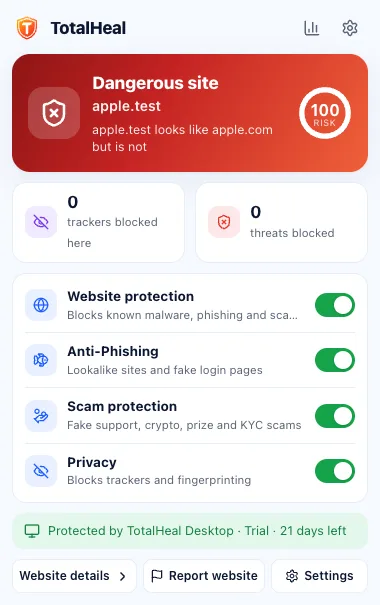
  • Fake-login and phishing blocking for banks, UPI, delivery and government look-alikes
  • Banking & payment mode with extra checks on card and UPI pages
  • QR and clipboard checks — see where a QR code really goes
  • No browsing history — only the site, verdict and rule for warnings, kept on your device
Extension popup warning that a site is dangerous
Extension popup showing a site looks safe
One TotalHeal ID

Protect me. Protect my family. Protect my business.

One account, several security workspaces — switch between them without a new login.

Personal AvailableFamily AvailableProfessional Workspace availableBusiness Available
For business

TotalHeal for teams and security teams.

DeviceSphere UEM, RemoteLink Remote Access, ZeroGate ZTNA and PrivilegeVault PAM — each sold on its own with a 30-day trial — in the TotalHeal console, on the platform that protects our home users. More products are in early access and development.

Available today

Everything in Personal.

42 features you can use today. Where a feature works only on some systems, it says so.

Protection (10)

  • Real-time antivirusWatches Downloads, Desktop, Documents, folders you add and USB drives, and scans each new or changed file.
  • Multi-engine detectionAllow list, known-bad hashes, YARA rules, heuristics and cloud reputation — the first verdict wins.
  • Smart, quick, full, custom and scheduled scansPause, resume or cancel; scans run at low priority.
  • Ransomware ShieldDecoy files and burst-rewrite detection with an alert that names the app; protected folders and allowed apps. It detects and alerts — it does not block at kernel level.
  • Crypto-mining protectionBehavioural detection of miners that slow your computer and run up your power bill.
  • Rescue scan and threat removalFinds infections already on the computer, including startup and persistence items, and removes them safely.
  • Stalkerware and spyware detectionFlags known stalkerware and covert “monitoring” apps, with severity by type.
  • Encrypted quarantine and restoreQuarantined files are encrypted and can be restored — even after a trial ends.
  • Tamper protectionA password is needed to pause or turn off protection, including from the tray.
  • Signed definitions and app updatesSigned hourly definitions and verified app updates that keep the previous version for rollback; they wait when you are on battery or a metered network.

Web and browser (7)

  • Web protection and “check a link”Dangerous sites checked against our definitions and cloud reputation.
  • Malicious-download blockingDownloads are checked on arrival and quarantined if dangerous.
  • Browser extension for Chrome, Edge and BraveInstalled from our site today; store listings are coming.
  • Phishing and fake-login detectionSpots a bank or brand login page on the wrong domain, look-alike letters and punycode tricks.
  • Tracker blockingOur own lists for advertising, analytics, fingerprinting, session replay and social trackers.
  • Per-site cookiesSee how many cookies a site keeps and clear them with one button.
  • Private-window rulesLocal rules only; nothing is recorded in private windows.

Scams and payments (5)

  • Scam warningsInvestment, crypto, fake support, KYC, delivery, refund and job scams.
  • Banking and payment modeExtra checks on UPI, card and net-banking pages, including warnings about risky browser extensions.
  • Look-alike bank, UPI, delivery and government sitesWarnings for domains made to look like the real thing.
  • QR and crypto-address checksShows where a QR code really goes; warns if a copied wallet address is swapped.
  • Scam-call protection“Someone is connected to this computer remotely right now” — an alert when a remote-access session is running, the classic fake-support scam.

Privacy (3)

  • App-permission auditmacOSWhich apps can use the camera, microphone, screen, contacts, photos, full disk and accessibility.
  • Webcam and microphone monitormacOSAn alert when an app starts using your camera or microphone.
  • Password breach checkChecks passwords against known breaches with k-anonymity — only 5 characters of a hash leave your device — plus a hygiene checklist.

Network and home (6)

  • Secure DNSmacOS, WindowsOpt-in encrypted DNS that blocks malware domains, with a check that your DNS has not been tampered with.
  • Adult-content blocking DNSmacOS, WindowsA Family mode of Secure DNS that also blocks adult content, with a test that proves it works.
  • Wi-Fi checkmacOSSecurity, band and signal of your network; flags open, WEP and WPA1 networks and captive portals.
  • Router securityYour router’s vendor, open admin ports and UPnP exposure.
  • Who is on my networkConnected devices, alerts for new or unknown devices, and risky services.
  • Firewall controlTurn the system firewall on, use stealth mode or block all incoming connections.

Device health (7)

  • TotalHeal Security ScoreOne score from 0 to 100 across six areas, and the next action to take.
  • Device healthDisk encryption, firewall, system protections, pending OS updates, screen lock and startup items.
  • Hardware healthmacOSSSD health and wear, battery cycles and capacity, and unsigned system extensions.
  • Performance toolsCPU, memory and disk use, top processes, a junk cleaner and startup items.
  • USB protectionmacOS, WindowsScan on insert, block untrusted drives, trusted and blocked lists.
  • Reports30- and 90-day activity and threat types, with CSV export.
  • History and notificationsOne clear log of everything TotalHeal did.

Account and help (4)

  • 30-day trial, no cardEvery new device gets 30 days of everything. Afterwards protection pauses; quarantine stays reachable.
  • Security workspacesPersonal, Professional, Family and Business workspaces on one TotalHeal ID, switched in the app.
  • Account, keys, devices and GST invoicesManage everything at totalhealsecurity.com/account.
  • Support and diagnosticsA diagnostics file without file contents or tokens, and a support dialog in the app.
Coming

Not available yet — and never shown as included

TotalHeal phone app Coming to storesAndroid Mobile Security (app scan, scam link and SMS check, Wi-Fi, Safe Browsing DNS) and an iPhone Security Check are built, not yet in the stores.
Browser extension in the stores Coming to storesChrome Web Store, Edge and Firefox listings are prepared, not yet published.
Linux desktop ComingBuilt, not yet published.
Anti-theft for your own devices ComingLocate, lock and wipe for home devices.
Vulnerable-app checker ComingOut-of-date third-party apps with known vulnerabilities.
Bootable rescue PlannedClean a computer that will not start normally.
Founder offer

Be one of our first 1,00,000 customers.

Everything in Personal, for our first 1,00,000 customers. Your founder price stays locked at every renewal.

  • Everything in Personal on 3 devices
  • Price locked — renew at the founder price for as long as you stay
₹499/ year

or ₹999 for 3 years · 18% GST added at checkout

Plans

Honest prices. Same price every year.

Prices in INR per year. 18% GST is added at checkout. Renewal is the same price — no introductory discount that jumps later.

Compare every feature

Signed, verified updates

Every update and definition file is cryptographically signed and checked before TotalHeal uses it.

How we protect updates

Built and hosted in India

Made by Freaquer Corporation in India, with account data stored on servers in India, under the DPDP Act 2023.

Privacy policy

Works when you’re offline

Protection runs on your device. If our cloud is unreachable, TotalHeal keeps protecting you and never blocks normal sites.

How protection works
Questions

Good questions, straight answers.

Is there a free version of TotalHeal?
No. TotalHeal is a paid product with an honest 30-day trial: every new device gets everything for 30 days, with no card. After 30 days, protection pauses until you subscribe or activate a product key. Your quarantined files always stay accessible. There are no ads and we never sell your data.
How does the 30-day trial work?
Every new device gets 30 days of everything automatically. You don’t need a card or even an account to start. After 30 days, protection pauses until you subscribe or activate a product key — we tell you clearly, we never charge you by surprise, and your quarantined files always stay accessible.
Will TotalHeal try to scare me into buying?
No. We never show fake or inflated threat counts, fake countdowns or “your PC is infected” pop-ups. During the trial we only suggest subscribing when it is genuinely relevant, at most once a week per topic, and you can dismiss it.
Which devices are supported?
The TotalHeal desktop app runs on macOS (Apple Silicon and Intel) and Windows; the Linux build is not published yet. The browser extension is for Chrome, Edge and Brave, installed from our site until the store listings go live. The phone app is built and coming to the stores.
What data do you collect?
Only what protection needs: device health, protection status and threat detections (file fingerprints, not file contents). We do not collect your browsing history. Account data is stored in India. See Trust & security for the full list.
Can I use one plan on several computers?
Yes. Personal covers 3 devices, Family 5 and Ultimate 10. Sign in with the same TotalHeal ID on each device and manage them from your account.
How do I activate a product key?
Open TotalHeal on your device and go to Account › License, or sign in at totalhealsecurity.com/account and choose License. Keys look like TH-XXXXXXXX-XXXXXXXX-XXXX-XXXX.

Your digital life. Protected.

Try every layer for 30 days. No card, no sign-in needed to start.