Ransomware shield
Ransomware tries to lock your photos and documents and then asks for money. TotalHeal watches your important folders and stops a program that starts rewriting them.
What it does
- Decoy files
Hidden canary files sit in each protected folder. Nothing legitimate opens them; ransomware does. - Burst detection
An app rewriting many files in seconds, with scrambled-looking content, is flagged at once. - Suspend first, then ask
The process is paused and you decide: allow it once, keep it blocked, or quarantine it. - Protected folders and allowed apps
Documents, Desktop and Pictures are protected by default. Add your own folders and trusted apps.
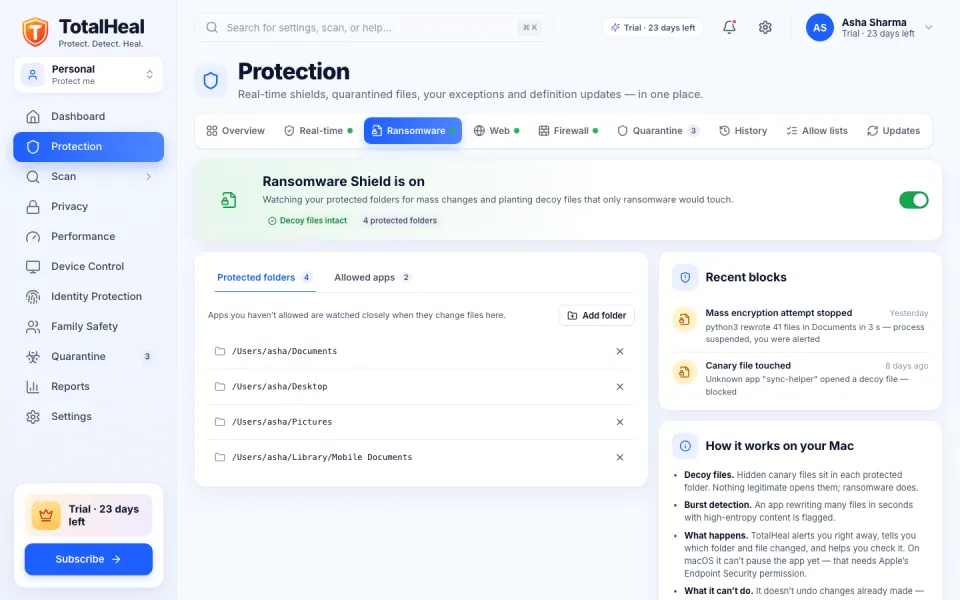
What it can’t do: TotalHeal can’t undo changes already made before it stepped in. Keep a backup (Time Machine, File History or another backup) — Cloud backup is coming to Ultimate.
Included in every plan — Personal, Family and Ultimate — and in the 30-day trial.
Questions
Will it block my photo editor or backup app?
More ways TotalHeal protects you
Antivirus and real-time protection
Stops malware the moment it lands — before it can run.
Learn moreWeb and download protection
Blocks phishing, scam and malware sites, and dangerous downloads.
Learn moreTotalHeal browser extension
Safety checks inside Chrome, Edge and Brave — phishing, scams, fake logins.
Learn morePrivacy protection
See which apps can use your camera, microphone, screen and files.
Learn moreFamily protection
One plan, up to 10 devices, and a family view that respects privacy.
Learn moreIdentity protection
Breach alerts for your email and personal details — coming soon.
Learn more