TotalHealImmutableVaultImmutable Backup Storage
Backup copies locked with S3 Object Lock: nobody can change or delete them before their retention ends.
Trial: 30 days. You sign in to the TotalHeal console with a Sttiz account and activate ImmutableVault Immutable Backup. No card.
An attacker with administrator access deletes the backups before encrypting the servers. If any account — yours, a stolen one, or your vendor’s — can delete a backup, the backup is not your last line.
ImmutableVault writes every RecoveryVault restore point to a repository with S3 Object Lock in compliance mode. Until its retention ends, no administrator, stolen key or TotalHeal itself can change or delete it.
ImmutableVault Immutable Backup, feature by feature.
Locked at write time
Every object of a restore point is locked in compliance mode as it is written.
Reused blocks stay locked
When a new restore point reuses an older block, that block’s lock is extended to the new point’s retention.
Deletion refused
Retention and clean-up never delete a locked object; deleting a server with held or locked points is refused and raises an alert.
Lock shortening refused
Attempts to shorten a policy’s lock are refused and alerted as inhibit-recovery activity (MITRE ATT&CK T1490).
Your bucket or ours
On an S3 bucket created with Object Lock — yours, or TotalHeal’s where offered.
How ImmutableVault Immutable Backup works.
ImmutableVault locks every RecoveryVault restore point with S3 Object Lock in compliance mode at the moment it is written. Until retention ends, no administrator, stolen key or TotalHeal itself can change or delete it — and every attempt raises an alert.
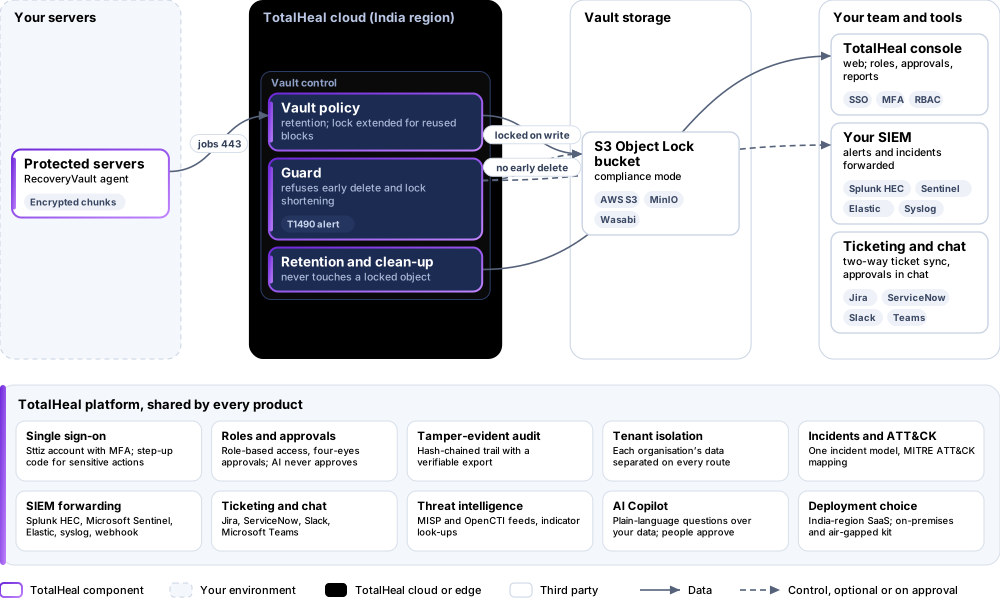
- WriteEach object is locked in compliance mode as it is written.
- ExtendReused blocks get their lock extended to the new point.
- RefuseDeletion before retention and lock shortening are refused and alerted.
Platforms and deployment
Platforms
| Platform | How it is covered |
|---|---|
| Storage | S3-compatible buckets created with Object Lock: AWS S3, MinIO, Wasabi |
| Sources | Servers protected by TotalHeal RecoveryVault |
Deployment
| Profile | Status |
|---|---|
| Your Object Lock bucket, SaaS control plane | Available |
| TotalHeal-hosted vault | PartialWhere offered; needs an Object Lock bucket in the region. |
| On-premises control plane | AvailableDelivered with our team from the on-premises kit. |
| Air-gapped | AvailableOffline kit, offline licence file and offline update bundles. |
Unit and tiers.
Priced per protected terabyte per year. Counted: data held in the vault, in terabytes. List prices are not published yet — our team quotes per unit and term.
| Business | Enterprise | |
|---|---|---|
| Object Lock at write, lock extension, refused deletion and shortening, alerts | Included | Included |
| Price | Contact sales | Contact sales |
ImmutableVault is sold on its own and needs RecoveryVault.
Government profile. Government is a profile, not a separate tier or price list: the Elite tier with Government defaults switched on — data residency in India, four-eyes approval of policy changes, a distinct approver for every approval-level action, retention of at least 180 days, and the CERT-In and DPDP reporting clocks.
What you need
- TotalHeal RecoveryVault
- An S3-compatible bucket with Object Lock enabled
Procurement documents for ImmutableVault Immutable Backup
The datasheet is public. The full dossier is sent on request, so we can match it to your tender.
- Datasheet. What the product does, platforms, deployment profiles, tiers and honest limits.
- Compliance matrix. Each requirement marked comply, partial or no, with an evidence reference — CERT-In directions, DPDP, ISO 27001 controls touched, accessibility of the console, data residency.
- Bill of materials. SKUs per sizing, the unit and quantity formula, customer-side components and services.
- Architecture and hardening. How the product is deployed and the hardening guidance for each component.
- SLA. Support tiers, response targets the team can meet, update cadence and end-of-life policy.
- OEM authorisation letter. A MAF template for resellers and system integrators, with product names exactly as on the SKU.
Works well with
Get a quote for ImmutableVault Immutable Backup.
Tell us how many protected terabytes you need and how you want to deploy. We reply with a quote and the procurement documents you ask for.
Or email business@totalhealsecurity.com.