Immutable Backup Storage
A backup that nobody can delete — not an attacker, not an admin, not us
Backup copies locked with S3 Object Lock: nobody can change or delete them before their retention ends.
Contents
- 1Executive summary
- 2The challenge
- 3Architecture
- 4How it works
- 5Capabilities in detail
- 6Security and data handling
- 7Where it fits
- 8Deployment and system requirements
- 9Technical specifications
- 10Getting started
1Executive summary
ImmutableVault locks every RecoveryVault restore point with S3 Object Lock in compliance mode at the moment it is written. Until retention ends, no administrator, stolen key or TotalHeal itself can change or delete it — and every attempt raises an alert.
2The challenge
An attacker with administrator access deletes the backups before encrypting the servers. If any account — yours, a stolen one, or your vendor’s — can delete a backup, the backup is not your last line.
The TotalHeal approach. ImmutableVault writes every RecoveryVault restore point to a repository with S3 Object Lock in compliance mode. Until its retention ends, no administrator, stolen key or TotalHeal itself can change or delete it.
3Architecture
4How it works
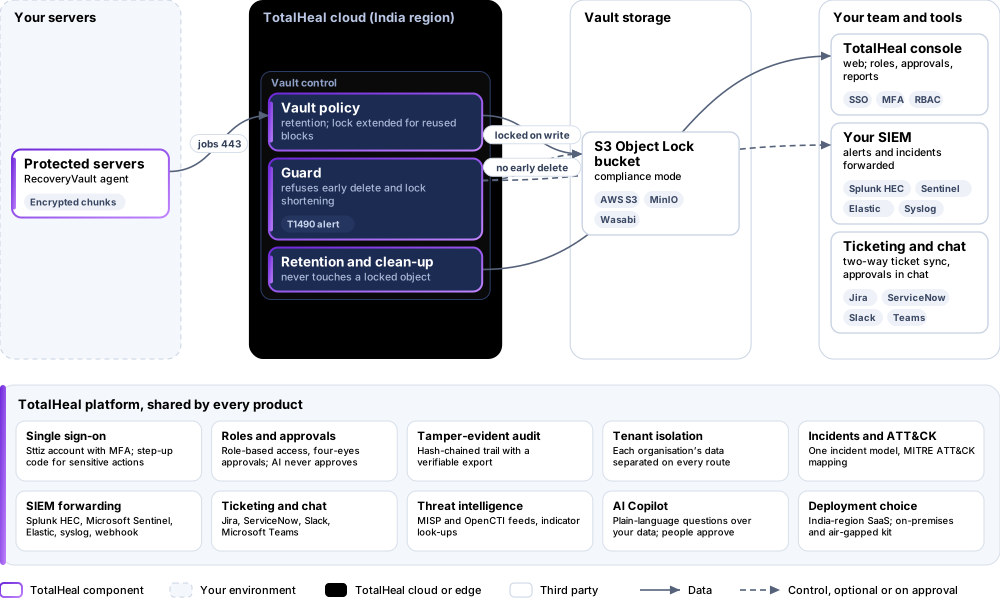
- WriteEach object is locked in compliance mode as it is written.
- ExtendReused blocks get their lock extended to the new point.
- RefuseDeletion before retention and lock shortening are refused and alerted.
5Capabilities in detail
- Locked at write timeEvery object of a restore point is locked in compliance mode as it is written.
- Reused blocks stay lockedWhen a new restore point reuses an older block, that block’s lock is extended to the new point’s retention.
- Deletion refusedRetention and clean-up never delete a locked object; deleting a server with held or locked points is refused and raises an alert.
- Lock shortening refusedAttempts to shorten a policy’s lock are refused and alerted as inhibit-recovery activity (MITRE ATT&CK T1490).
- Your bucket or oursOn an S3 bucket created with Object Lock — yours, or TotalHeal’s where offered.
6Security and data handling
- Compliance-mode locksNobody can delete a locked object early.
- Alerts on attemptsShortening or deletion attempts raise alerts.
- Your bucketLocks live in storage you can own.
7Where it fits
8Deployment and system requirements
Protected platforms
- AWS S3
- MinIO
- Wasabi
On-premises server
- Operating system
- RHEL, Rocky Linux or AlmaLinux 8 / 9; Ubuntu 20.04, 22.04 or 24.04; Debian 11 / 12
- Processor
- 4 vCPU (tested configuration)
- Memory
- 8 GB recommended (6 GB minimum)
- Disk
- 10 GB free for software, releases and backups, plus data
- Sign-in
- Active Directory / LDAP, SAML 2.0 or OpenID Connect
- Software
- Nothing to pre-install: no container runtime, database, web server or Java
Network and access
- TotalHeal RecoveryVault
- An S3-compatible bucket with Object Lock enabled
Alerts and tickets to
- Splunk
- Microsoft Sentinel
- Elastic
- Syslog / CEF
- Jira
- ServiceNow
- Slack
- Microsoft Teams
9Technical specifications
| Features | Included | |
|---|---|---|
| Locked at write time | Included | |
| Reused blocks stay locked | Included | |
| Deletion refused | Included | |
| Lock shortening refused | Included | |
| Your bucket or ours | Included | |
| Availability by edition | Business | Enterprise |
| Object Lock at write, lock extension, refused deletion and shortening, alerts | Included | Included |
| Platforms and coverage | ||
| Storage | S3-compatible buckets created with Object Lock: AWS S3, MinIO, Wasabi | |
| Sources | Servers protected by TotalHeal RecoveryVault | |
| Deployment options | ||
| Your Object Lock bucket, SaaS control plane | Available | |
| TotalHeal-hosted vault | PartialWhere offered; needs an Object Lock bucket in the region. | |
| On-premises control plane | AvailableDelivered with our team from the on-premises kit. | |
| Air-gapped | AvailableOffline kit, offline licence file and offline update bundles. | |
| Licensing | ||
| Priced per | Protected terabyte per year | |
| Counted | Data held in the vault, in terabytes | |
| Trial | 30 days | |
| Editions | ImmutableVault is sold on its own and needs RecoveryVault. | |
| Government profile | Government is a profile, not a separate tier or price list: the Elite tier with Government defaults switched on — data residency in India, four-eyes approval of policy changes, a distinct approver for every approval-level action, retention of at least 180 days, and the CERT-In and DPDP reporting clocks. | |
| Procurement dossier | Compliance matrix, bill of materials, architecture and hardening, SLA and OEM authorisation letter, on request | |
| On-premises server | ||
| Operating system | RHEL, Rocky Linux or AlmaLinux 8 / 9; Ubuntu 20.04, 22.04 or 24.04; Debian 11 / 12 | |
| Processor | 4 vCPU (tested configuration) | |
| Memory | 8 GB recommended (6 GB minimum) | |
| Disk | 10 GB free for software, releases and backups, plus data | |
| Sign-in | Active Directory / LDAP, SAML 2.0 or OpenID Connect | |
| Software | Nothing to pre-install: no container runtime, database, web server or Java | |
| Requirements | ||
| Requirement 1 | TotalHeal RecoveryVault | |
| Requirement 2 | An S3-compatible bucket with Object Lock enabled | |
10Getting started
- TotalHeal RecoveryVault
- An S3-compatible bucket with Object Lock enabled
Start a 30 days trial in the TotalHeal console with a Sttiz account. For a quote, an on-premises installation or the procurement dossier (compliance matrix, bill of materials, architecture and hardening, SLA, OEM authorisation letter), write to business@totalhealsecurity.com.