TotalHealDatasheet · 27 October 2026
TotalHealImmutableVault
Immutable Backup Storage
Backup copies locked with S3 Object Lock: nobody can change or delete them before their retention ends.
- Cloud (SaaS)
- On-premises
- Air-gapped
The challenge
An attacker with administrator access deletes the backups before encrypting the servers. If any account — yours, a stolen one, or your vendor’s — can delete a backup, the backup is not your last line.
The answer
ImmutableVault writes every RecoveryVault restore point to a repository with S3 Object Lock in compliance mode. Until its retention ends, no administrator, stolen key or TotalHeal itself can change or delete it.
- Status
- Available
- Deploys as
- Cloud (SaaS) · On-premises · Air-gapped
- Runs on
- Priced per
- Protected terabyte per year
- Trial
- 30 days
- Licence
- Sold on its own; one TotalHeal console
Supported platforms
- AWS S3
- MinIO
- Wasabi
How it works
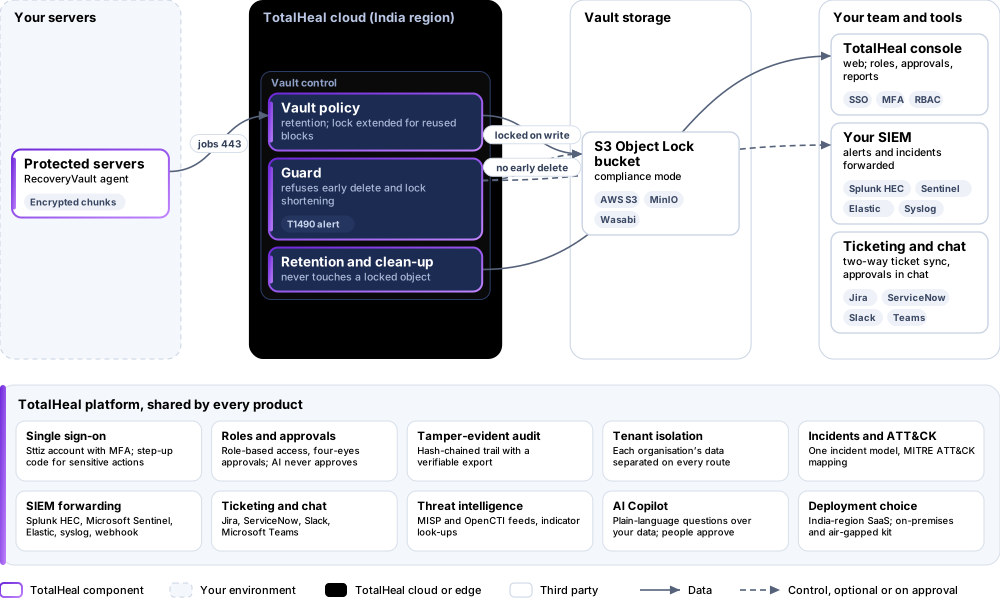
- WriteEach object is locked in compliance mode as it is written.
- ExtendReused blocks get their lock extended to the new point.
- RefuseDeletion before retention and lock shortening are refused and alerted.
Reference architecture
Key capabilities
- Locked at write timeEvery object of a restore point is locked in compliance mode as it is written.
- Reused blocks stay lockedWhen a new restore point reuses an older block, that block’s lock is extended to the new point’s retention.
- Deletion refusedRetention and clean-up never delete a locked object; deleting a server with held or locked points is refused and raises an alert.
- Lock shortening refusedAttempts to shorten a policy’s lock are refused and alerted as inhibit-recovery activity (MITRE ATT&CK T1490).
- Your bucket or oursOn an S3 bucket created with Object Lock — yours, or TotalHeal’s where offered.
Deployment options
Cloud (SaaS)AvailableRun by TotalHeal in an India region: nothing to host, updates delivered by us.
On-premisesAvailableDelivered with our team from the on-premises kit.
Air-gappedAvailableOffline kit, offline licence file and offline update bundles.
System requirements
Protected platforms
- AWS S3
- MinIO
- Wasabi
On-premises server
- Operating system
- RHEL, Rocky Linux or AlmaLinux 8 / 9; Ubuntu 20.04, 22.04 or 24.04; Debian 11 / 12
- Processor
- 4 vCPU (tested configuration)
- Memory
- 8 GB recommended (6 GB minimum)
- Disk
- 10 GB free for software, releases and backups, plus data
- Sign-in
- Active Directory / LDAP, SAML 2.0 or OpenID Connect
- Software
- Nothing to pre-install: no container runtime, database, web server or Java
Network and access
- TotalHeal RecoveryVault
- An S3-compatible bucket with Object Lock enabled
Alerts and tickets to
- Splunk
- Microsoft Sentinel
- Elastic
- Syslog / CEF
- Jira
- ServiceNow
- Slack
- Microsoft Teams
Technical specifications
| Features | Included | |
|---|---|---|
| Locked at write time | Included | |
| Reused blocks stay locked | Included | |
| Deletion refused | Included | |
| Lock shortening refused | Included | |
| Your bucket or ours | Included | |
| Availability by edition | Business | Enterprise |
| Object Lock at write, lock extension, refused deletion and shortening, alerts | Included | Included |
| Platforms and coverage | ||
| Storage | S3-compatible buckets created with Object Lock: AWS S3, MinIO, Wasabi | |
| Sources | Servers protected by TotalHeal RecoveryVault | |
| Deployment options | ||
| Your Object Lock bucket, SaaS control plane | Available | |
| TotalHeal-hosted vault | PartialWhere offered; needs an Object Lock bucket in the region. | |
| On-premises control plane | AvailableDelivered with our team from the on-premises kit. | |
| Air-gapped | AvailableOffline kit, offline licence file and offline update bundles. | |
| Licensing | ||
| Priced per | Protected terabyte per year | |
| Counted | Data held in the vault, in terabytes | |
| Trial | 30 days | |
| Editions | ImmutableVault is sold on its own and needs RecoveryVault. | |
| Government profile | Government is a profile, not a separate tier or price list: the Elite tier with Government defaults switched on — data residency in India, four-eyes approval of policy changes, a distinct approver for every approval-level action, retention of at least 180 days, and the CERT-In and DPDP reporting clocks. | |
| Procurement dossier | Compliance matrix, bill of materials, architecture and hardening, SLA and OEM authorisation letter, on request | |
| On-premises server | ||
| Operating system | RHEL, Rocky Linux or AlmaLinux 8 / 9; Ubuntu 20.04, 22.04 or 24.04; Debian 11 / 12 | |
| Processor | 4 vCPU (tested configuration) | |
| Memory | 8 GB recommended (6 GB minimum) | |
| Disk | 10 GB free for software, releases and backups, plus data | |
| Sign-in | Active Directory / LDAP, SAML 2.0 or OpenID Connect | |
| Software | Nothing to pre-install: no container runtime, database, web server or Java | |
| Requirements | ||
| Requirement 1 | TotalHeal RecoveryVault | |
| Requirement 2 | An S3-compatible bucket with Object Lock enabled | |