TotalHealThreatGuardBusiness Antivirus (NGAV / Endpoint Protection)
Business antivirus on the TotalHeal agent: stop known malware without quarantining legitimate work.
Trial: 30 days. You sign in to the TotalHeal console with a Sttiz account and activate ThreatGuard NGAV / Endpoint Protection. No card.
Every organisation still has to stop known malware on its laptops and desktops, and tenders buy antivirus as its own line. An antivirus that quarantines developers’ projects or business files soon gets switched off.
Endpoint protection on the same TotalHeal agent as your other products, steered from the console, with every quarantine, restore and exclusion on record.
ThreatGuard NGAV / Endpoint Protection, feature by feature.
Layered detection
Known-bad files from signed threat definitions, YARA rules, archive inspection, static heuristics and cloud reputation for files the device has never seen.
Real-time protection
Files arriving in Downloads, Desktop, Documents, folders you add and USB drives are checked as soon as they finish writing.
Built against false positives
Only confident verdicts are quarantined automatically; heuristic findings wait for a person. Rules only count on the kind of file they were written for, and common developer folders are excluded by default — visibly, and removable.
Quick, full and custom scans
On the device or sent from the console, with pause, resume and cancel.
Safe quarantine and restore
Quarantined files are kept encrypted and can be put back exactly as they were. A restore never overwrites a newer file.
Works offline
Protection keeps running with the last installed definitions when the device is offline; definitions are verified before they are used.
Central policy
Real-time protection on or off, quarantine or report on detection, and scheduled scans — set once for the organisation.
Central quarantine and detections
Every detection across devices in one list; restore or delete quarantined files from the console, with an audit trail.
USB control and Ransomware Shield (Enterprise)
Scan drives on insert and eject untrusted ones; ransomware activity in protected folders is detected and raised as an alert.
Approved exclusions and per-group policy (Enterprise)
Every exclusion carries a reason and a second person’s approval; different policies and scan schedules per device group.
Its own licence
An expired ThreatGuard licence pauses only antivirus, with a clear message on the device; other TotalHeal products keep running and restores always work.
How ThreatGuard NGAV / Endpoint Protection works.
ThreatGuard runs on the same TotalHeal agent as your other products. It blocks known malware with layered detection, quarantines only confident verdicts automatically and puts every quarantine, restore and exclusion on record — because an antivirus that quarantines legitimate work soon gets switched off.
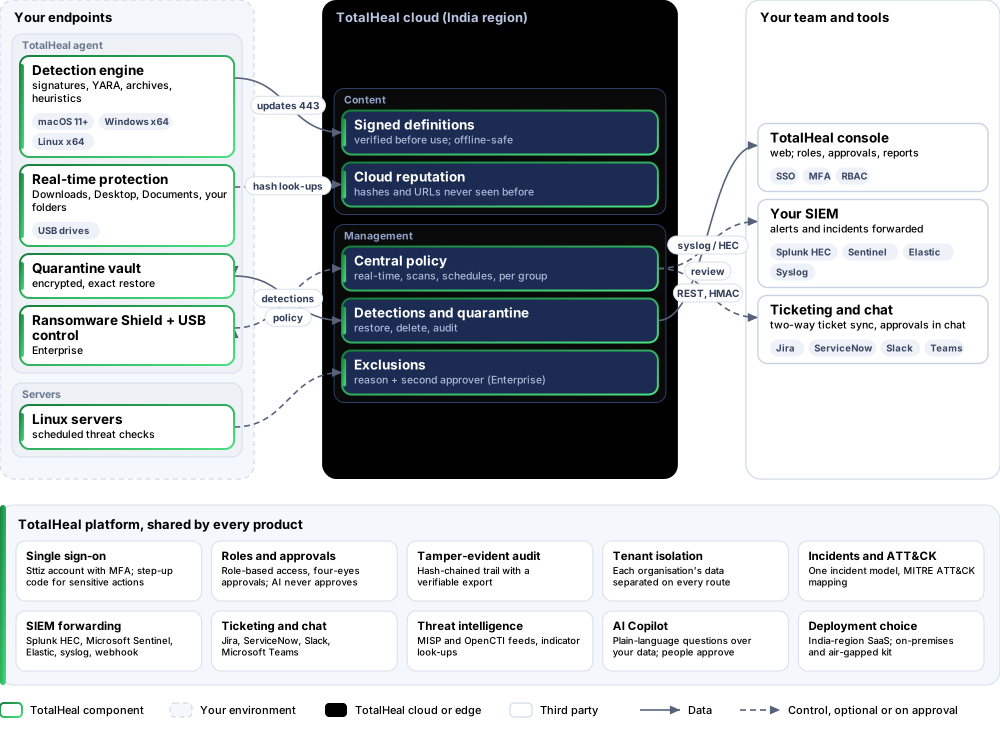
- ArriveA file lands in Downloads, Desktop, Documents, a folder you add or a USB drive.
- CheckSigned definitions, YARA rules, archive inspection and heuristics on the device; cloud reputation for unknown files.
- DecideConfident verdicts are quarantined; heuristic findings wait for a person.
- ReviewEvery detection across devices in one list, with restore and delete from the console.
Platforms and deployment
Platforms
| Platform | How it is covered |
|---|---|
| macOS 11 or later | TotalHeal desktop agent (Full Disk Access needed for real-time protection) |
| Windows (x64) | TotalHeal desktop agent |
| Linux desktops (x64) | TotalHeal desktop agent |
| Linux servers | Threat checks by the TotalHeal server agent: scheduled, not real-time |
Deployment
| Profile | Status |
|---|---|
| SaaS (TotalHeal cloud, India region) | PartialIn development: the console side is built; company computers apply the policy from desktop 0.3.10, not released yet. |
| On-premises | AvailableDelivered with our team from the on-premises kit. |
| Air-gapped | RoadmapNo offline definitions package yet. |
Unit and tiers.
Priced per endpoint per year. Counted: devices with endpoint protection switched on. List prices are not published yet — our team quotes per unit and term.
| Business | Enterprise | |
|---|---|---|
| Detection engine, real-time protection, quarantine, offline protection | Included | Included |
| Central policy, scheduled scans, quick and full scans from the console | Included | Included |
| Central quarantine (restore, delete, audit) and detections list | Included | Included |
| USB control and Ransomware Shield policy | — | Included |
| Exclusions with reason and second-person approval | — | Included |
| Per-group policies and scan schedules | — | Included |
| Price | Contact sales | Contact sales |
Government profile. Government is a profile, not a separate tier or price list: the Elite tier with Government defaults switched on — data residency in India, four-eyes approval of policy changes, a distinct approver for every approval-level action, retention of at least 180 days, and the CERT-In and DPDP reporting clocks.
What you need
- TotalHeal desktop agent enrolled to your organisation on each endpoint
- macOS: Full Disk Access for TotalHeal (by the person or your MDM)
- Outbound HTTPS to the TotalHeal cloud for definitions, reputation and policy
Procurement documents for ThreatGuard NGAV / Endpoint Protection
The datasheet is public. The full dossier is sent on request, so we can match it to your tender.
- Datasheet. What the product does, platforms, deployment profiles, tiers and honest limits.
- Compliance matrix. Each requirement marked comply, partial or no, with an evidence reference — CERT-In directions, DPDP, ISO 27001 controls touched, accessibility of the console, data residency.
- Bill of materials. SKUs per sizing, the unit and quantity formula, customer-side components and services.
- Architecture and hardening. How the product is deployed and the hardening guidance for each component.
- SLA. Support tiers, response targets the team can meet, update cadence and end-of-life policy.
- OEM authorisation letter. A MAF template for resellers and system integrators, with product names exactly as on the SKU.
Works well with
Part of TotalHeal Endpoint Defense suite and of Complete — each product is still licensed on its own.
TotalHealDeviceSphere
Unified Endpoint Management (UEM)
Enrol, configure, update and secure every laptop, phone and tablet from one console.
TotalHealVulnSight
Vulnerability Management
Know which installed software carries a known, exploited vulnerability — without a scanner appliance.
TotalHealPatchPilot
Patch Management
See what is missing on every computer and roll updates out in waves — with proof afterwards.
Get a quote for ThreatGuard NGAV / Endpoint Protection.
Tell us how many endpoints you need and how you want to deploy. We reply with a quote and the procurement documents you ask for.
Or email business@totalhealsecurity.com.