TotalHealDataShieldData Loss Prevention (DLP) and data discovery
Finds Aadhaar numbers, PAN, bank accounts, card numbers, keys and your own confidential records where they should not be — on servers, in OneDrive, SharePoint and Google Drive, and in mail that leaves — and takes access away with a second person’s approval.
Trial: 30 days, up to 5 servers. You sign in to the TotalHeal console with a Sttiz account and activate DataShield DLP. No card.
Sensitive data spreads: a patient export left on an application server, a .env with production keys every user can read, a vendor list with PAN and bank accounts mailed to an outside firm, a results sheet shared with “anyone with the link”. Under the DPDP Act 2023, the Aadhaar Act and PCI DSS the organisation must know where this data is and who can reach it — and pattern-matching tools drown teams in invoice numbers that look like account numbers.
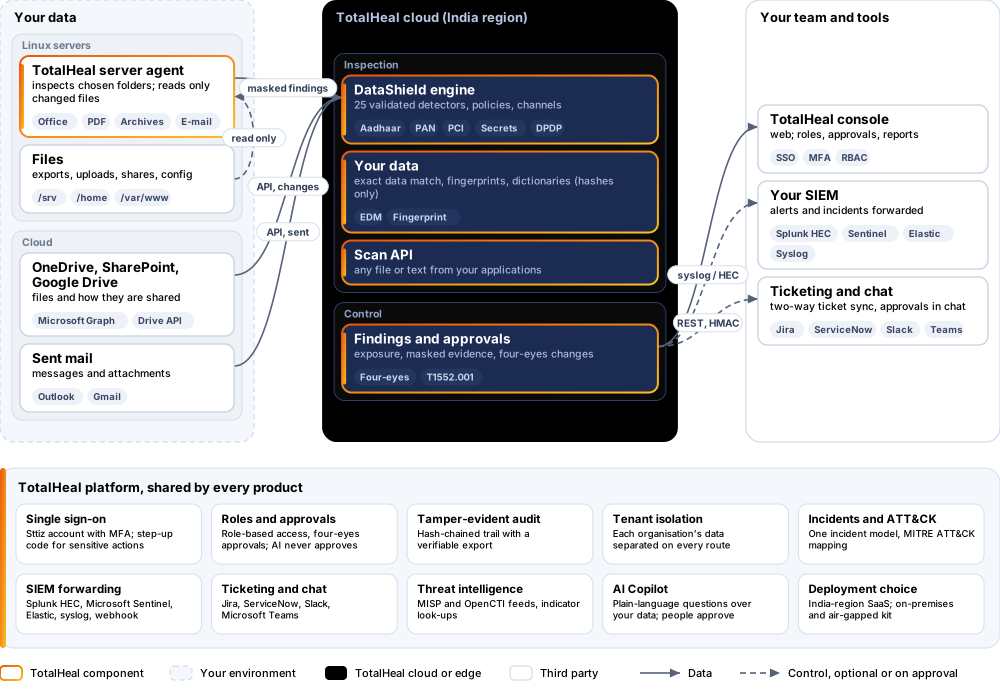
DataShield inspects files on Linux servers, in Microsoft 365 and Google Workspace, in sent mail and anything sent to its scan API with an engine of its own: identifiers validated by their checksums, your own records matched exactly, confidential documents recognised by fingerprint. It shows where each finding is and who can reach it, and removes public links or file access when a second person approves.

DataShield DLP, feature by feature.
25 detectors, validated
Aadhaar (Verhoeff check digit), PAN (holder type), GSTIN (check character), bank account numbers next to account words, IFSC, UPI IDs (known bank and app handles), Indian mobile numbers, passport, voter ID (EPIC) and driving-licence numbers, payment cards (Luhn and real network prefixes: Visa, Mastercard, RuPay, Amex, Discover, Diners, JCB), IBAN (mod-97), SWIFT, US SSN, e-mail addresses — each with context words that raise its confidence; repeated and sequential test numbers are ignored.
Secrets and keys
Private keys (RSA, EC, OpenSSH, PGP), AWS access keys, GitHub, Slack and Google API tokens, Stripe and Razorpay live secret keys, JSON Web Tokens, database and broker connection strings with passwords, Azure storage keys and passwords in configuration files (placeholders ignored).
Exact data match
Upload a CSV of your customers, patients, employees or accounts: DataShield keeps only salted hashes and finds files holding two or more fields of the same record, however the numbers are written.
Document fingerprints
Register a board paper, contract or design: files that copy a share of its text are found, even with other text around it. Only hashes of the document are kept.
Keyword dictionaries
Codenames, project names and labels such as “Strictly confidential”, matched as whole words in any case.
Text from real files
Word, Excel and PowerPoint (Office Open XML), OpenDocument, PDF text, CSV, JSON, XML, HTML, e-mail with attachments, and zip archives nested up to three levels; legacy Office files by their text; password-protected files reported, never silently skipped; archive bombs refused.
Policies for regulation
Ready templates for the Aadhaar Act, PCI DSS, the DPDP Act 2023 (bulk personal data), Indian financial identifiers, credentials and GDPR / GLBA, and your own policies: data types with minimum counts and confidence, your records, documents and words, per channel — edited in the console, never as JSON.
Servers: data at rest
The TotalHeal server agent inspects the folders you choose on every Linux server every day and on demand, reads only new or changed files, never follows links and never reads system trees, and reports who owns each file and whether every user of the server can read it.
OneDrive, SharePoint and Google Drive
Changed files in every user’s drive (and every SharePoint site library) are inspected every five minutes, with how each is shared: a link anyone can open, people outside your domains, the whole organisation or nobody. Google Docs, Sheets and Slides are inspected through their text.
Mail that leaves
Every sent message and its attachments in Microsoft 365 and Gmail is inspected; recipients outside your domains make the finding exposed.
Scan API
POST any file or text to the scan API from your applications, upload paths or CI and get the verdict, the masked findings and the policies broken; record the result as a finding if you choose.
Masked evidence
A full sensitive value never leaves the inspection: findings keep the count, the confidence and up to three masked samples (•••• •••• 9012), the file and the part of an archive or attachment it was in.
Take access away, with approval
On a server, group and other users lose access to a flagged file and its old permissions are journaled so it can be put back; in Microsoft 365 or Google Drive, public links and outside shares are removed while shares inside the organisation stay. Every change needs a second person — never the requester, never a service account.
Findings that stay current
Resolve, accept the risk with an expiry, or reopen; files that are deleted or cleaned are resolved by the next scan, and a finding that comes back reopens.
Alerts in the same incident queue
A new finding that breaks a policy becomes an alert (credentials in files: MITRE ATT&CK T1552.001) correlated with endpoint, identity and cloud alerts and sent on to your SIEM, ticketing and playbooks.
How DataShield DLP works.
DataShield inspects servers, OneDrive, SharePoint, Google Drive, sent mail and anything sent to its scan API with identifiers validated by checksum, your own records matched exactly and confidential documents recognised by fingerprint; it shows who can reach each finding and takes access away when a second person approves. Sensitive values never leave the inspection unmasked.
- TeachChoose regulation templates; add your records, confidential documents and codenames — kept only as hashes.
- InspectServers daily and on demand, cloud drives and sent mail every five minutes, applications through the scan API.
- ValidateChecksums, context words and thresholds keep ordinary numbers out of the findings.
- See exposureEvery finding shows who can reach it: anyone with a link, outside recipients, every user of a server.
- ContainRemove public links or take file access away after a second person approves; resolve or accept the rest.
Platforms and deployment
Platforms
| Platform | How it is covered |
|---|---|
| Linux servers (Ubuntu, Debian, RHEL, Rocky, AlmaLinux) | TotalHeal server agent with datashield.enabled and the folders to inspect |
| Microsoft 365 | OneDrive, SharePoint and sent mail through Microsoft Graph (Files.ReadWrite.All, Sites.Read.All, Mail.Read, User.Read.All), or keyless with a federated credential |
| Google Workspace | Drive and Gmail sent mail through a service account with domain-wide delegation |
| Applications and pipelines | The scan API (any file or text up to 25 MB) |
| Console | TotalHeal web console |
Deployment
| Profile | Status |
|---|---|
| SaaS (India region) | AvailableSingle-region service. |
| On-premises control plane | AvailableDelivered with our team from the on-premises kit. |
| Air-gapped | AvailableOffline kit, offline licence file and offline update bundles. |
Unit and tiers.
Priced per server per year. Counted: servers reporting to DataShield; Microsoft 365 / Google Workspace connections included. List prices are not published yet — our team quotes per unit and term.
| Business | Enterprise | |
|---|---|---|
| Detectors, exact data match, fingerprints, dictionaries, policies, servers, OneDrive / SharePoint / Google Drive, sent mail, scan API, approved access changes, alerts | Included | Included |
| Price | Contact sales | Contact sales |
DataShield is sold on its own, outside the editions.
Government profile. Government is a profile, not a separate tier or price list: the Elite tier with Government defaults switched on — data residency in India, four-eyes approval of policy changes, a distinct approver for every approval-level action, retention of at least 180 days, and the CERT-In and DPDP reporting clocks.
What you need
- The TotalHeal server agent on each Linux server, with datashield.enabled and the folders to inspect
- datashield.allow_restrict on servers where approved access changes may run
- For cloud files and mail: an administrator who grants API access to Microsoft 365 or Google Workspace
Procurement documents for DataShield DLP
The datasheet is public. The full dossier is sent on request, so we can match it to your tender.
- Datasheet. What the product does, platforms, deployment profiles, tiers and honest limits.
- Compliance matrix. Each requirement marked comply, partial or no, with an evidence reference — CERT-In directions, DPDP, ISO 27001 controls touched, accessibility of the console, data residency.
- Bill of materials. SKUs per sizing, the unit and quantity formula, customer-side components and services.
- Architecture and hardening. How the product is deployed and the hardening guidance for each component.
- SLA. Support tiers, response targets the team can meet, update cadence and end-of-life policy.
- OEM authorisation letter. A MAF template for resellers and system integrators, with product names exactly as on the SKU.
Get a quote for DataShield DLP.
Tell us how many servers you need and how you want to deploy. We reply with a quote and the procurement documents you ask for.
Or email business@totalhealsecurity.com.