TotalHealCyberAwareSecurity Awareness Training
Short security courses for every employee, with signed certificates and reports for auditors. Phishing simulation coming.
Trial: 30 days. You sign in to the TotalHeal console with a Sttiz account and activate CyberAware. No card.
Most incidents involve a person: a shared OTP, a reused password, a UPI collect request approved by mistake, a lost phone reported days late. Auditors expect organisations to train staff and keep evidence of it.
Courses of 5 to 10 minutes that work on a phone, assigned by department with due dates and reminders, with signed certificates and a compliance report. Training only in this release.

CyberAware, feature by feature.
Six built-in courses
Passwords and two-step sign-in, UPI and payment safety, safe browsing, personal data under the DPDP Act, reporting incidents within the CERT-In window, and mobile safety — each 5 to 10 minutes with a quiz.
English and Hindi
Hindi versions of the passwords, UPI and mobile safety courses; more languages can be written in the course editor.
Your own courses (Enterprise)
A course editor with forms only — text, images, your own videos and quizzes — and duplicating built-in courses to adapt them.
Assignments and reminders
Assign courses to everyone, to departments or to named people with a due date; reminders before the due date and once when overdue.
E-mail only to your verified domains
Sign-in links and reminders go only to your employees at domains you have proved you own with a DNS record. Nothing is sent anywhere else.
Learner portal
Employees open their courses from an e-mail link — no account or password — on a phone or computer, in light or dark.
Signed certificates
A certificate of completion for every finished course, signed by TotalHeal CyberAware, with a public page to check that it is genuine.
Reports for auditors
Completion by department, course and person, a monthly trend and a downloadable compliance report listing the training evidence auditors commonly ask for. No official logos are used.
How CyberAware works.
CyberAware gives every employee short courses that work on a phone, assigned by department with due dates and reminders, and keeps signed certificates and a compliance report as evidence. E-mail goes only to domains you have proved you own.
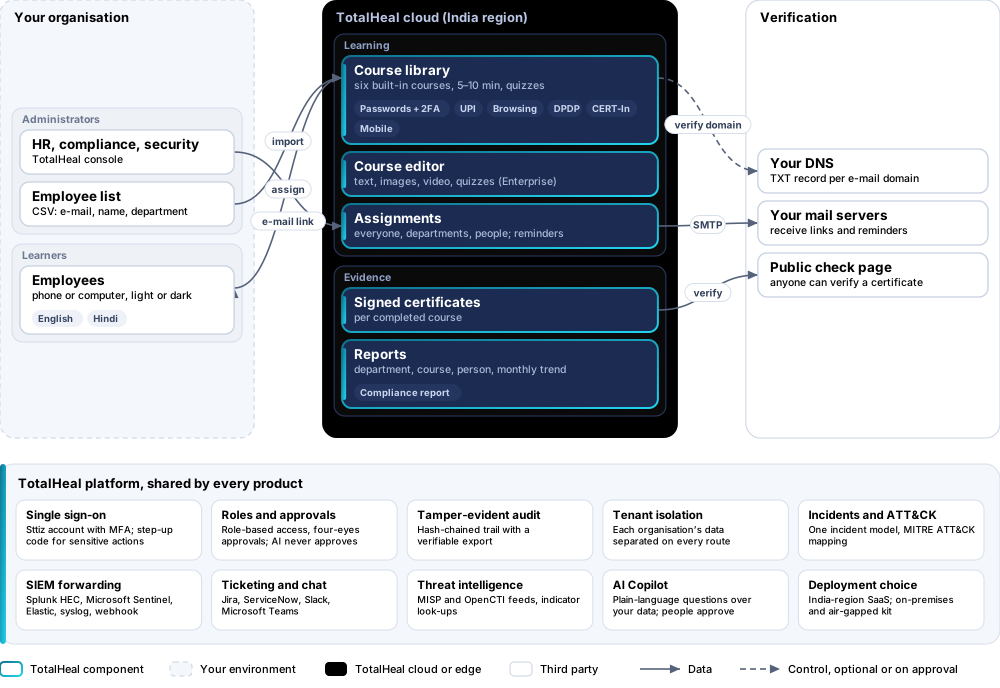
- VerifyProve each e-mail domain with a DNS TXT record.
- ImportUpload employees with e-mail, name and department.
- AssignCourses to everyone, departments or people, with due dates.
- LearnEmployees open courses from an e-mail link, no account needed.
- ReportSigned certificates and a compliance report for auditors.
Platforms and deployment
Platforms
| Platform | How it is covered |
|---|---|
| Learner portal | Any modern browser on a phone or computer |
| Console | TotalHeal web console |
Deployment
| Profile | Status |
|---|---|
| SaaS (India) | AvailableTraining only; phishing simulation is not included yet. |
| On-premises / air-gapped | AvailableWith your own mail and DNS servers. |
Unit and tiers.
Priced per employee per year. Counted: active employees in the training programme. List prices are not published yet — our team quotes per unit and term.
| Business | Enterprise | |
|---|---|---|
| Built-in courses, assignments, reminders, learner portal, certificates, reports and compliance report | Included | Included |
| Your own courses (images, video, quizzes), duplicating built-in courses | — | Included |
| API access with service accounts | — | Included |
| Phishing simulation | Roadmap | Roadmap |
| Price | Contact sales | Contact sales |
Government profile. Government is a profile, not a separate tier or price list: the Elite tier with Government defaults switched on — data residency in India, four-eyes approval of policy changes, a distinct approver for every approval-level action, retention of at least 180 days, and the CERT-In and DPDP reporting clocks.
What you need
- A DNS TXT record for each e-mail domain of your employees
- A list of employees (CSV with e-mail, name and department)
Procurement documents for CyberAware
The datasheet is public. The full dossier is sent on request, so we can match it to your tender.
- Datasheet. What the product does, platforms, deployment profiles, tiers and honest limits.
- Compliance matrix. Each requirement marked comply, partial or no, with an evidence reference — CERT-In directions, DPDP, ISO 27001 controls touched, accessibility of the console, data residency.
- Bill of materials. SKUs per sizing, the unit and quantity formula, customer-side components and services.
- Architecture and hardening. How the product is deployed and the hardening guidance for each component.
- SLA. Support tiers, response targets the team can meet, update cadence and end-of-life policy.
- OEM authorisation letter. A MAF template for resellers and system integrators, with product names exactly as on the SKU.
Works well with
TotalHealDNSGuard
DNS Firewall & Security
Stop malware, phishing and DNS tunnelling at the lookup — for every device, on site or on the road.
TotalHealPrivilegeVault
Privileged Access Management (PAM)
Vault admin passwords, broker sessions without revealing them, record everything and rotate afterwards.
TotalHealDeviceSphere
Unified Endpoint Management (UEM)
Enrol, configure, update and secure every laptop, phone and tablet from one console.
Get a quote for CyberAware.
Tell us how many employees you need and how you want to deploy. We reply with a quote and the procurement documents you ask for.
Or email business@totalhealsecurity.com.