Security Awareness Training
Training every employee — with evidence an auditor accepts
Short security courses for every employee, with signed certificates and reports for auditors. Phishing simulation coming.
Contents
- 1Executive summary
- 2The challenge
- 3Architecture
- 4How it works
- 5Capabilities in detail
- 6Security and data handling
- 7Where it fits
- 8Deployment and system requirements
- 9Technical specifications
- 10Getting started
1Executive summary
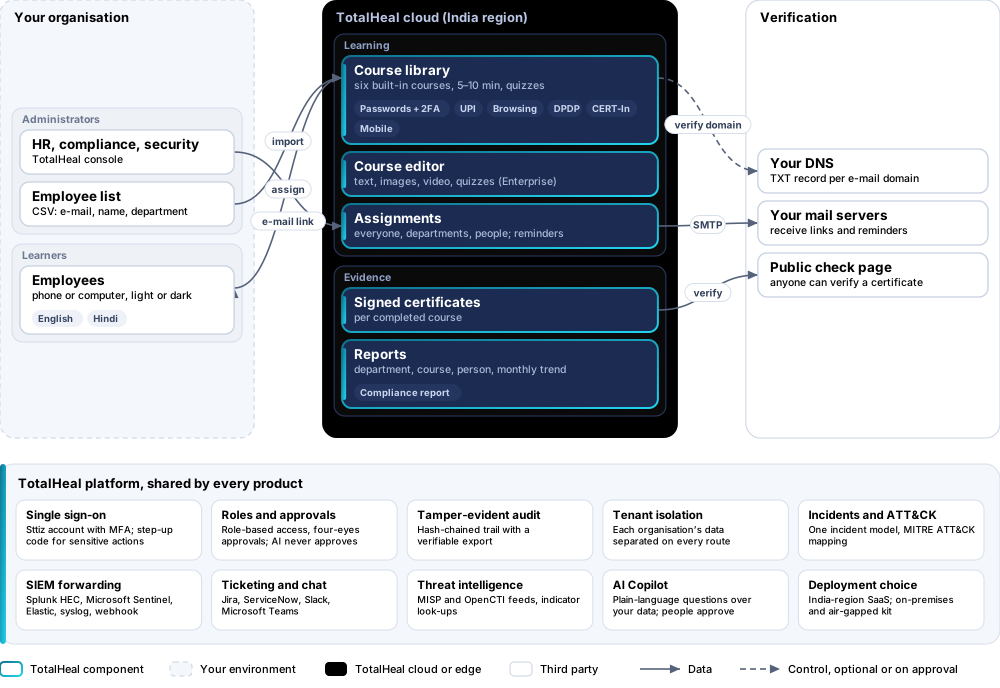
CyberAware gives every employee short courses that work on a phone, assigned by department with due dates and reminders, and keeps signed certificates and a compliance report as evidence. E-mail goes only to domains you have proved you own.
2The challenge
Most incidents involve a person: a shared OTP, a reused password, a UPI collect request approved by mistake, a lost phone reported days late. Auditors expect organisations to train staff and keep evidence of it.
The TotalHeal approach. Courses of 5 to 10 minutes that work on a phone, assigned by department with due dates and reminders, with signed certificates and a compliance report. Training only in this release.
3Architecture
4How it works
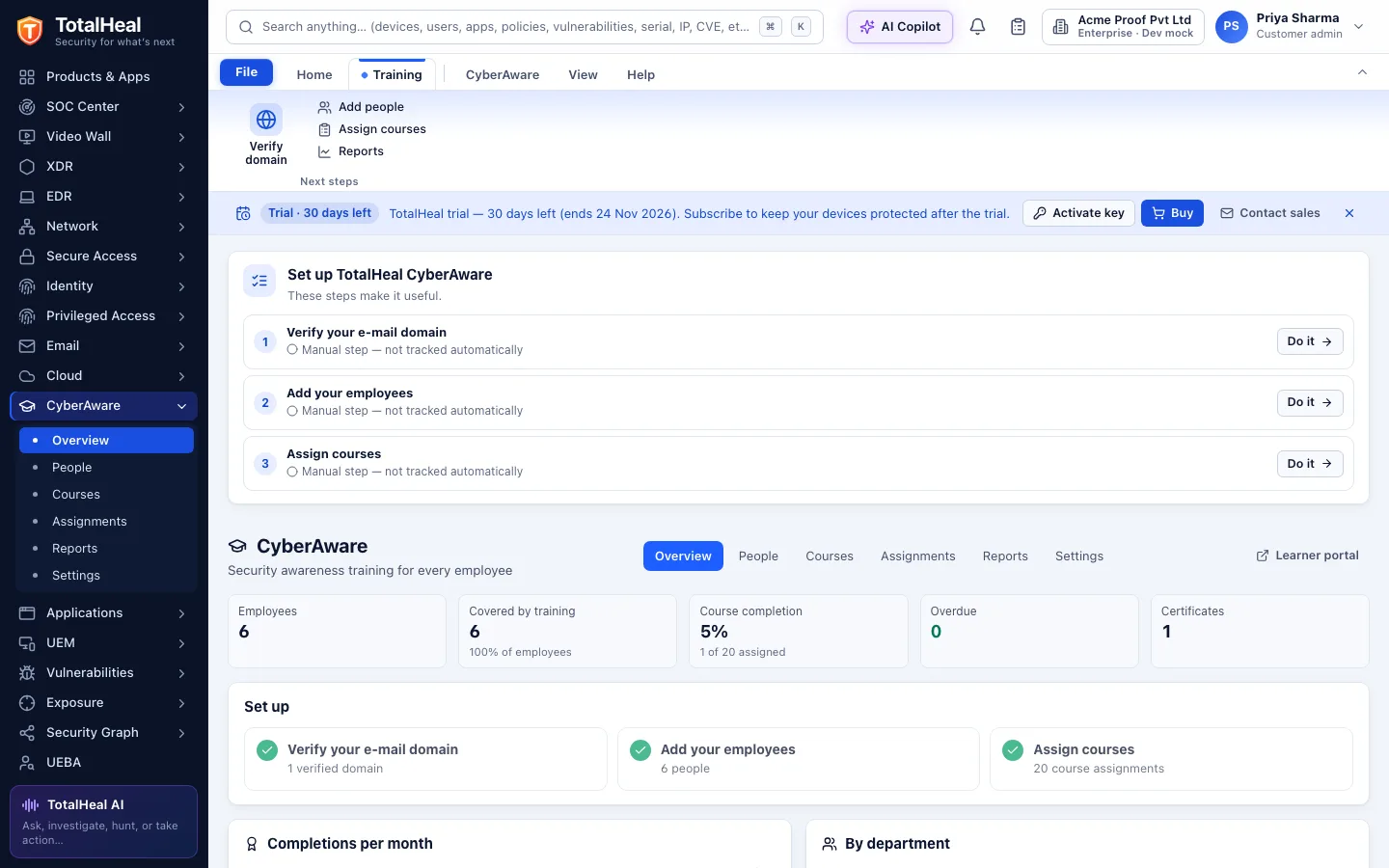
- VerifyProve each e-mail domain with a DNS TXT record.
- ImportUpload employees with e-mail, name and department.
- AssignCourses to everyone, departments or people, with due dates.
- LearnEmployees open courses from an e-mail link, no account needed.
- ReportSigned certificates and a compliance report for auditors.
5Capabilities in detail
- Six built-in coursesPasswords and two-step sign-in, UPI and payment safety, safe browsing, personal data under the DPDP Act, reporting incidents within the CERT-In window, and mobile safety — each 5 to 10 minutes with a quiz.
- English and HindiHindi versions of the passwords, UPI and mobile safety courses; more languages can be written in the course editor.
- Your own courses (Enterprise)A course editor with forms only — text, images, your own videos and quizzes — and duplicating built-in courses to adapt them.
- Assignments and remindersAssign courses to everyone, to departments or to named people with a due date; reminders before the due date and once when overdue.
- E-mail only to your verified domainsSign-in links and reminders go only to your employees at domains you have proved you own with a DNS record. Nothing is sent anywhere else.
- Learner portalEmployees open their courses from an e-mail link — no account or password — on a phone or computer, in light or dark.
- Signed certificatesA certificate of completion for every finished course, signed by TotalHeal CyberAware, with a public page to check that it is genuine.
- Reports for auditorsCompletion by department, course and person, a monthly trend and a downloadable compliance report listing the training evidence auditors commonly ask for. No official logos are used.
6Security and data handling
- Mail only to verified domainsLinks and reminders go only to domains you own.
- Certificates that verifyEach certificate is signed and has a public check page.
- Evidence, not certificationThe report is evidence of training, not a certification.
7Where it fits
8Deployment and system requirements
Protected platforms
- Any browser
- Android8.0 and later
- iPhone, iPadApple MDM
- Windows10 / 11 (x64)
- macOS11 and later
On-premises server
- Operating system
- RHEL, Rocky Linux or AlmaLinux 8 / 9; Ubuntu 20.04, 22.04 or 24.04; Debian 11 / 12
- Processor
- 4 vCPU (tested configuration)
- Memory
- 8 GB recommended (6 GB minimum)
- Disk
- 10 GB free for software, releases and backups, plus data
- Sign-in
- Active Directory / LDAP, SAML 2.0 or OpenID Connect
- Software
- Nothing to pre-install: no container runtime, database, web server or Java
Network and access
- A DNS TXT record for each e-mail domain of your employees
- A list of employees (CSV with e-mail, name and department)
Alerts and tickets to
- Splunk
- Microsoft Sentinel
- Elastic
- Syslog / CEF
- Jira
- ServiceNow
- Slack
- Microsoft Teams
9Technical specifications
| Features | Included | |
|---|---|---|
| Six built-in courses | Included | |
| English and Hindi | Included | |
| Your own courses (Enterprise) | Included | |
| Assignments and reminders | Included | |
| E-mail only to your verified domains | Included | |
| Learner portal | Included | |
| Signed certificates | Included | |
| Reports for auditors | Included | |
| Availability by edition | Business | Enterprise |
| Built-in courses, assignments, reminders, learner portal, certificates, reports and compliance report | Included | Included |
| Your own courses (images, video, quizzes), duplicating built-in courses | — | Included |
| API access with service accounts | — | Included |
| Phishing simulation | Roadmap | Roadmap |
| Platforms and coverage | ||
| Learner portal | Any modern browser on a phone or computer | |
| Console | TotalHeal web console | |
| Deployment options | ||
| SaaS (India) | AvailableTraining only; phishing simulation is not included yet. | |
| On-premises / air-gapped | AvailableWith your own mail and DNS servers. | |
| Licensing | ||
| Priced per | Employee per year | |
| Counted | Active employees in the training programme | |
| Trial | 30 days | |
| Government profile | Government is a profile, not a separate tier or price list: the Elite tier with Government defaults switched on — data residency in India, four-eyes approval of policy changes, a distinct approver for every approval-level action, retention of at least 180 days, and the CERT-In and DPDP reporting clocks. | |
| Procurement dossier | Compliance matrix, bill of materials, architecture and hardening, SLA and OEM authorisation letter, on request | |
| On-premises server | ||
| Operating system | RHEL, Rocky Linux or AlmaLinux 8 / 9; Ubuntu 20.04, 22.04 or 24.04; Debian 11 / 12 | |
| Processor | 4 vCPU (tested configuration) | |
| Memory | 8 GB recommended (6 GB minimum) | |
| Disk | 10 GB free for software, releases and backups, plus data | |
| Sign-in | Active Directory / LDAP, SAML 2.0 or OpenID Connect | |
| Software | Nothing to pre-install: no container runtime, database, web server or Java | |
| Requirements | ||
| Requirement 1 | A DNS TXT record for each e-mail domain of your employees | |
| Requirement 2 | A list of employees (CSV with e-mail, name and department) | |
10Getting started
- A DNS TXT record for each e-mail domain of your employees
- A list of employees (CSV with e-mail, name and department)
Start a 30 days trial in the TotalHeal console with a Sttiz account. For a quote, an on-premises installation or the procurement dossier (compliance matrix, bill of materials, architecture and hardening, SLA, OEM authorisation letter), write to business@totalhealsecurity.com.