TotalHealSaaSGuardCloud app discovery and control (CASB)
Shows which cloud apps your people use — generative AI, file transfer, remote access and 100 more — how risky each is, and blocks the ones you decide against through DNSGuard.
Trial: 30 days, up to 50 users. You sign in to the TotalHeal console with a Sttiz account and activate SaaSGuard Cloud App Control. No card.
People sign up for whatever gets the job done: a free AI assistant for a contract, a file-transfer site for a large export, a remote-desktop tool for a vendor, a PDF converter for a payslip. None of it is on an approved list, and nobody can say which apps hold company data, who uses them, or whether the one that was banned last quarter is still in use.
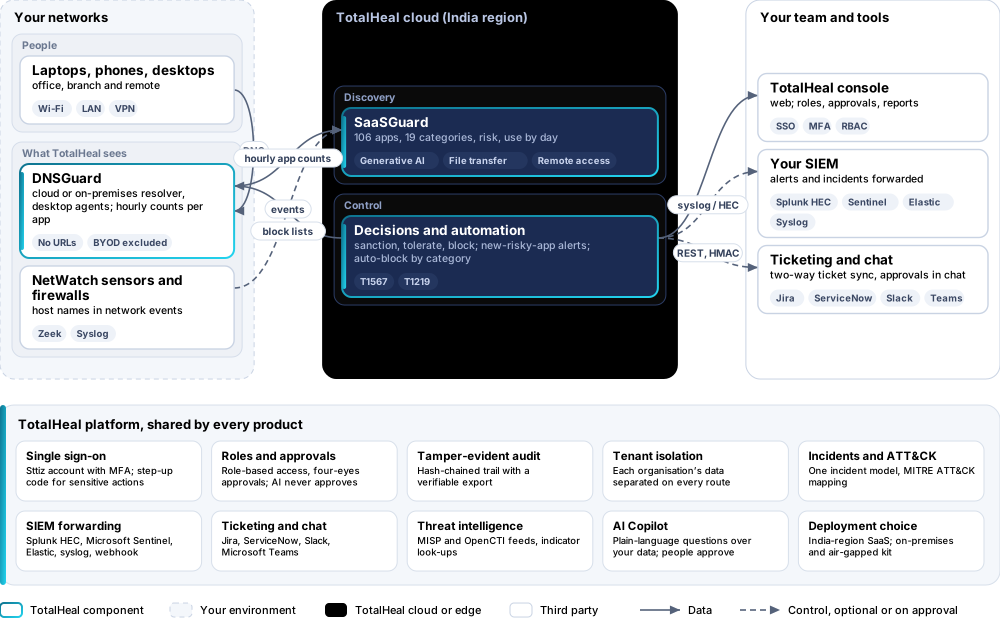
SaaSGuard learns which cloud apps are used from what TotalHeal already sees — DNSGuard’s hourly count per app, DNS logs and the host names in network-sensor and firewall events — and matches it against a catalogue of 106 applications in 19 categories. Each app gets a risk and a decision: sanctioned, tolerated or blocked. Blocking goes through DNSGuard on every network straight away.

SaaSGuard Cloud App Control, feature by feature.
Discovery without an agent or a proxy
Usage comes from DNSGuard’s hourly SaaS counts, full DNS logs where a policy keeps them, and the host names in NetWatch sensor and firewall events already in TotalHeal. Nothing new is installed and no traffic is decrypted.
Privacy by design
DNSGuard sends the app and how many clients used it in each hour — never URLs, page content or anyone’s browsing history. Personal (BYOD) networks and policies that log nothing are never counted, and discovery can be turned off per policy.
A catalogue of 106 cloud apps
Office suites, storage, file transfer, messaging, video meetings, generative AI, collaboration, document tools, translation, e-signature, development, cloud consoles, paste sites and tunnels, remote access, CRM, marketing, web mail, social media and streaming — matched by their domains, the most specific first.
Risk for every app
Each category has a base risk from what it lets data do (file transfer, paste sites and tunnels: very high; generative AI, remote access, document tools: high); wide use raises it, and a sanctioned app is lowest.
What each app is used for
Look-ups, refused look-ups, users, networks, sources, first and last seen, and use by day over up to 90 days, for every app seen or decided.
Sanction, tolerate or block
Every decision carries a note and is kept in the audit trail. Blocking puts the app’s domains on the deny list of every DNSGuard policy straight away; unblocking or sanctioning removes exactly the domains SaaSGuard added and nothing an administrator put there.
New risky apps raise an alert
Every hour SaaSGuard checks for apps used for the first time; a high-risk one nobody has reviewed raises an alert mapped to MITRE ATT&CK (T1567 exfiltration over web services, T1219 remote access software) in the same incident queue as endpoint and identity alerts.
Block new apps automatically
Choose categories — paste sites and tunnels, file transfer, remote access — and a new app in them is blocked the first time it is seen. Apps you already decided about are never changed.
Generative AI in view
ChatGPT, Claude, Gemini, Copilot, DeepSeek, Perplexity and other AI assistants are their own category, so you can see who uses them and sanction the one the company pays for.
How SaaSGuard Cloud App Control works.
SaaSGuard turns what TotalHeal already sees — DNSGuard’s hourly count per app and the host names in sensor and firewall events — into an inventory of the cloud apps in use, each with a risk. Mark each one sanctioned, tolerated or blocked; blocking goes through DNSGuard on every network straight away, and new high-risk apps raise an alert or are blocked automatically.
- SeeWith DNSGuard on your networks, apps appear within the hour: users, look-ups, networks and use by day.
- ScoreEach app gets a risk from its category and how widely it is used.
- DecideSanction the tools the company pays for, tolerate the harmless ones, block the rest.
- EnforceA blocked app’s domains are refused by DNSGuard on every network and desktop that uses it.
- Stay aheadA new high-risk app raises an alert; categories you choose are blocked the first time a new app appears.
Platforms and deployment
Platforms
| Platform | How it is covered |
|---|---|
| Sources | DNSGuard (cloud resolver, on-premises resolver or desktop agents); NetWatch sensors; firewall and proxy logs sent to TotalHeal |
| Blocking | Through DNSGuard policies, on every network and desktop that uses them |
| Console | TotalHeal web console |
Deployment
| Profile | Status |
|---|---|
| SaaS (India region) | AvailableDiscovery and decisions in the cloud; blocking in DNSGuard wherever it resolves. |
| On-premises control plane | AvailableDelivered with our team from the on-premises kit. |
| Air-gapped | AvailableOffline kit, offline licence file and offline update bundles. |
Essential, Professional or Elite.
Priced per user per year. Counted: people in the organisation whose traffic SaaSGuard covers.
| Feature | EssentialUS$12per user per year | ProfessionalUS$24per user per year | EliteUS$36per user per year |
|---|---|---|---|
| Discovery from DNSGuard hourly counts, DNS logs and network-sensor and firewall events: 106 cloud apps in 19 categories, risk, users, look-ups, networks, use by day | |||
| Decisions per app — sanctioned, tolerated, not reviewed — with a note and an audit trail; app catalogue | |||
| Alert in the incident queue when a new high-risk app is used for the first time | |||
| Block an app: its domains go on every DNSGuard policy, and unblocking removes exactly what SaaSGuard added | |||
| Block new apps automatically in the categories you choose |
List prices per user per year; minimum 25 users. Each tier includes everything in the tier before it. Volume, multi-product and partner pricing on request.
SaaSGuard is sold on its own, outside the editions; blocking needs DNSGuard.
Government profile. Government is a profile, not a separate tier or price list: the Elite tier with Government defaults switched on — data residency in India, four-eyes approval of policy changes, a distinct approver for every approval-level action, retention of at least 180 days, and the CERT-In and DPDP reporting clocks.
What you need
- DNSGuard on your networks or desktop agents, a NetWatch sensor, or firewall logs sent to TotalHeal
- For blocking: DNSGuard with at least one policy
Procurement documents for SaaSGuard Cloud App Control
The datasheet is public. The full dossier is sent on request, so we can match it to your tender.
- Datasheet. What the product does, platforms, deployment profiles, tiers and honest limits.
- Compliance matrix. Each requirement marked comply, partial or no, with an evidence reference — CERT-In directions, DPDP, ISO 27001 controls touched, accessibility of the console, data residency.
- Bill of materials. SKUs per sizing, the unit and quantity formula, customer-side components and services.
- Architecture and hardening. How the product is deployed and the hardening guidance for each component.
- SLA. Support tiers, response targets the team can meet, update cadence and end-of-life policy.
- OEM authorisation letter. A MAF template for resellers and system integrators, with product names exactly as on the SKU.
Get a quote for SaaSGuard Cloud App Control.
Tell us how many users you need and how you want to deploy. We reply with a quote and the procurement documents you ask for.
Or email business@totalhealsecurity.com.