Business Antivirus (NGAV / Endpoint Protection)
Business antivirus that stops malware without stopping the business
Business antivirus on the TotalHeal agent: stop known malware without quarantining legitimate work.
Contents
- 1Executive summary
- 2The challenge
- 3Architecture
- 4How it works
- 5Capabilities in detail
- 6Security and data handling
- 7Where it fits
- 8Deployment and system requirements
- 9Technical specifications
- 10Getting started
1Executive summary
ThreatGuard runs on the same TotalHeal agent as your other products. It blocks known malware with layered detection, quarantines only confident verdicts automatically and puts every quarantine, restore and exclusion on record — because an antivirus that quarantines legitimate work soon gets switched off.
2The challenge
Every organisation still has to stop known malware on its laptops and desktops, and tenders buy antivirus as its own line. An antivirus that quarantines developers’ projects or business files soon gets switched off.
The TotalHeal approach. Endpoint protection on the same TotalHeal agent as your other products, steered from the console, with every quarantine, restore and exclusion on record.
3Architecture
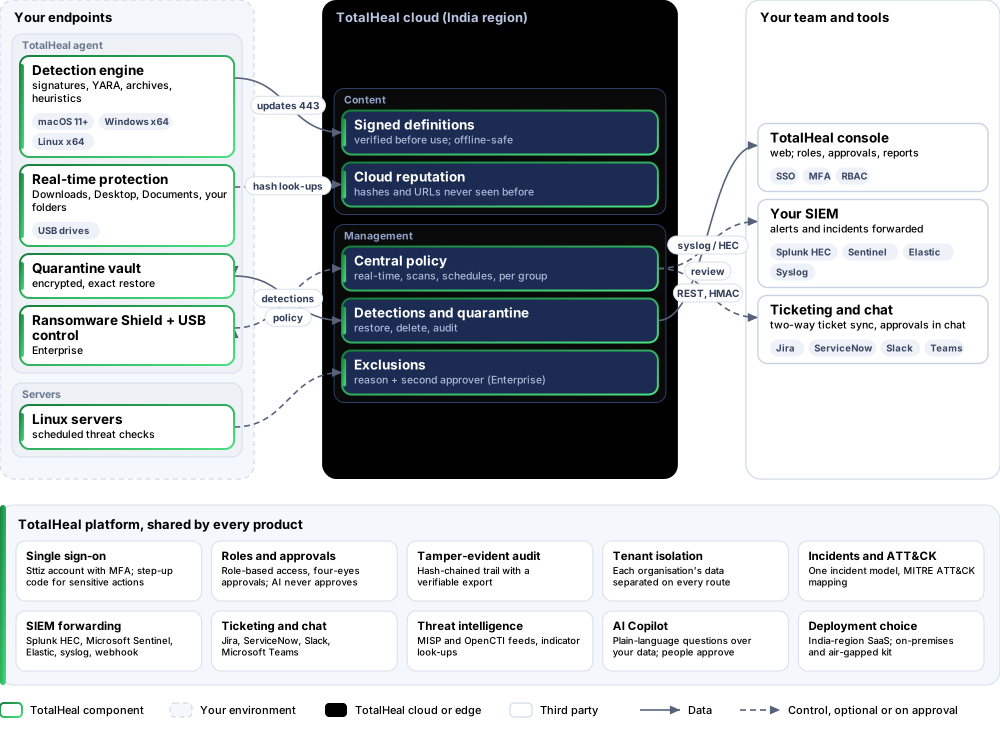
4How it works
- ArriveA file lands in Downloads, Desktop, Documents, a folder you add or a USB drive.
- CheckSigned definitions, YARA rules, archive inspection and heuristics on the device; cloud reputation for unknown files.
- DecideConfident verdicts are quarantined; heuristic findings wait for a person.
- ReviewEvery detection across devices in one list, with restore and delete from the console.
5Capabilities in detail
- Layered detectionKnown-bad files from signed threat definitions, YARA rules, archive inspection, static heuristics and cloud reputation for files the device has never seen.
- Real-time protectionFiles arriving in Downloads, Desktop, Documents, folders you add and USB drives are checked as soon as they finish writing.
- Built against false positivesOnly confident verdicts are quarantined automatically; heuristic findings wait for a person. Rules only count on the kind of file they were written for, and common developer folders are excluded by default — visibly, and removable.
- Quick, full and custom scansOn the device or sent from the console, with pause, resume and cancel.
- Safe quarantine and restoreQuarantined files are kept encrypted and can be put back exactly as they were. A restore never overwrites a newer file.
- Works offlineProtection keeps running with the last installed definitions when the device is offline; definitions are verified before they are used.
- Central policyReal-time protection on or off, quarantine or report on detection, and scheduled scans — set once for the organisation.
- Central quarantine and detectionsEvery detection across devices in one list; restore or delete quarantined files from the console, with an audit trail.
- USB control and Ransomware Shield (Enterprise)Scan drives on insert and eject untrusted ones; ransomware activity in protected folders is detected and raised as an alert.
- Approved exclusions and per-group policy (Enterprise)Every exclusion carries a reason and a second person’s approval; different policies and scan schedules per device group.
- Its own licenceAn expired ThreatGuard licence pauses only antivirus, with a clear message on the device; other TotalHeal products keep running and restores always work.
6Security and data handling
- Restores are exactQuarantined files are kept encrypted and put back exactly as they were; a restore never overwrites a newer file.
- Exclusions are approvedEach exclusion carries a reason and, on Enterprise, a second person’s approval.
- Definitions are verifiedDefinitions are signed and checked before use; protection keeps working offline.
7Where it fits
8Deployment and system requirements
Protected platforms
- macOS11 and later
- Windowsx64
- Linux desktopx64
- Linux serversscheduled checks
On-premises server
- Operating system
- RHEL, Rocky Linux or AlmaLinux 8 / 9; Ubuntu 20.04, 22.04 or 24.04; Debian 11 / 12
- Processor
- 4 vCPU (tested configuration)
- Memory
- 8 GB recommended (6 GB minimum)
- Disk
- 10 GB free for software, releases and backups, plus data
- Sign-in
- Active Directory / LDAP, SAML 2.0 or OpenID Connect
- Software
- Nothing to pre-install: no container runtime, database, web server or Java
Network and access
- TotalHeal desktop agent enrolled to your organisation on each endpoint
- macOS: Full Disk Access for TotalHeal (by the person or your MDM)
- Outbound HTTPS to the TotalHeal cloud for definitions, reputation and policy
Alerts and tickets to
- Splunk
- Microsoft Sentinel
- Elastic
- Syslog / CEF
- Jira
- ServiceNow
- Slack
- Microsoft Teams
9Technical specifications
| Features | Included | |
|---|---|---|
| Layered detection | Included | |
| Real-time protection | Included | |
| Built against false positives | Included | |
| Quick, full and custom scans | Included | |
| Safe quarantine and restore | Included | |
| Works offline | Included | |
| Central policy | Included | |
| Central quarantine and detections | Included | |
| USB control and Ransomware Shield (Enterprise) | Included | |
| Approved exclusions and per-group policy (Enterprise) | Included | |
| Its own licence | Included | |
| Availability by edition | Business | Enterprise |
| Detection engine, real-time protection, quarantine, offline protection | Included | Included |
| Central policy, scheduled scans, quick and full scans from the console | Included | Included |
| Central quarantine (restore, delete, audit) and detections list | Included | Included |
| USB control and Ransomware Shield policy | — | Included |
| Exclusions with reason and second-person approval | — | Included |
| Per-group policies and scan schedules | — | Included |
| Platforms and coverage | ||
| macOS 11 or later | TotalHeal desktop agent (Full Disk Access needed for real-time protection) | |
| Windows (x64) | TotalHeal desktop agent | |
| Linux desktops (x64) | TotalHeal desktop agent | |
| Linux servers | Threat checks by the TotalHeal server agent: scheduled, not real-time | |
| Deployment options | ||
| SaaS (TotalHeal cloud, India region) | PartialIn development: the console side is built; company computers apply the policy from desktop 0.3.10, not released yet. | |
| On-premises | AvailableDelivered with our team from the on-premises kit. | |
| Air-gapped | RoadmapNo offline definitions package yet. | |
| Licensing | ||
| Priced per | Endpoint per year | |
| Counted | Devices with endpoint protection switched on | |
| Trial | 30 days | |
| Government profile | Government is a profile, not a separate tier or price list: the Elite tier with Government defaults switched on — data residency in India, four-eyes approval of policy changes, a distinct approver for every approval-level action, retention of at least 180 days, and the CERT-In and DPDP reporting clocks. | |
| Procurement dossier | Compliance matrix, bill of materials, architecture and hardening, SLA and OEM authorisation letter, on request | |
| On-premises server | ||
| Operating system | RHEL, Rocky Linux or AlmaLinux 8 / 9; Ubuntu 20.04, 22.04 or 24.04; Debian 11 / 12 | |
| Processor | 4 vCPU (tested configuration) | |
| Memory | 8 GB recommended (6 GB minimum) | |
| Disk | 10 GB free for software, releases and backups, plus data | |
| Sign-in | Active Directory / LDAP, SAML 2.0 or OpenID Connect | |
| Software | Nothing to pre-install: no container runtime, database, web server or Java | |
| Requirements | ||
| Requirement 1 | TotalHeal desktop agent enrolled to your organisation on each endpoint | |
| Requirement 2 | macOS: Full Disk Access for TotalHeal (by the person or your MDM) | |
| Requirement 3 | Outbound HTTPS to the TotalHeal cloud for definitions, reputation and policy | |
10Getting started
- TotalHeal desktop agent enrolled to your organisation on each endpoint
- macOS: Full Disk Access for TotalHeal (by the person or your MDM)
- Outbound HTTPS to the TotalHeal cloud for definitions, reputation and policy
Start a 30 days trial in the TotalHeal console with a Sttiz account. For a quote, an on-premises installation or the procurement dossier (compliance matrix, bill of materials, architecture and hardening, SLA, OEM authorisation letter), write to business@totalhealsecurity.com.