TotalHealDatasheet · 27 October 2026
TotalHealCyberRecover
Cyber Recovery
After ransomware: find the newest clean restore point and roll the server back, with a second person approving.
- Cloud (SaaS)
- On-premises
- Air-gapped
The challenge
After ransomware the hard question is not whether a backup exists but which one is clean. Restore too new and the attacker’s files come back; restore too old and days of work are lost.
The answer
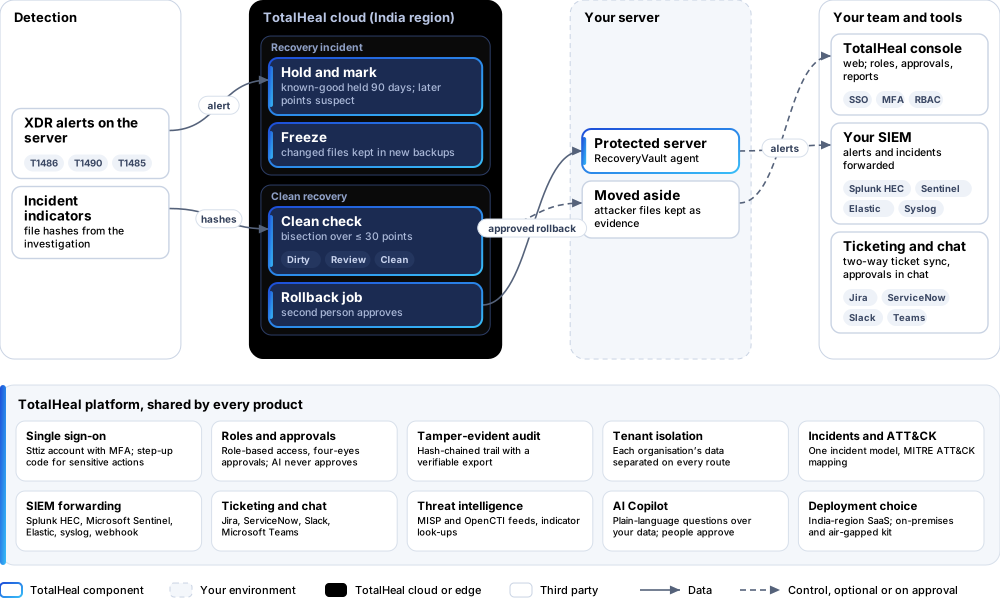
CyberRecover turns ransomware alerts into a recovery incident, holds the last known-good restore point, checks restore points for the attacker’s files and rolls the server back with a second person approving.
- Status
- Available
- Deploys as
- Cloud (SaaS) · On-premises · Air-gapped
- Runs on
- Linux servers; Alerts
- Priced per
- Protected server per year
- Trial
- 30 days
- Licence
- Sold on its own; one TotalHeal console
Supported platforms
- Ubuntu20.04, 22.04, 24.04
- Debian11, 12
- Red Hat Enterprise Linux8, 9
- Rocky Linux8, 9
- AlmaLinux8, 9
How it works
- HoldThe newest point before detection minus 15 minutes is held for 90 days.
- CheckCandidate points are checked by bisection for incident indicators.
- ApproveA second person approves the rollback.
- Roll backFiles restored; the attacker’s files moved aside.
Reference architecture
Key capabilities
- Alert to recoveryRansomware, inhibit-recovery and destruction alerts on a protected server open a recovery incident: the newest committed point before detection minus 15 minutes is held for 90 days and later points are marked suspect.
- Clean check by bisectionUp to 30 candidate points are checked by bisection: a file whose hash is an incident indicator makes a point dirty; ransom notes and encrypted copies mark it for review.
- False positives never delay recoveryName-based hints only mark a point for review; they never push recovery further back.
- One-step rollbackRoll the server back to the chosen point with a second person approving; files the attacker created are moved aside, never deleted.
- Frozen evidenceChanged files are frozen in new backups so evidence survives the clean-up.
Deployment options
Cloud (SaaS)AvailableSingle-region service.
On-premisesAvailableDelivered with our team from the on-premises kit.
Air-gappedAvailableOffline kit, offline licence file and offline update bundles.
System requirements
Protected platforms
- Ubuntu20.04, 22.04, 24.04
- Debian11, 12
- Red Hat Enterprise Linux8, 9
- Rocky Linux8, 9
- AlmaLinux8, 9
On-premises server
- Operating system
- RHEL, Rocky Linux or AlmaLinux 8 / 9; Ubuntu 20.04, 22.04 or 24.04; Debian 11 / 12
- Processor
- 4 vCPU (tested configuration)
- Memory
- 8 GB recommended (6 GB minimum)
- Disk
- 10 GB free for software, releases and backups, plus data
- Sign-in
- Active Directory / LDAP, SAML 2.0 or OpenID Connect
- Software
- Nothing to pre-install: no container runtime, database, web server or Java
Network and access
- TotalHeal RecoveryVault on the servers to recover
Alerts and tickets to
- Splunk
- Microsoft Sentinel
- Elastic
- Syslog / CEF
- Jira
- ServiceNow
- Slack
- Microsoft Teams
Technical specifications
| Features | Included | |
|---|---|---|
| Alert to recovery | Included | |
| Clean check by bisection | Included | |
| False positives never delay recovery | Included | |
| One-step rollback | Included | |
| Frozen evidence | Included | |
| Availability by edition | Business | Enterprise |
| Recovery incidents, holds, clean check, four-eyes rollback | Included | Included |
| Platforms and coverage | ||
| Linux servers | Protected by TotalHeal RecoveryVault | |
| Alerts | TotalHeal XDR alerts on the protected server | |
| Deployment options | ||
| SaaS (India region) | AvailableSingle-region service. | |
| On-premises control plane | AvailableDelivered with our team from the on-premises kit. | |
| Air-gapped | AvailableOffline kit, offline licence file and offline update bundles. | |
| Licensing | ||
| Priced per | Protected server per year | |
| Counted | Servers with CyberRecover switched on | |
| Trial | 30 days | |
| Editions | CyberRecover is sold on its own and needs RecoveryVault. | |
| Government profile | Government is a profile, not a separate tier or price list: the Elite tier with Government defaults switched on — data residency in India, four-eyes approval of policy changes, a distinct approver for every approval-level action, retention of at least 180 days, and the CERT-In and DPDP reporting clocks. | |
| Procurement dossier | Compliance matrix, bill of materials, architecture and hardening, SLA and OEM authorisation letter, on request | |
| On-premises server | ||
| Operating system | RHEL, Rocky Linux or AlmaLinux 8 / 9; Ubuntu 20.04, 22.04 or 24.04; Debian 11 / 12 | |
| Processor | 4 vCPU (tested configuration) | |
| Memory | 8 GB recommended (6 GB minimum) | |
| Disk | 10 GB free for software, releases and backups, plus data | |
| Sign-in | Active Directory / LDAP, SAML 2.0 or OpenID Connect | |
| Software | Nothing to pre-install: no container runtime, database, web server or Java | |
| Requirements | ||
| Requirement 1 | TotalHeal RecoveryVault on the servers to recover | |