TotalHealDatasheet · 27 October 2026
TotalHealDisasterRecover
Disaster Recovery
Recovery plans that bring servers back at another site in order, with health checks, and drills that measure the real recovery time.
- Cloud (SaaS)
- On-premises
- Air-gapped
The challenge
Most disaster-recovery plans are documents. Nobody knows the real recovery time until the day it is needed, and on that day steps get skipped under pressure.
The answer
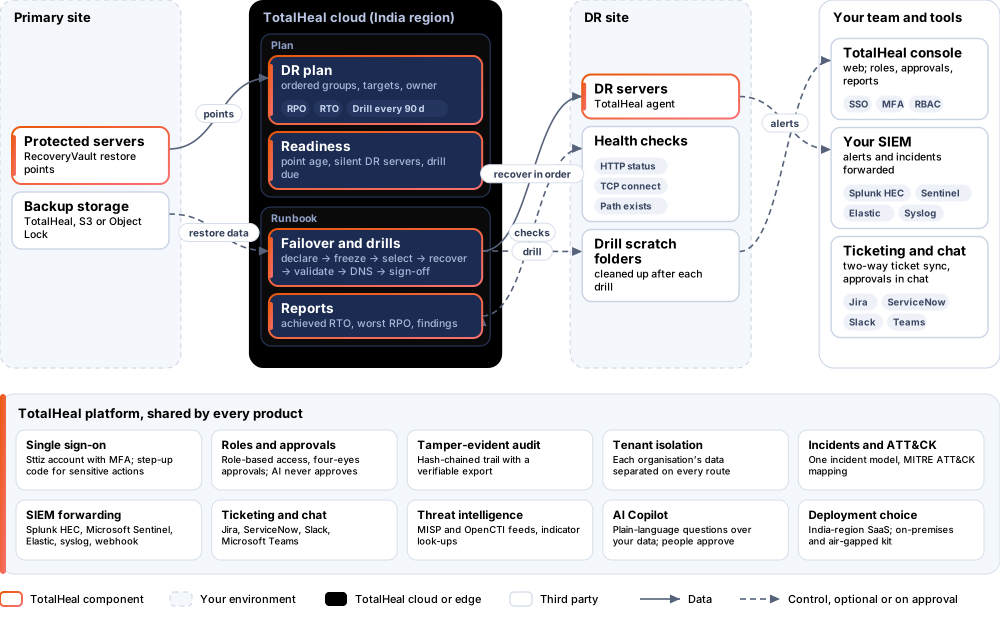
DisasterRecover turns the plan into a runbook the system enforces: servers recover in order at the DR site, health checks prove they work, people confirm the gates, and quarterly drills measure the recovery time you would really get.
- Status
- Available
- Deploys as
- Cloud (SaaS) · On-premises · Air-gapped
- Runs on
- Linux servers
- Priced per
- Protected server per year
- Trial
- 30 days
- Licence
- Sold on its own; one TotalHeal console
Supported platforms
- Ubuntu20.04, 22.04, 24.04
- Debian11, 12
- Red Hat Enterprise Linux8, 9
- Rocky Linux8, 9
- AlmaLinux8, 9
How it works
- DeclareA second person declares the disaster.
- SelectThe newest clean, verified point per server is frozen and chosen.
- RecoverGroups recover in order on the DR servers.
- ValidateHealth checks run; DNS switch and sign-off are confirmed.
- ReportAchieved RTO, worst RPO and findings are kept.
Reference architecture
Key capabilities
- Plans in orderRecovery groups in order; each server mapped to the DR server it recovers on, original paths or a folder, and health checks (HTTP status, TCP connect, path exists).
- Targets and readinessRPO and RTO targets, worst restore-point age against the RPO, DR servers not seen for an hour, last drill and when the next is due.
- Failover runbookA second person declares the disaster; points are frozen; the newest clean, verified point is selected; groups recover in order; health checks run; DNS switch and business sign-off are confirmed steps; a report closes it.
- Non-disruptive drillsEvery group restores into a scratch folder on the DR server, is cleaned up and reported — every 90 days by default, started by the schedule.
- Measured, not assumedAchieved RTO, worst RPO, targets met, files and bytes restored, checks passed and failed, and findings, kept for audit.
- No skipped gatesA run never skips a gate; a failed step fails the run with its reason.
Deployment options
Cloud (SaaS)AvailableSingle-region service.
On-premisesAvailableDelivered with our team from the on-premises kit.
Air-gappedAvailableOffline kit, offline licence file and offline update bundles.
System requirements
Protected platforms
- Ubuntu20.04, 22.04, 24.04
- Debian11, 12
- Red Hat Enterprise Linux8, 9
- Rocky Linux8, 9
- AlmaLinux8, 9
On-premises server
- Operating system
- RHEL, Rocky Linux or AlmaLinux 8 / 9; Ubuntu 20.04, 22.04 or 24.04; Debian 11 / 12
- Processor
- 4 vCPU (tested configuration)
- Memory
- 8 GB recommended (6 GB minimum)
- Disk
- 10 GB free for software, releases and backups, plus data
- Sign-in
- Active Directory / LDAP, SAML 2.0 or OpenID Connect
- Software
- Nothing to pre-install: no container runtime, database, web server or Java
Network and access
- TotalHeal RecoveryVault
- A server at the recovery site with the TotalHeal agent
Alerts and tickets to
- Splunk
- Microsoft Sentinel
- Elastic
- Syslog / CEF
- Jira
- ServiceNow
- Slack
- Microsoft Teams
Technical specifications
| Features | Included | |
|---|---|---|
| Plans in order | Included | |
| Targets and readiness | Included | |
| Failover runbook | Included | |
| Non-disruptive drills | Included | |
| Measured, not assumed | Included | |
| No skipped gates | Included | |
| Availability by edition | Business | Enterprise |
| Plans, readiness, failover runbook, drills, reports | Included | Included |
| Platforms and coverage | ||
| Linux servers | Protected by TotalHeal RecoveryVault, with the TotalHeal agent at the DR site | |
| Deployment options | ||
| SaaS (India region) | AvailableSingle-region service. | |
| On-premises control plane | AvailableDelivered with our team from the on-premises kit. | |
| Air-gapped | AvailableOffline kit, offline licence file and offline update bundles. | |
| Licensing | ||
| Priced per | Protected server per year | |
| Counted | Servers in a DR plan | |
| Trial | 30 days | |
| Editions | DisasterRecover is sold on its own and needs RecoveryVault. | |
| Government profile | Government is a profile, not a separate tier or price list: the Elite tier with Government defaults switched on — data residency in India, four-eyes approval of policy changes, a distinct approver for every approval-level action, retention of at least 180 days, and the CERT-In and DPDP reporting clocks. | |
| Procurement dossier | Compliance matrix, bill of materials, architecture and hardening, SLA and OEM authorisation letter, on request | |
| On-premises server | ||
| Operating system | RHEL, Rocky Linux or AlmaLinux 8 / 9; Ubuntu 20.04, 22.04 or 24.04; Debian 11 / 12 | |
| Processor | 4 vCPU (tested configuration) | |
| Memory | 8 GB recommended (6 GB minimum) | |
| Disk | 10 GB free for software, releases and backups, plus data | |
| Sign-in | Active Directory / LDAP, SAML 2.0 or OpenID Connect | |
| Software | Nothing to pre-install: no container runtime, database, web server or Java | |
| Requirements | ||
| Requirement 1 | TotalHeal RecoveryVault | |
| Requirement 2 | A server at the recovery site with the TotalHeal agent | |