TotalHealDatasheet · 27 October 2026
TotalHealIdentityWatch
Identity Threat Detection & Response (ITDR)
Spot identity attacks in your sign-in data and act on them.
- Cloud (SaaS)
- On-premises
- Air-gapped
The challenge
Most intrusions now start with a valid sign-in: a sprayed password, a tired user approving the tenth MFA push, a malicious app granted access to mail. Identity providers record all of it, but few teams watch it.
The answer
IdentityWatch connects to your identity provider, keeps an inventory of active identities, detects identity attacks in the sign-in and audit data, and lets you disable a user or revoke sessions from the incident.
- Status
- Available
- Deploys as
- Cloud (SaaS) · On-premises · Air-gapped
- Runs on
- Identity providers
- Priced per
- Identity per year
- Trial
- 30 days
- Licence
- Sold on its own; one TotalHeal console
Supported platforms
- Microsoft Entra ID
- Okta
- Google Workspace
- Microsoft 365
How it works
- ConnectGrant read access to the identity provider’s logs.
- WatchEvery active identity and its sign-ins.
- DetectSpraying, MFA fatigue, impossible travel, risky consent and more.
- RespondDisable or revoke sessions behind your approval rules.
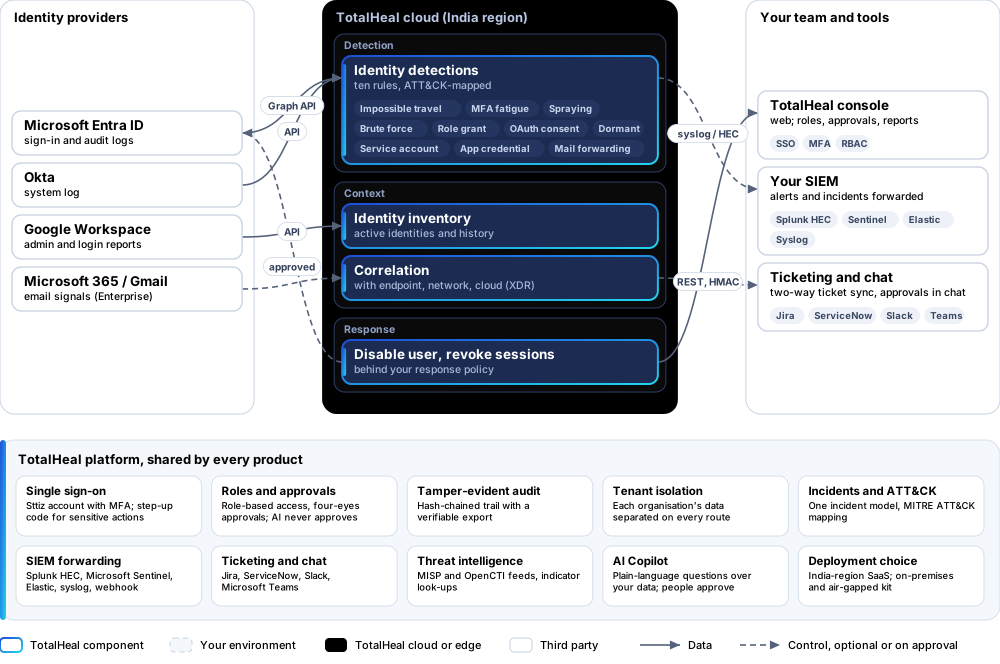
Reference architecture
Key capabilities
- Identity provider connectorMicrosoft Entra ID, Okta or Google Workspace sign-in and audit logs, read through the provider’s API.
- Ten identity detectionsImpossible travel, MFA fatigue, password spraying, brute force on one account, privileged role grants, suspicious OAuth consent, dormant-account sign-in, interactive sign-in by a service account, new application credentials and mailbox forwarding to an outside address — each mapped to MITRE ATT&CK.
- Identity inventoryEvery active identity seen, with its sign-in history and alerts.
- ResponseDisable a user or revoke their sessions, behind your response policy and its approvals.
- One incidentIdentity alerts join the same incidents as endpoint, network and cloud alerts when ThreatFusion XDR is present.
- Email signals (Enterprise)Microsoft 365 and Google Workspace email signals for your users — the providers’ own verdicts.
Deployment options
Cloud (SaaS)AvailableSingle-region service.
On-premisesAvailableDelivered with our team from the on-premises kit.
Air-gappedAvailableOffline kit, offline licence file and offline update bundles.
System requirements
Protected platforms
- Microsoft Entra ID
- Okta
- Google Workspace
- Microsoft 365
On-premises server
- Operating system
- RHEL, Rocky Linux or AlmaLinux 8 / 9; Ubuntu 20.04, 22.04 or 24.04; Debian 11 / 12
- Processor
- 4 vCPU (tested configuration)
- Memory
- 8 GB recommended (6 GB minimum)
- Disk
- 10 GB free for software, releases and backups, plus data
- Sign-in
- Active Directory / LDAP, SAML 2.0 or OpenID Connect
- Software
- Nothing to pre-install: no container runtime, database, web server or Java
Network and access
- An administrator who can grant TotalHeal read access to the identity provider’s logs
Alerts and tickets to
- Splunk
- Microsoft Sentinel
- Elastic
- Syslog / CEF
- Jira
- ServiceNow
- Slack
- Microsoft Teams
Technical specifications
| Features | Included | |
|---|---|---|
| Identity provider connector | Included | |
| Ten identity detections | Included | |
| Identity inventory | Included | |
| Response | Included | |
| One incident | Included | |
| Email signals (Enterprise) | Included | |
| Availability by edition | Business | Enterprise |
| Connector, identity detections, inventory, response | Included | Included |
| Microsoft 365 and Google Workspace email signals | — | Included |
| Platforms and coverage | ||
| Identity providers | Microsoft Entra ID, Okta, Google Workspace | |
| Console | TotalHeal web console | |
| Deployment options | ||
| SaaS (India region) | AvailableSingle-region service. | |
| On-premises control plane | AvailableDelivered with our team from the on-premises kit. | |
| Air-gapped | AvailableOffline kit, offline licence file and offline update bundles. | |
| Licensing | ||
| Priced per | Identity per year | |
| Counted | Active identities seen through the connector | |
| Trial | 30 days | |
| Government profile | Government is a profile, not a separate tier or price list: the Elite tier with Government defaults switched on — data residency in India, four-eyes approval of policy changes, a distinct approver for every approval-level action, retention of at least 180 days, and the CERT-In and DPDP reporting clocks. | |
| Procurement dossier | Compliance matrix, bill of materials, architecture and hardening, SLA and OEM authorisation letter, on request | |
| On-premises server | ||
| Operating system | RHEL, Rocky Linux or AlmaLinux 8 / 9; Ubuntu 20.04, 22.04 or 24.04; Debian 11 / 12 | |
| Processor | 4 vCPU (tested configuration) | |
| Memory | 8 GB recommended (6 GB minimum) | |
| Disk | 10 GB free for software, releases and backups, plus data | |
| Sign-in | Active Directory / LDAP, SAML 2.0 or OpenID Connect | |
| Software | Nothing to pre-install: no container runtime, database, web server or Java | |
| Requirements | ||
| Requirement 1 | An administrator who can grant TotalHeal read access to the identity provider’s logs | |