TotalHealInfraGuard
Server & Infrastructure Security (hardening and configuration)
Continuously checks how your Linux servers are configured — 79 hardening checks with evidence — and fixes them with a second person’s approval and a rollback for every change.
- Cloud (SaaS)
- On-premises
- Air-gapped
The challenge
Most server breaches start with a setting, not a zero-day: root logins over SSH, password logins open to the internet, weak ciphers, world-readable shadow files, no audit trail, no firewall. Servers drift — a hardened image is weakened by the next change — and auditors ask for evidence that nobody has.
The answer
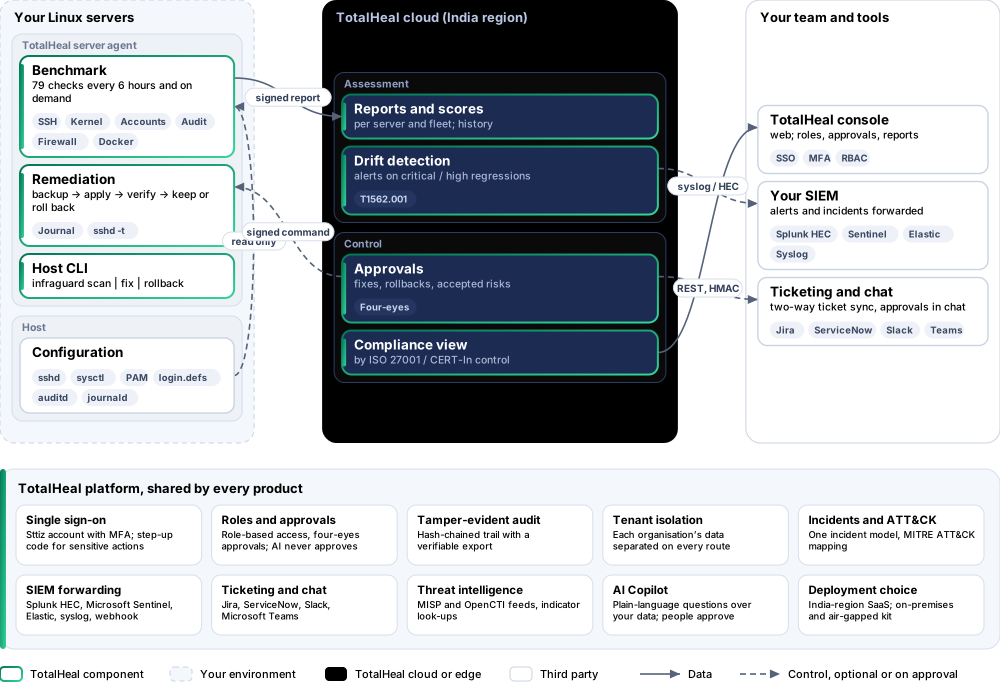
InfraGuard runs a 79-check hardening benchmark on every Linux server through the TotalHeal server agent, scores each server and the fleet, alerts when a check newly fails, and fixes what you approve — with a backup, a check that the fix took effect, and a rollback for every change.
- Status
- Available
- Deploys as
- Cloud (SaaS) · On-premises · Air-gapped
- Runs on
- Ubuntu 20.04, 22.04, 24.04; Debian 11, 12; RHEL, Rocky Linux, AlmaLinux 8 and 9
- Priced per
- Server per year
- Trial
- 30 days, up to 5 servers
- Licence
- Sold on its own; one TotalHeal console
Supported platforms
- Ubuntu20.04, 22.04, 24.04
- Debian11, 12
- Red Hat Enterprise Linux8, 9
- Rocky Linux8, 9
- AlmaLinux8, 9
- Docker hosts
How it works
- ScanThe server agent reads the host — files, kernel settings, services — every 6 hours and on demand; nothing is changed.
- ScoreEach check passes or fails with evidence; a severity-weighted score per server and for the fleet.
- AlertA check that newly fails at critical or high raises an alert in the incident queue.
- ApproveSomeone requests a fix with a reason; a different person approves it.
- Fix and verifyThe agent backs up, applies, re-reads the host and rolls back any fix that did not take effect.
Reference architecture
Key capabilities
- 79 checks with evidenceSSH (root and password login, attempts, ciphers, MACs, key exchange, host keys), kernel and network settings, accounts and PAM, file permissions, services, logging and audit, updates, firewall, time sync, SELinux / AppArmor, Secure Boot and Docker — each result with the exact value found.
- Why it matters, how to fixEvery check explains the risk in one sentence and names its fix or the guidance to follow.
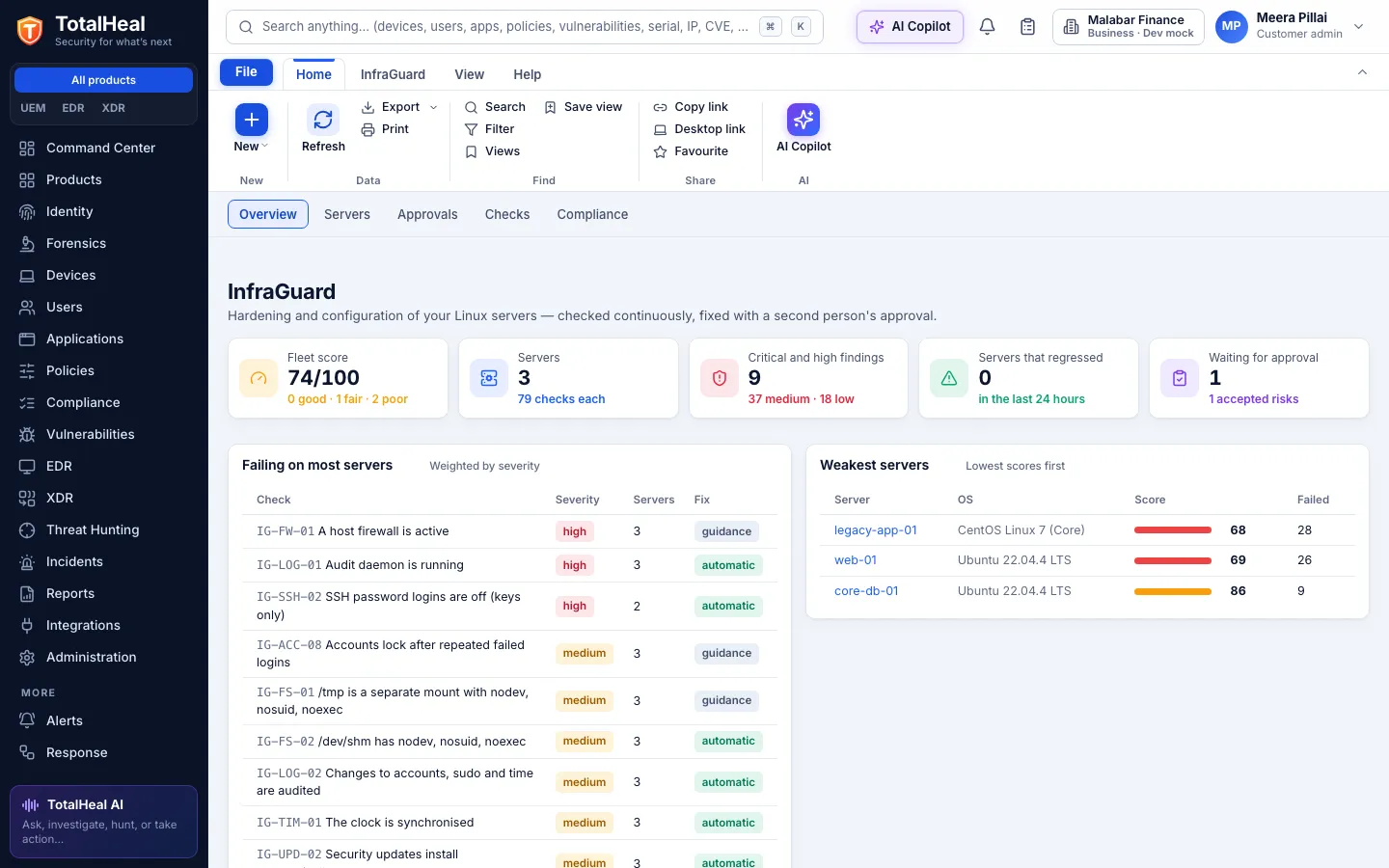
- Score per server and for the fleetA severity-weighted score from 0 to 100 (critical 10, high 6, medium 3, low 1), score history, and the checks failing on most servers.
- Drift alertsA check that newly fails at critical or high raises an alert (MITRE ATT&CK T1562.001) in the same incident queue as every other alert.
- Fixes with four-eyes approvalRequest a fix with a reason; a second person approves — never the requester, never an AI; the agent applies it as a signed command.
- Backup, verify, roll backEvery file a fix touches is backed up first; the host is re-read to check the fix took effect, and a fix that did not is rolled back automatically. Any applied fix can be rolled back later, byte for byte.
- Safe where it mattersSSH changes are validated with sshd -t before reload; firewall and partition changes are guidance only, never automatic; remediation runs only where the host owner allowed it.
- Accepted risksAn exception for one server or all servers needs a reason, an expiry of up to a year and a second person; it leaves the score while it lasts.
- Evidence by controlResults grouped by ISO 27001:2022 Annex A control and the CERT-In directions (log retention, clock synchronisation) for auditors.
- On the host toototalheal-server-agent infraguard scan | fix | rollback runs the same benchmark on a server without the cloud.
In the console
Deployment options
System requirements
Protected platforms
- Ubuntu20.04, 22.04, 24.04
- Debian11, 12
- Red Hat Enterprise Linux8, 9
- Rocky Linux8, 9
- AlmaLinux8, 9
- Docker hosts
On-premises server
- Operating system
- RHEL, Rocky Linux or AlmaLinux 8 / 9; Ubuntu 20.04, 22.04 or 24.04; Debian 11 / 12
- Processor
- 4 vCPU (tested configuration)
- Memory
- 8 GB recommended (6 GB minimum)
- Disk
- 10 GB free for software, releases and backups, plus data
- Sign-in
- Active Directory / LDAP, SAML 2.0 or OpenID Connect
- Software
- Nothing to pre-install: no container runtime, database, web server or Java
Network and access
- The TotalHeal server agent on each Linux server, with infraguard.enabled
- infraguard.allow_remediation on servers where approved fixes may run
- Outbound HTTPS from each server to the TotalHeal cloud
Alerts and tickets to
- Splunk
- Microsoft Sentinel
- Elastic
- Syslog / CEF
- Jira
- ServiceNow
- Slack
- Microsoft Teams
Technical specifications
| Features | Included | |
|---|---|---|
| 79 checks with evidence | Included | |
| Why it matters, how to fix | Included | |
| Score per server and for the fleet | Included | |
| Drift alerts | Included | |
| Fixes with four-eyes approval | Included | |
| Backup, verify, roll back | Included | |
| Safe where it matters | Included | |
| Accepted risks | Included | |
| Evidence by control | Included | |
| On the host too | Included | |
| Availability by edition | Business | Enterprise |
| Benchmark, scores, drift alerts, approved fixes with rollback, exceptions, compliance view, host CLI | Included | Included |
| Platforms and coverage | ||
| Ubuntu 20.04, 22.04, 24.04 | TotalHeal server agent (signed .deb) | |
| Debian 11, 12 | TotalHeal server agent (signed .deb) | |
| RHEL, Rocky Linux, AlmaLinux 8 and 9 | TotalHeal server agent (signed .rpm) | |
| Docker hosts | Socket permissions, TCP exposure and inter-container traffic checked | |
| Console | TotalHeal web console | |
| Deployment options | ||
| SaaS (India region) | AvailableSingle-region service. | |
| On-premises control plane | AvailableDelivered with our team from the on-premises kit. | |
| Air-gapped | AvailableOffline kit, offline licence file and offline update bundles. | |
| Licensing | ||
| Priced per | Server per year | |
| Counted | Servers reporting the InfraGuard benchmark | |
| Trial | 30 days, up to 5 servers | |
| Editions | InfraGuard is sold on its own, outside the editions. | |
| Government profile | Government is a profile, not a separate tier or price list: the Elite tier with Government defaults switched on — data residency in India, four-eyes approval of policy changes, a distinct approver for every approval-level action, retention of at least 180 days, and the CERT-In and DPDP reporting clocks. | |
| Procurement dossier | Compliance matrix, bill of materials, architecture and hardening, SLA and OEM authorisation letter, on request | |
| On-premises server | ||
| Operating system | RHEL, Rocky Linux or AlmaLinux 8 / 9; Ubuntu 20.04, 22.04 or 24.04; Debian 11 / 12 | |
| Processor | 4 vCPU (tested configuration) | |
| Memory | 8 GB recommended (6 GB minimum) | |
| Disk | 10 GB free for software, releases and backups, plus data | |
| Sign-in | Active Directory / LDAP, SAML 2.0 or OpenID Connect | |
| Software | Nothing to pre-install: no container runtime, database, web server or Java | |
| Requirements | ||
| Requirement 1 | The TotalHeal server agent on each Linux server, with infraguard.enabled | |
| Requirement 2 | infraguard.allow_remediation on servers where approved fixes may run | |
| Requirement 3 | Outbound HTTPS from each server to the TotalHeal cloud | |