TotalHealPromptShield
AI Security (GenAI firewall)
See which AI assistants your people use and block the ones you have not approved; put your own AI applications behind a gateway that stops sensitive data and injection attempts.
- Cloud (SaaS)
- On-premises
- Air-gapped
The challenge
People paste contracts, customer records and source code into whichever AI assistant is open, and the company’s own AI applications send whatever their users type straight to a model provider. Nobody can say which assistants are in use, what data has left, or whether someone is trying to talk an internal assistant into ignoring its instructions.
The answer
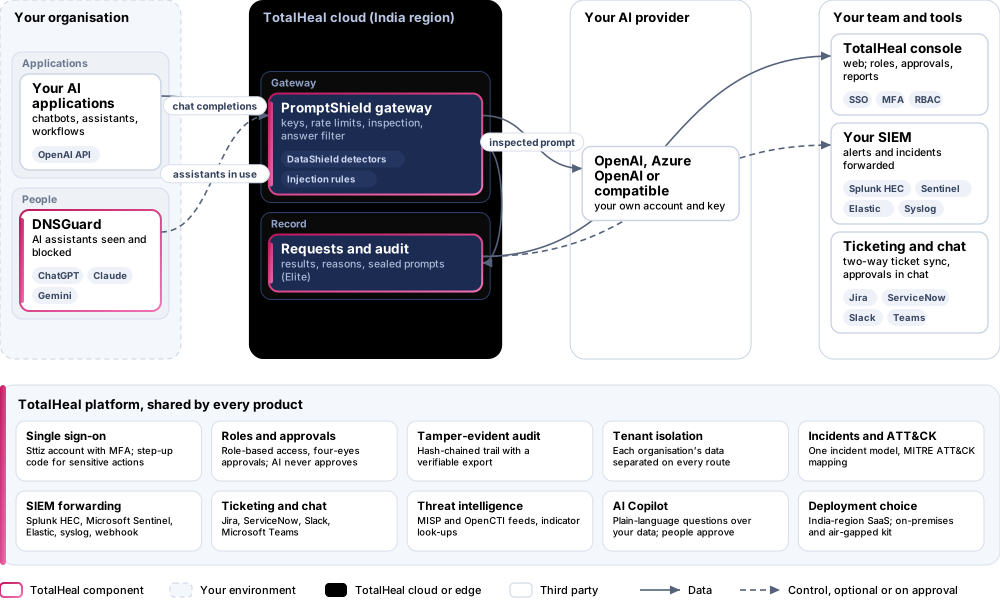
PromptShield shows which AI assistants are used on your networks and lets you sanction or block each one. For your own applications it is a gateway: they call PromptShield exactly as they would call the OpenAI API, and every prompt is inspected before it reaches your provider — sensitive data redacted or blocked, injection attempts stopped — and every answer is checked on the way back.
- Status
- Available
- Deploys as
- Cloud (SaaS) · On-premises · Air-gapped
- Runs on
- Discovery and blocking; Gateway; Providers
- Priced per
- User per year
- Trial
- 30 days, up to 50 users
- Licence
- Sold on its own; one TotalHeal console
Supported platforms
- OpenAI
- Azure OpenAI
- OpenAI-compatible endpoints (Anthropic, Mistral, Groq, vLLM, Ollama)
How it works
- SeeAI assistants in use appear from DNSGuard and network sensors within the hour.
- DecideSanction the assistant the company pays for; block the rest on every network.
- ConnectAdd your provider account as a gateway and give each application its own key.
- InspectPrompts are checked for sensitive data and injection attempts before they leave.
- RecordEvery request is recorded; regulated teams keep the full prompt, encrypted.
Reference architecture
Key capabilities
- AI assistants in useChatGPT, Claude, Gemini, Microsoft Copilot, DeepSeek, Perplexity and other assistants found from DNSGuard’s hourly counts and network-sensor events: how many people, how often, since when. Sanction the one the company pays for; block the rest through DNSGuard on every network.
- A gateway that speaks the OpenAI APIApplications change only the base URL and the key. Chat completions and the model list are supported; streaming requests are answered as server-sent events after the answer is inspected.
- Your provider, your accountOpenAI, Azure OpenAI or any OpenAI-compatible endpoint — Anthropic’s compatibility endpoint, Mistral, Groq, a self-hosted vLLM or Ollama. The provider API key is kept encrypted and never shown again; requests leave through TotalHeal’s egress guard.
- Sensitive data never reaches the modelEvery prompt is inspected with the DataShield detectors — Aadhaar, PAN, GSTIN, card numbers, bank accounts and IFSC, passports, cloud keys, tokens and passwords — and allowed, redacted or blocked by severity. The application receives a coaching message to show the person.
- Answers checked tooHigh and critical sensitive data in a model’s answer is replaced before the application sees it.
- Prompt injection and jailbreaksA curated rule set of published attack patterns — instructions to ignore earlier instructions, requests for the system prompt, “developer mode” and DAN-style role play, forged chat-template markers, hidden characters, encoded payloads and data-exfiltration links — scored per prompt; above your threshold the prompt is blocked or flagged.
- Per-model policyAllow only the models you have approved on each gateway, and cap the tokens of the expensive ones.
- One key per applicationEach application gets its own key with its own rate limit; revoke one without touching the others. Only a fingerprint of each key is kept.
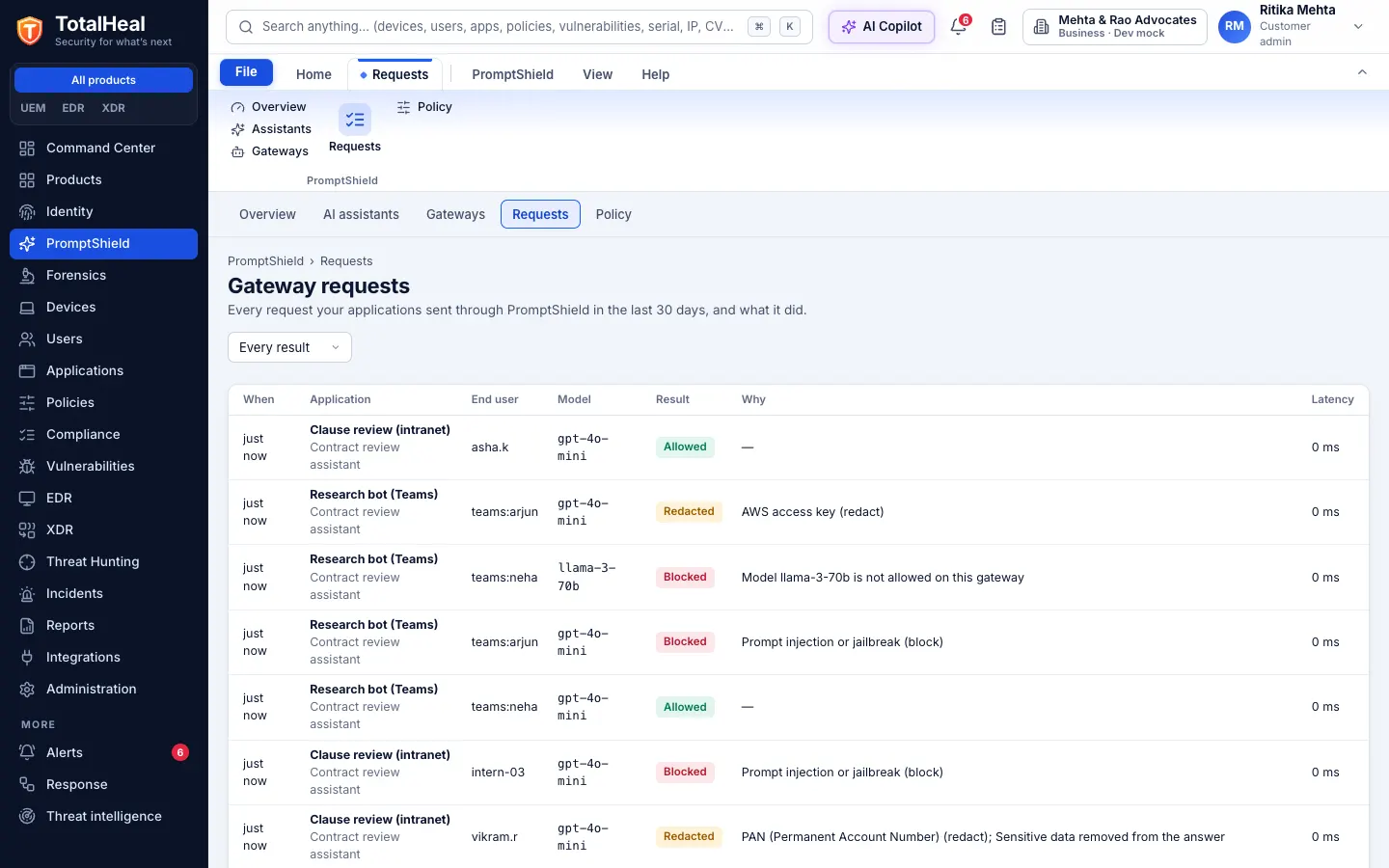
- Every request on recordApplication, end user, model, result, reasons, sensitive data found (masked), latency and tokens. For regulated teams the full prompt and answer are kept encrypted, and opening one is itself recorded in the audit log.
In the console
Deployment options
System requirements
Protected platforms
- OpenAI
- Azure OpenAI
- OpenAI-compatible endpoints (Anthropic, Mistral, Groq, vLLM, Ollama)
On-premises server
- Operating system
- RHEL, Rocky Linux or AlmaLinux 8 / 9; Ubuntu 20.04, 22.04 or 24.04; Debian 11 / 12
- Processor
- 4 vCPU (tested configuration)
- Memory
- 8 GB recommended (6 GB minimum)
- Disk
- 10 GB free for software, releases and backups, plus data
- Sign-in
- Active Directory / LDAP, SAML 2.0 or OpenID Connect
- Software
- Nothing to pre-install: no container runtime, database, web server or Java
Network and access
- DNSGuard for discovering and blocking AI assistants
- Your own account with OpenAI, Azure OpenAI or an OpenAI-compatible provider for the gateway
Alerts and tickets to
- Splunk
- Microsoft Sentinel
- Elastic
- Syslog / CEF
- Jira
- ServiceNow
- Slack
- Microsoft Teams
Technical specifications
| Features | Included | ||
|---|---|---|---|
| AI assistants in use | Included | ||
| A gateway that speaks the OpenAI API | Included | ||
| Your provider, your account | Included | ||
| Sensitive data never reaches the model | Included | ||
| Answers checked too | Included | ||
| Prompt injection and jailbreaks | Included | ||
| Per-model policy | Included | ||
| One key per application | Included | ||
| Every request on record | Included | ||
| Availability by tier | Essential | Professional | Elite |
| AI assistants in use (ChatGPT, Claude, Gemini, Copilot, DeepSeek and more) from DNSGuard and network sensors; sanction or block each through DNSGuard | Included | Included | Included |
| AI gateway for your own applications: OpenAI-compatible endpoint, one key per application with its own rate limit, your provider key kept encrypted | — | Included | Included |
| Prompts inspected with the DataShield detectors: sensitive data allowed, redacted or blocked by severity, with a coaching message | — | Included | Included |
| Sensitive data removed from answers; every request recorded; alerts for blocked requests | — | Included | Included |
| Prompt-injection and jailbreak detection, allowed models and token caps per model, full prompt audit kept encrypted | — | — | Included |
| List price per user per year | US$18 · ₹1,710 | US$36 · ₹3,430 | US$54 · ₹5,140 |
| Platforms and coverage | |||
| Discovery and blocking | DNSGuard (cloud or on-premises resolver, desktop agents); NetWatch sensors | ||
| Gateway | OpenAI Chat Completions API (POST /v1/chat/completions, GET /v1/models), streaming included | ||
| Providers | OpenAI, Azure OpenAI, any OpenAI-compatible endpoint (Anthropic, Mistral, Groq, vLLM, Ollama) | ||
| Console | TotalHeal web console | ||
| Deployment options | |||
| SaaS (India region) | AvailableThe gateway runs in the TotalHeal cloud and calls your provider from there. | ||
| On-premises control plane | AvailableDelivered with our team from the on-premises kit. | ||
| Air-gapped | AvailableOffline kit, offline licence file and offline update bundles. | ||
| Licensing | |||
| Priced per | User per year | ||
| Counted | People in the organisation covered by discovery and the gateway | ||
| Trial | 30 days, up to 50 users | ||
| Editions | PromptShield is sold on its own, outside the editions; blocking assistants needs DNSGuard. | ||
| Government profile | Government is a profile, not a separate tier or price list: the Elite tier with Government defaults switched on — data residency in India, four-eyes approval of policy changes, a distinct approver for every approval-level action, retention of at least 180 days, and the CERT-In and DPDP reporting clocks. | ||
| Procurement dossier | Compliance matrix, bill of materials, architecture and hardening, SLA and OEM authorisation letter, on request | ||
| On-premises server | |||
| Operating system | RHEL, Rocky Linux or AlmaLinux 8 / 9; Ubuntu 20.04, 22.04 or 24.04; Debian 11 / 12 | ||
| Processor | 4 vCPU (tested configuration) | ||
| Memory | 8 GB recommended (6 GB minimum) | ||
| Disk | 10 GB free for software, releases and backups, plus data | ||
| Sign-in | Active Directory / LDAP, SAML 2.0 or OpenID Connect | ||
| Software | Nothing to pre-install: no container runtime, database, web server or Java | ||
| Requirements | |||
| Requirement 1 | DNSGuard for discovering and blocking AI assistants | ||
| Requirement 2 | Your own account with OpenAI, Azure OpenAI or an OpenAI-compatible provider for the gateway | ||