TotalHealDatasheet · 27 October 2026
TotalHealDeviceSphere
Unified Endpoint Management (UEM)
Enrol, configure, update and secure every laptop, phone and tablet from one console.
- Cloud (SaaS)
- On-premises
- Air-gapped
The challenge
Organisations run a mix of Windows and Mac laptops, Linux machines, iPhones, iPads and Android phones. IT needs to know what each device is, keep it configured and encrypted, deploy apps, and lock or wipe a lost device — usually with several separate tools.
The answer
One device record, one console, one policy engine and one signed command channel for Windows, macOS, Linux, iPhone, iPad and Android.
- Status
- Available
- Deploys as
- Cloud (SaaS) · On-premises · Air-gapped
- Runs on
- macOS 11 and later; Windows 10 and 11 (x64); Linux desktop (.deb, AppImage)
- Priced per
- Managed device per year
- Trial
- 30 days, up to 25 devices
- Licence
- Sold on its own; one TotalHeal console
Supported platforms
- Windows10 / 11 (x64)
- macOS11 and later
- Linux desktop.deb, AppImage
- iPhone, iPadApple MDM
- Android8.0 and later
- Apple Business Manager
How it works
- EnrolDevices enrol with a token, QR code or link into corporate, BYOD or server profiles.
- InventoryHardware, software, encryption, firewall and patch level are reported and kept current.
- ConfigureSigned, versioned policies are simulated on a device first, then rolled out.
- ComplyCompliance rules set compliant, grace or non-compliant states that feed Zero Trust and reports.
- ActLock, retire or wipe with typed confirmation and a second approver.
Reference architecture
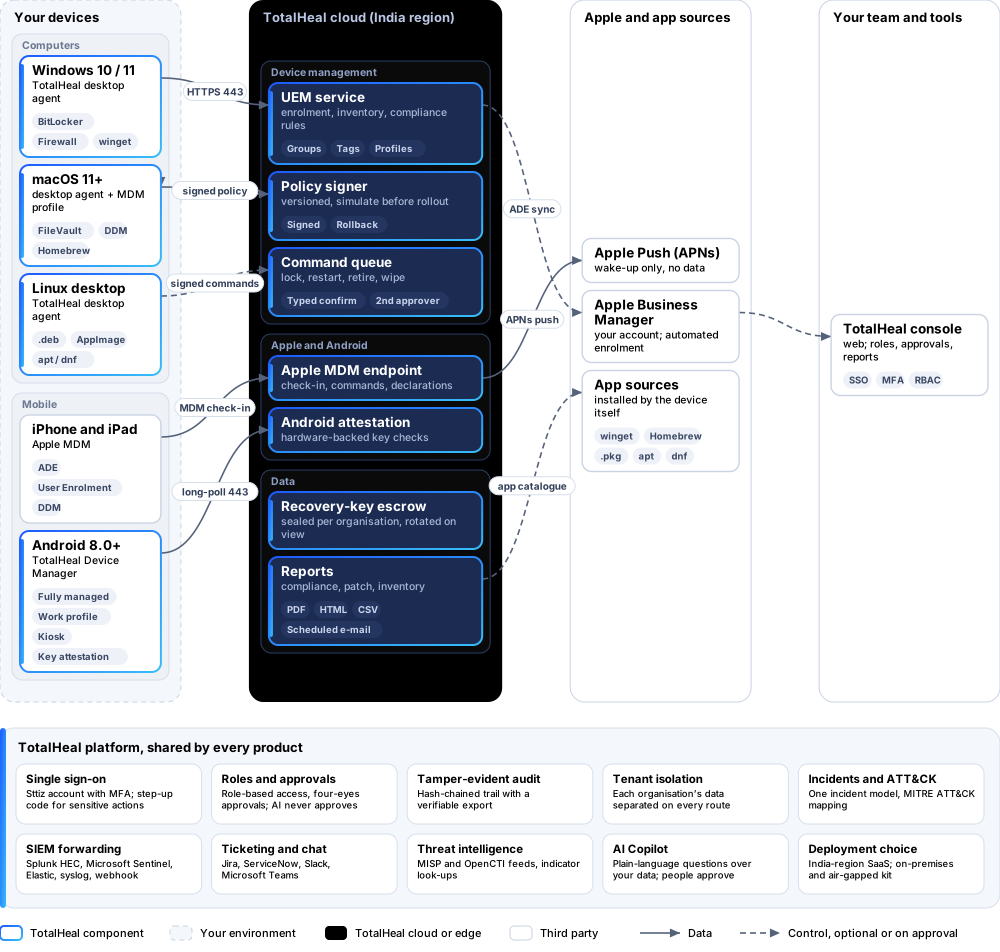
Key capabilities
- Enrolment your wayToken, QR code or link, with corporate, BYOD and server profiles, groups, tags, expiry and maximum uses. Command-line enrolment for bulk rollout.
- Hardware and software inventoryModel, serial, CPU, RAM, disks, battery, OS and patch level, installed software, users, network, encryption, firewall and Secure Boot.
- Signed configuration policiesPassword and screen lock, disk encryption, firewall, OS auto-update, USB control, remote-login services, Wi-Fi rules and settings lock — versioned, with “simulate on device” before rollout.
- Compliance rulesCompliant, non-compliant and grace states that feed Zero Trust posture and reports.
- Apps and updatesAn app catalogue deployed through winget, Homebrew/.pkg, apt and dnf, required or self-service, with allow and block rules on the device. OS and third-party updates with patch rings.
- Remote actions with a second approverLock, restart, sync, message, collect diagnostics, locate (opt-in) and retire. Destructive actions need a typed confirmation and a second human approver — never AI.
- Recovery-key escrowBitLocker and FileVault keys sealed per organisation. Viewing one needs an admin role, a reason and a fresh two-step code; the key is then rotated.
- iPhone, iPad and AndroidApple MDM with Declarative Device Management, User Enrolment and Apple Business Manager. An Android device-policy app for fully managed, work profile and kiosk devices, with hardware key attestation.
- Reports and a tamper-evident trailFleet compliance and patch reports as PDF, HTML or CSV, scheduled by e-mail, and a hash-chained audit trail you can verify.
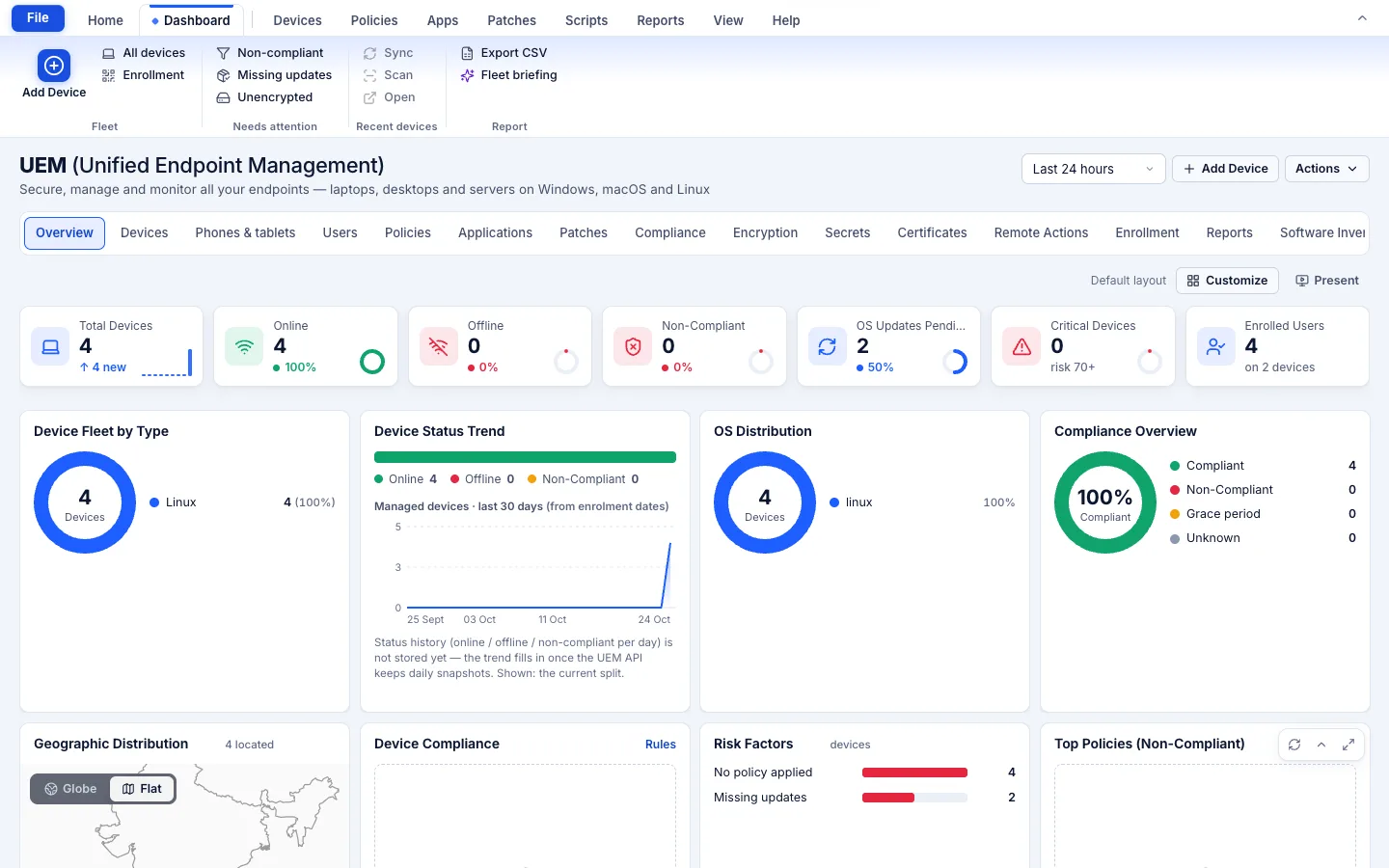
In the console
Deployment options
Cloud (SaaS)AvailableRun by TotalHeal in an India region: nothing to host, updates delivered by us.
On-premisesAvailableDelivered with our team from the on-premises kit.
Air-gappedAvailableAndroid works over the local network; iPhone and iPad management uses Apple Push.
System requirements
Protected platforms
- Windows10 / 11 (x64)
- macOS11 and later
- Linux desktop.deb, AppImage
- iPhone, iPadApple MDM
- Android8.0 and later
Works with
- Apple Business Manager
On-premises server
- Operating system
- RHEL, Rocky Linux or AlmaLinux 8 / 9; Ubuntu 20.04, 22.04 or 24.04; Debian 11 / 12
- Processor
- 4 vCPU (tested configuration)
- Memory
- 8 GB recommended (6 GB minimum)
- Disk
- 10 GB free for software, releases and backups, plus data
- Sign-in
- Active Directory / LDAP, SAML 2.0 or OpenID Connect
- Software
- Nothing to pre-install: no container runtime, database, web server or Java
Network and access
- HTTPS from devices to the TotalHeal cloud
- Apple Push certificate for iPhone/iPad
- Android: a factory-reset device for device-owner modes
- A Sttiz account for each console user
Alerts and tickets to
- Splunk
- Microsoft Sentinel
- Elastic
- Syslog / CEF
- Jira
- ServiceNow
- Slack
- Microsoft Teams
Technical specifications
| Features | Included | |
|---|---|---|
| Enrolment your way | Included | |
| Hardware and software inventory | Included | |
| Signed configuration policies | Included | |
| Compliance rules | Included | |
| Apps and updates | Included | |
| Remote actions with a second approver | Included | |
| Recovery-key escrow | Included | |
| iPhone, iPad and Android | Included | |
| Reports and a tamper-evident trail | Included | |
| Availability by edition | Business | Enterprise |
| Enrolment, inventory, policies, apps, compliance rules, remote actions, scripts, Apple MDM, Android, reports | Included | Included |
| ADE at scale, recovery-key escrow, multi-site, four-eyes policy change | Planned for Enterprise | Included |
| Windows Autopilot | Roadmap | Roadmap |
| Platforms and coverage | ||
| macOS 11 and later | TotalHeal desktop agent | |
| Windows 10 and 11 (x64) | TotalHeal desktop agent | |
| Linux desktop (.deb, AppImage) | TotalHeal desktop agent — a few actions are macOS/Windows only | |
| iPhone and iPad | Apple MDM — needs your Apple Push certificate; ADE needs Apple Business or School Manager | |
| Android 8.0 and later | TotalHeal Device Manager, provisioned by QR code or NFC | |
| Deployment options | ||
| SaaS (TotalHeal cloud, India region) | Available | |
| On-premises | AvailableDelivered with our team from the on-premises kit. | |
| Air-gapped | AvailableAndroid works over the local network; iPhone and iPad management uses Apple Push. | |
| Licensing | ||
| Priced per | Managed device per year | |
| Counted | Active enrolled devices: desktops, Apple MDM and Android devices | |
| Trial | 30 days, up to 25 devices | |
| Editions | The Business/Enterprise split is the commercial plan; until it is enforced, both tiers get the full product. | |
| Government profile | Government is a profile, not a separate tier or price list: the Elite tier with Government defaults switched on — data residency in India, four-eyes approval of policy changes, a distinct approver for every approval-level action, retention of at least 180 days, and the CERT-In and DPDP reporting clocks. | |
| Procurement dossier | Compliance matrix, bill of materials, architecture and hardening, SLA and OEM authorisation letter, on request | |
| On-premises server | ||
| Operating system | RHEL, Rocky Linux or AlmaLinux 8 / 9; Ubuntu 20.04, 22.04 or 24.04; Debian 11 / 12 | |
| Processor | 4 vCPU (tested configuration) | |
| Memory | 8 GB recommended (6 GB minimum) | |
| Disk | 10 GB free for software, releases and backups, plus data | |
| Sign-in | Active Directory / LDAP, SAML 2.0 or OpenID Connect | |
| Software | Nothing to pre-install: no container runtime, database, web server or Java | |
| Requirements | ||
| Requirement 1 | HTTPS from devices to the TotalHeal cloud | |
| Requirement 2 | Apple Push certificate for iPhone/iPad | |
| Requirement 3 | Android: a factory-reset device for device-owner modes | |
| Requirement 4 | A Sttiz account for each console user | |