Backup & Cyber Recovery
Backups that ransomware cannot read, swap or quietly poison
Encrypted, incremental backup of Linux servers and their databases, with verified restore points and ransomware detection in every backup.
Contents
- 1Executive summary
- 2The challenge
- 3Architecture
- 4How it works
- 5Capabilities in detail
- 6Security and data handling
- 7Where it fits
- 8Deployment and system requirements
- 9Technical specifications
- 10Getting started
1Executive summary
RecoveryVault treats the backup as the target it now is. Data is encrypted on the server before it leaves, every restore point is scored for ransomware as it is taken, and nothing is restored to another place without a second person. The result is a restore point you can trust on the worst day, not only a copy of the files.
2The challenge
Ransomware now goes after backups first: it deletes them, encrypts them or waits until the bad files are in every copy. Many organisations find out during the incident that their last good backup is weeks old, unreadable or reachable with the same stolen administrator password.
The TotalHeal approach. RecoveryVault encrypts on the server before anything leaves it, keeps incremental, deduplicated restore points on your storage or ours, scores every backup for ransomware, and restores only through approved, audited jobs.
3Architecture
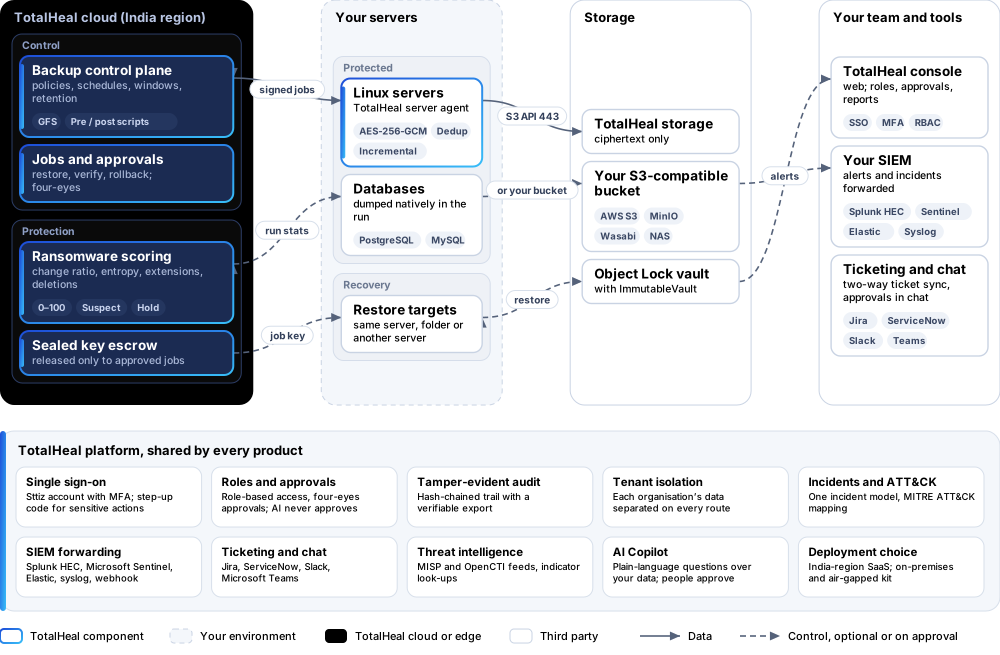
4How it works
- ProtectSwitch backup on for a server and attach a policy: what to back up, databases, schedule, window and retention.
- Back upThe agent chunks changed data, encrypts it and uploads it straight to storage; the restore point is committed only when every object is confirmed.
- ScoreEach run is scored 0–100 for ransomware; a suspect point opens an incident and the last good point is held.
- VerifyVerification jobs read restore points back on a schedule, so you know they restore before you need them.
- RestorePick a point and a target; restores to another server wait for a second person, and nothing on the target is deleted.
5Capabilities in detail
- Encrypted before it leavesAES-256-GCM on the server with keys derived from that server’s own root key. Storage and TotalHeal see only ciphertext, and every stored object is bound to its identity, so a swapped object is refused.
- Incremental and deduplicatedContent-defined chunking sends only what changed: one edit inside a 6 MiB file uploaded less than 3 MiB in our end-to-end test. Identical blocks are stored once.
- Databases, nativelyPostgreSQL and MySQL dumped by their own tools inside the backup run, with pre- and post-backup scripts for anything else that must be quiesced.
- Schedules, windows and retentionPer-policy schedules and backup windows, and grandfather-father-son retention: daily, weekly, monthly and yearly points kept as long as you set.
- Your storage or oursTotalHeal storage, or your own S3-compatible bucket (AWS S3, MinIO, Wasabi or a NAS with an S3 interface). Backup data goes straight from the server to storage.
- Ransomware score on every backupChange ratio, entropy jumps on normally compressible files, new extensions and deletions give a 0–100 score. At your threshold the point is marked suspect, an incident opens and the last good point is held.
- Restores that never destroy dataRestore to the same server, a folder or another server. Files are written through temporary copies, verified against their checksum, and replaced files are moved aside, never deleted.
- Four-eyes recoveryRestores to another server and rollbacks wait for a second person; the requester can never approve their own job. Every key release and job is in the tamper-evident audit.
- VerificationScheduled and on-demand verification jobs read restore points back and check them, so a backup is known to be restorable before it is needed.
- A lost server can be rebuiltEach server’s root key is escrowed sealed, and released only to the same server or to the agent running an approved restore job, sealed to that job’s one-time key.
6Security and data handling
- Only ciphertext leaves the serverStorage and TotalHeal never see backup content; objects are bound to their identity, so a swapped object is detected.
- Keys are released only to approved workA server’s key goes back to that server, or to the agent running an approved restore job, sealed to that job and audited.
- Restores never destroy dataReplaced files are moved aside, never deleted, and every restored file is checked against its checksum.
- A person, not a script, approvesCross-server restores and rollbacks need a second person; AI never approves.
- Never held hostageWithout a licence, a server that has data stays restore-only: you can always get your data back.
7Where it fits
8Deployment and system requirements
Protected platforms
- Ubuntu20.04, 22.04, 24.04
- Debian11, 12
- Red Hat Enterprise Linux8, 9
- Rocky Linux8, 9
- AlmaLinux8, 9
- PostgreSQL
- MySQL
Works with
- AWS S3
- MinIO
- Wasabi
On-premises server
- Operating system
- RHEL, Rocky Linux or AlmaLinux 8 / 9; Ubuntu 20.04, 22.04 or 24.04; Debian 11 / 12
- Processor
- 4 vCPU (tested configuration)
- Memory
- 8 GB recommended (6 GB minimum)
- Disk
- 10 GB free for software, releases and backups, plus data
- Sign-in
- Active Directory / LDAP, SAML 2.0 or OpenID Connect
- Software
- Nothing to pre-install: no container runtime, database, web server or Java
Network and access
- The TotalHeal server agent on each Linux server, with backup switched on
- Storage: TotalHeal’s, or an S3-compatible bucket you own
- Outbound HTTPS from each server to the TotalHeal cloud and to the storage
Alerts and tickets to
- Splunk
- Microsoft Sentinel
- Elastic
- Syslog / CEF
- Jira
- ServiceNow
- Slack
- Microsoft Teams
9Technical specifications
| Features | Included | |
|---|---|---|
| Encrypted before it leaves | Included | |
| Incremental and deduplicated | Included | |
| Databases, natively | Included | |
| Schedules, windows and retention | Included | |
| Your storage or ours | Included | |
| Ransomware score on every backup | Included | |
| Restores that never destroy data | Included | |
| Four-eyes recovery | Included | |
| Verification | Included | |
| A lost server can be rebuilt | Included | |
| Availability by edition | Business | Enterprise |
| Encrypted incremental backup, databases, schedules, retention, ransomware score, restores, four-eyes approval, verification, audit | Included | Included |
| Immutable copies (ImmutableVault), clean recovery (CyberRecover), DR plans and drills (DisasterRecover) | Separate products | Separate products |
| Platforms and coverage | ||
| Linux servers: Debian, Ubuntu, RHEL, AlmaLinux, Rocky | TotalHeal server agent (signed .deb and .rpm packages) | |
| Databases | PostgreSQL and MySQL, dumped natively | |
| Storage | TotalHeal storage, or any S3-compatible bucket: AWS S3, MinIO, Wasabi, S3-capable NAS | |
| Console | TotalHeal web console | |
| Deployment options | ||
| SaaS control plane (India region) with TotalHeal storage | AvailableSingle-region service. | |
| SaaS control plane with your own S3 storage | AvailableBackup data goes from your servers straight to your bucket. | |
| On-premises control plane | AvailableDelivered with our team from the on-premises kit. | |
| Air-gapped | AvailableWith storage inside your network. | |
| Licensing | ||
| Priced per | Protected terabyte per year | |
| Counted | Data selected for backup, in terabytes; the counting rule is set in the quote until list prices are published | |
| Trial | 30 days | |
| Editions | RecoveryVault is sold on its own, outside the editions; there is no Business/Enterprise split. | |
| Government profile | Government is a profile, not a separate tier or price list: the Elite tier with Government defaults switched on — data residency in India, four-eyes approval of policy changes, a distinct approver for every approval-level action, retention of at least 180 days, and the CERT-In and DPDP reporting clocks. | |
| Procurement dossier | Compliance matrix, bill of materials, architecture and hardening, SLA and OEM authorisation letter, on request | |
| On-premises server | ||
| Operating system | RHEL, Rocky Linux or AlmaLinux 8 / 9; Ubuntu 20.04, 22.04 or 24.04; Debian 11 / 12 | |
| Processor | 4 vCPU (tested configuration) | |
| Memory | 8 GB recommended (6 GB minimum) | |
| Disk | 10 GB free for software, releases and backups, plus data | |
| Sign-in | Active Directory / LDAP, SAML 2.0 or OpenID Connect | |
| Software | Nothing to pre-install: no container runtime, database, web server or Java | |
| Requirements | ||
| Requirement 1 | The TotalHeal server agent on each Linux server, with backup switched on | |
| Requirement 2 | Storage: TotalHeal’s, or an S3-compatible bucket you own | |
| Requirement 3 | Outbound HTTPS from each server to the TotalHeal cloud and to the storage | |
10Getting started
- The TotalHeal server agent on each Linux server, with backup switched on
- Storage: TotalHeal’s, or an S3-compatible bucket you own
- Outbound HTTPS from each server to the TotalHeal cloud and to the storage
Start a 30 days trial in the TotalHeal console with a Sttiz account. For a quote, an on-premises installation or the procurement dossier (compliance matrix, bill of materials, architecture and hardening, SLA, OEM authorisation letter), write to business@totalhealsecurity.com.