Cloud Security Posture Management (CSPM)
Finding cloud misconfigurations without handing out a single key
Find risky settings in your AWS, Azure and Google Cloud accounts — connected without keys.
Contents
- 1Executive summary
- 2The challenge
- 3Architecture
- 4How it works
- 5Capabilities in detail
- 6Security and data handling
- 7Where it fits
- 8Deployment and system requirements
- 9Technical specifications
- 10Getting started
1Executive summary
CloudPosture connects to AWS, Azure and Google Cloud through read-only trust created by a one-line installer in the cloud’s own shell — no access key or secret is ever created — and checks each account for the misconfigurations behind most cloud breaches.
2The challenge
Public storage buckets, administrators without MFA and roles anyone can assume are the commonest cloud breaches, and most security tools want a long-lived access key to look for them — one more secret to leak.
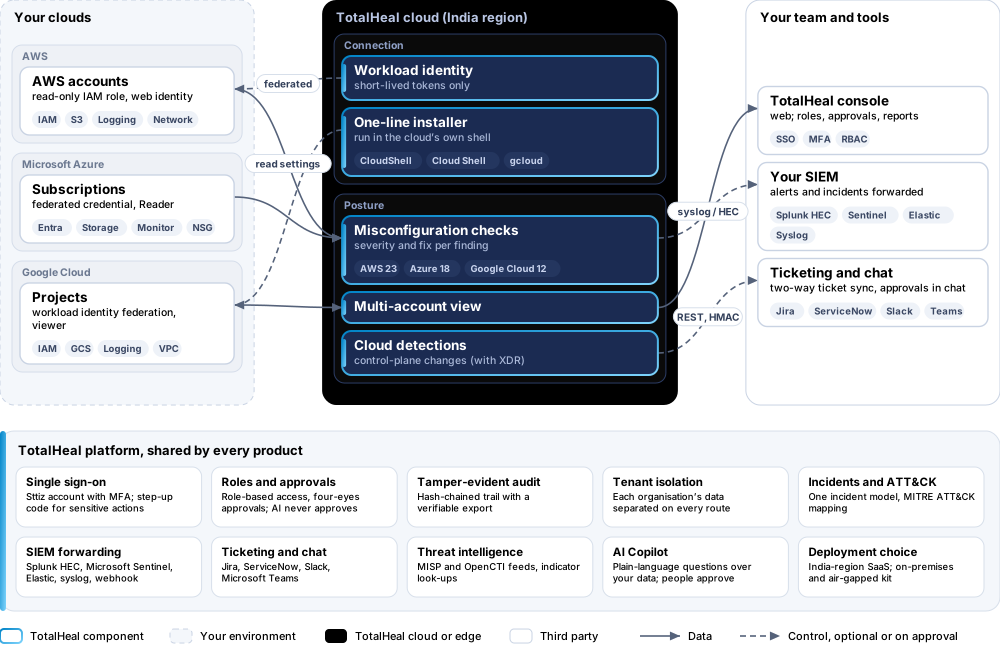
The TotalHeal approach. CloudPosture connects to each cloud account without keys: a one-line installer in the cloud’s own shell makes the account trust TotalHeal, read-only. It then checks the account’s settings and lists what is risky, account by account.
3Architecture
4How it works
- ConnectRun the one-line installer in the cloud’s own shell.
- CheckIdentity, storage, logging and network settings are checked.
- PrioritiseFindings per account with severity and the fix.
5Capabilities in detail
- Keyless connectionFor AWS, Azure and Google Cloud a one-line installer run in the cloud’s own shell creates a read-only trust for TotalHeal. No access key, secret or key file is created or stored.
- Misconfiguration checksChecks across identity, storage, logging and network settings — 23 for AWS, 18 for Azure and 12 for Google Cloud — such as public buckets, console users without MFA, old access keys and roles any account can assume.
- Per account and across accountsFindings per account with severity and how to fix them, and a multi-account view.
- Cloud detectionsCloud audit-log rules for control-plane changes join incidents when ThreatFusion XDR is present.
6Security and data handling
- No keysNo access key, secret or key file is created or stored.
- Read-onlyTotalHeal can read settings, never change them.
- Short-lived accessEach check uses short-lived federated tokens.
7Where it fits
8Deployment and system requirements
Protected platforms
- AWS
- Microsoft Azure
- Google Cloud
On-premises server
- Operating system
- RHEL, Rocky Linux or AlmaLinux 8 / 9; Ubuntu 20.04, 22.04 or 24.04; Debian 11 / 12
- Processor
- 4 vCPU (tested configuration)
- Memory
- 8 GB recommended (6 GB minimum)
- Disk
- 10 GB free for software, releases and backups, plus data
- Sign-in
- Active Directory / LDAP, SAML 2.0 or OpenID Connect
- Software
- Nothing to pre-install: no container runtime, database, web server or Java
Network and access
- Someone who may create a read-only role or federation in each cloud account
Alerts and tickets to
- Splunk
- Microsoft Sentinel
- Elastic
- Syslog / CEF
- Jira
- ServiceNow
- Slack
- Microsoft Teams
9Technical specifications
| Features | Included | |
|---|---|---|
| Keyless connection | Included | |
| Misconfiguration checks | Included | |
| Per account and across accounts | Included | |
| Cloud detections | Included | |
| Availability by edition | Business | Enterprise |
| Keyless connection, misconfiguration checks, multi-account view | Included | Included |
| Platforms and coverage | ||
| Amazon Web Services | Read-only role trusted by TotalHeal | |
| Microsoft Azure | Read-only access through workload identity federation | |
| Google Cloud | Read-only access through workload identity federation | |
| Console | TotalHeal web console | |
| Deployment options | ||
| SaaS (India region) | AvailableSingle-region service. | |
| On-premises control plane | AvailableDelivered with our team from the on-premises kit. | |
| Air-gapped | AvailableOffline kit, offline licence file and offline update bundles. | |
| Licensing | ||
| Priced per | Cloud account per year | |
| Counted | Connected cloud accounts, subscriptions or projects | |
| Trial | 30 days | |
| Editions | No Business/Enterprise split is set for CloudPosture yet. | |
| Government profile | Government is a profile, not a separate tier or price list: the Elite tier with Government defaults switched on — data residency in India, four-eyes approval of policy changes, a distinct approver for every approval-level action, retention of at least 180 days, and the CERT-In and DPDP reporting clocks. | |
| Procurement dossier | Compliance matrix, bill of materials, architecture and hardening, SLA and OEM authorisation letter, on request | |
| On-premises server | ||
| Operating system | RHEL, Rocky Linux or AlmaLinux 8 / 9; Ubuntu 20.04, 22.04 or 24.04; Debian 11 / 12 | |
| Processor | 4 vCPU (tested configuration) | |
| Memory | 8 GB recommended (6 GB minimum) | |
| Disk | 10 GB free for software, releases and backups, plus data | |
| Sign-in | Active Directory / LDAP, SAML 2.0 or OpenID Connect | |
| Software | Nothing to pre-install: no container runtime, database, web server or Java | |
| Requirements | ||
| Requirement 1 | Someone who may create a read-only role or federation in each cloud account | |
10Getting started
- Someone who may create a read-only role or federation in each cloud account
Start a 30 days trial in the TotalHeal console with a Sttiz account. For a quote, an on-premises installation or the procurement dossier (compliance matrix, bill of materials, architecture and hardening, SLA, OEM authorisation letter), write to business@totalhealsecurity.com.