Digital Forensics & Triage
Triage evidence collected in minutes, with a chain of custody
Collect triage evidence from an endpoint or server during an investigation, with chain of custody.
Contents
- 1Executive summary
- 2The challenge
- 3Architecture
- 4How it works
- 5Capabilities in detail
- 6Security and data handling
- 7Where it fits
- 8Deployment and system requirements
- 9Technical specifications
- 10Getting started
1Executive summary
EvidenceLens collects a volatile-state snapshot — running programs, connections, startup items — from an endpoint or server on a signed command, shows the collection to the person at the device, and keeps it with a chain of custody.
2The challenge
During an incident the first questions are what was running, what was connected and what starts at boot — and the answers vanish when a machine is rebooted or cleaned. Evidence collected ad hoc, by hand, is hard to defend later.
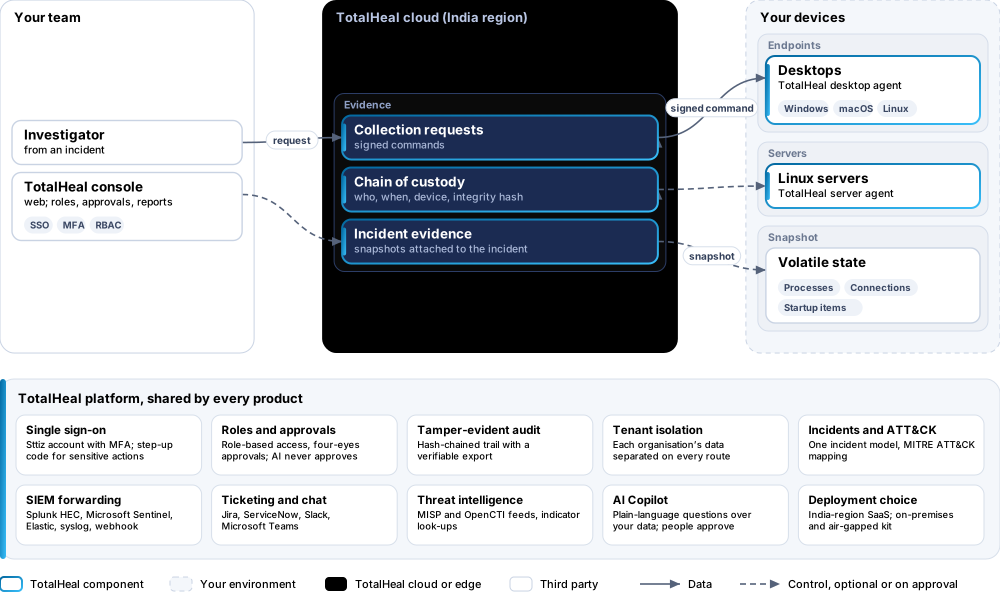
The TotalHeal approach. EvidenceLens takes a volatile-state snapshot from an endpoint or server on a signed command from the console, shows the collection to the person at the device, and keeps the evidence with a chain of custody.
3Architecture
4How it works
- RequestAn investigator asks for a snapshot from an incident.
- CollectThe agent captures processes, connections and startup items.
- RecordCustody details and the integrity hash are recorded.
5Capabilities in detail
- Volatile-state snapshotRunning programs, network connections and startup items from the moment of collection — no file contents.
- Only on a signed commandCollection starts only from a signed command issued in the console, and is shown to the person at the device.
- Chain of custodyEach collection is recorded with who asked, when, from which device and its integrity hash.
- Part of the investigationSnapshots attach to the incident they were taken for, next to the alerts and timeline.
6Security and data handling
- Only on signed commandNo collection starts without a signed console command.
- Visible to the personThe collection is shown at the device.
- No file contentsSnapshots hold lists, not files.
7Where it fits
8Deployment and system requirements
Protected platforms
- Windows10 / 11 (x64)
- macOS11 and later
- Linux desktop.deb, AppImage
- Linux serversx86_64, aarch64, systemd
On-premises server
- Operating system
- RHEL, Rocky Linux or AlmaLinux 8 / 9; Ubuntu 20.04, 22.04 or 24.04; Debian 11 / 12
- Processor
- 4 vCPU (tested configuration)
- Memory
- 8 GB recommended (6 GB minimum)
- Disk
- 10 GB free for software, releases and backups, plus data
- Sign-in
- Active Directory / LDAP, SAML 2.0 or OpenID Connect
- Software
- Nothing to pre-install: no container runtime, database, web server or Java
Network and access
- A TotalHeal agent on the endpoint or server (any TotalHeal agent licence)
- An EvidenceLens licence
Alerts and tickets to
- Splunk
- Microsoft Sentinel
- Elastic
- Syslog / CEF
- Jira
- ServiceNow
- Slack
- Microsoft Teams
9Technical specifications
| Features | Included | |
|---|---|---|
| Volatile-state snapshot | Included | |
| Only on a signed command | Included | |
| Chain of custody | Included | |
| Part of the investigation | Included | |
| Availability by edition | Business | Enterprise |
| Triage snapshots on signed command, chain of custody | Included | Included |
| Disk and memory acquisition | — | Roadmap |
| Platforms and coverage | ||
| Windows, macOS, Linux desktops | TotalHeal desktop agent | |
| Linux servers | TotalHeal server agent | |
| Console | TotalHeal web console | |
| Deployment options | ||
| SaaS (India region) | AvailableSingle-region service. | |
| On-premises control plane | AvailableDelivered with our team from the on-premises kit. | |
| Air-gapped | AvailableOffline kit, offline licence file and offline update bundles. | |
| Licensing | ||
| Priced per | Endpoint per year | |
| Counted | Devices that can be collected from | |
| Trial | 30 days | |
| Government profile | Government is a profile, not a separate tier or price list: the Elite tier with Government defaults switched on — data residency in India, four-eyes approval of policy changes, a distinct approver for every approval-level action, retention of at least 180 days, and the CERT-In and DPDP reporting clocks. | |
| Procurement dossier | Compliance matrix, bill of materials, architecture and hardening, SLA and OEM authorisation letter, on request | |
| On-premises server | ||
| Operating system | RHEL, Rocky Linux or AlmaLinux 8 / 9; Ubuntu 20.04, 22.04 or 24.04; Debian 11 / 12 | |
| Processor | 4 vCPU (tested configuration) | |
| Memory | 8 GB recommended (6 GB minimum) | |
| Disk | 10 GB free for software, releases and backups, plus data | |
| Sign-in | Active Directory / LDAP, SAML 2.0 or OpenID Connect | |
| Software | Nothing to pre-install: no container runtime, database, web server or Java | |
| Requirements | ||
| Requirement 1 | A TotalHeal agent on the endpoint or server (any TotalHeal agent licence) | |
| Requirement 2 | An EvidenceLens licence | |
10Getting started
- A TotalHeal agent on the endpoint or server (any TotalHeal agent licence)
- An EvidenceLens licence
Start a 30 days trial in the TotalHeal console with a Sttiz account. For a quote, an on-premises installation or the procurement dossier (compliance matrix, bill of materials, architecture and hardening, SLA, OEM authorisation letter), write to business@totalhealsecurity.com.