Network Access Control (NAC)
Only known, healthy devices on your network — and a compromised one off it in seconds
Decides which devices join your wired and wireless network and in which VLAN — by device certificate, health and policy — and moves a compromised device to quarantine the moment the SOC acts.
Contents
- 1Executive summary
- 2The challenge
- 3Architecture
- 4How it works
- 5Capabilities in detail
- 6Security and data handling
- 7Where it fits
- 8Deployment and system requirements
- 9Technical specifications
- 10Getting started
1Executive summary
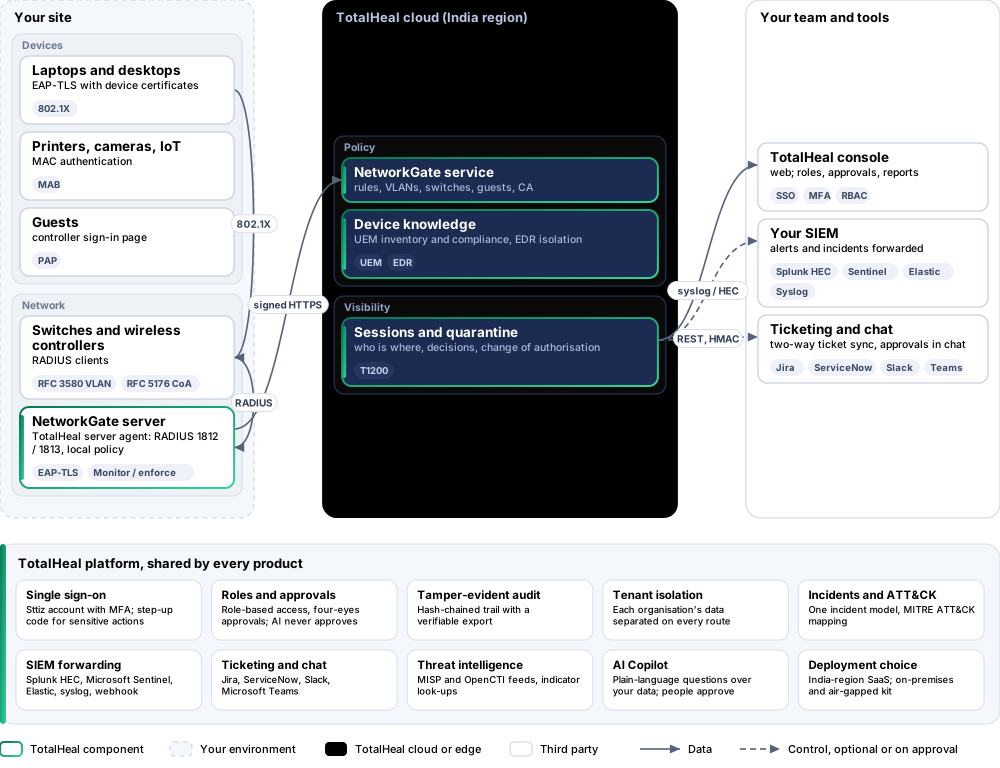
NetworkGate runs a RADIUS server of its own at each site. Switches and wireless controllers ask it about every device; it admits managed devices by certificate and UEM compliance, registered printers and cameras by MAC, guests by sponsored account, refuses the rest, and moves a device to the quarantine VLAN the moment the SOC acts.
2The challenge
Anyone who plugs into a meeting-room port or learns the Wi-Fi password is on the same network as finance and the plant. Laptops that have stopped patching, printers and cameras that can never run an agent, contractors and guests all share it, and when a laptop is compromised the network keeps carrying its traffic until someone walks to the switch.
The TotalHeal approach. NetworkGate runs a RADIUS server of its own at each site in the TotalHeal server agent. Switches and wireless controllers ask it about every device: managed laptops sign in with certificates and are admitted by their UEM compliance, printers and cameras are admitted by registration, guests by sponsored accounts, and everything else is refused — with each decision, port and VLAN visible in the console. Quarantine from an incident moves the device at once.
3Architecture
4How it works
- ConnectTurn on NetworkGate in the server agent at the site and add your switches and controllers.
- MonitorEvery device is admitted unchanged while NetworkGate records what enforcement would do.
- RegisterRegister the printers, cameras and IoT it found; give guests sponsored accounts.
- EnforceDevices land in their VLANs by certificate, compliance and policy; unknown devices are refused.
- ContainQuarantine from an incident disconnects the device at its switch into the quarantine VLAN.
5Capabilities in detail
- 802.1X with device certificatesEAP-TLS over RADIUS: the device presents a certificate from your enterprise authority or the TotalHeal NetworkGate authority; revoked serials are refused; the certificate names identify the managed device. MS-MPPE keys are returned for WPA2 / WPA3-Enterprise Wi-Fi.
- Devices TotalHeal already knowsManaged laptops and desktops are recognised from TotalHeal UEM inventory (every Ethernet and Wi-Fi MAC address) and admitted by their compliance with your device policy: compliant, in grace, not compliant.
- MAC authentication for what cannot do 802.1XPrinters, cameras, phones and IoT are admitted by registration (name, group, VLAN); an unknown MAC is refused and raises an alert (MITRE ATT&CK T1200 Hardware Additions).
- GuestsSponsored guest accounts with an expiry for the controller’s guest sign-in page (PAP); the password is shown once and stored only as a salted hash.
- VLANs by policyOrdered rules over how the device signed in, what it is (managed, registered, guest, unknown), its compliance, quarantine, registered group, MAC vendor, site and SSID — allow, quarantine VLAN, guest VLAN or refuse — sent to the switch as RFC 3580 VLAN attributes. Rules are edited in the console, never as JSON.
- Monitor before you enforceMonitor mode admits every device unchanged and records what enforcement would do, so refused devices can be registered before anyone is locked out.
- Quarantine that takes effect nowQuarantining a device from the console or a playbook sends a RADIUS change of authorisation (RFC 5176) to the switch it is on; it re-authenticates straight into the quarantine VLAN. A device isolated by an EDR response, and optionally one with an open critical alert, is quarantined too.
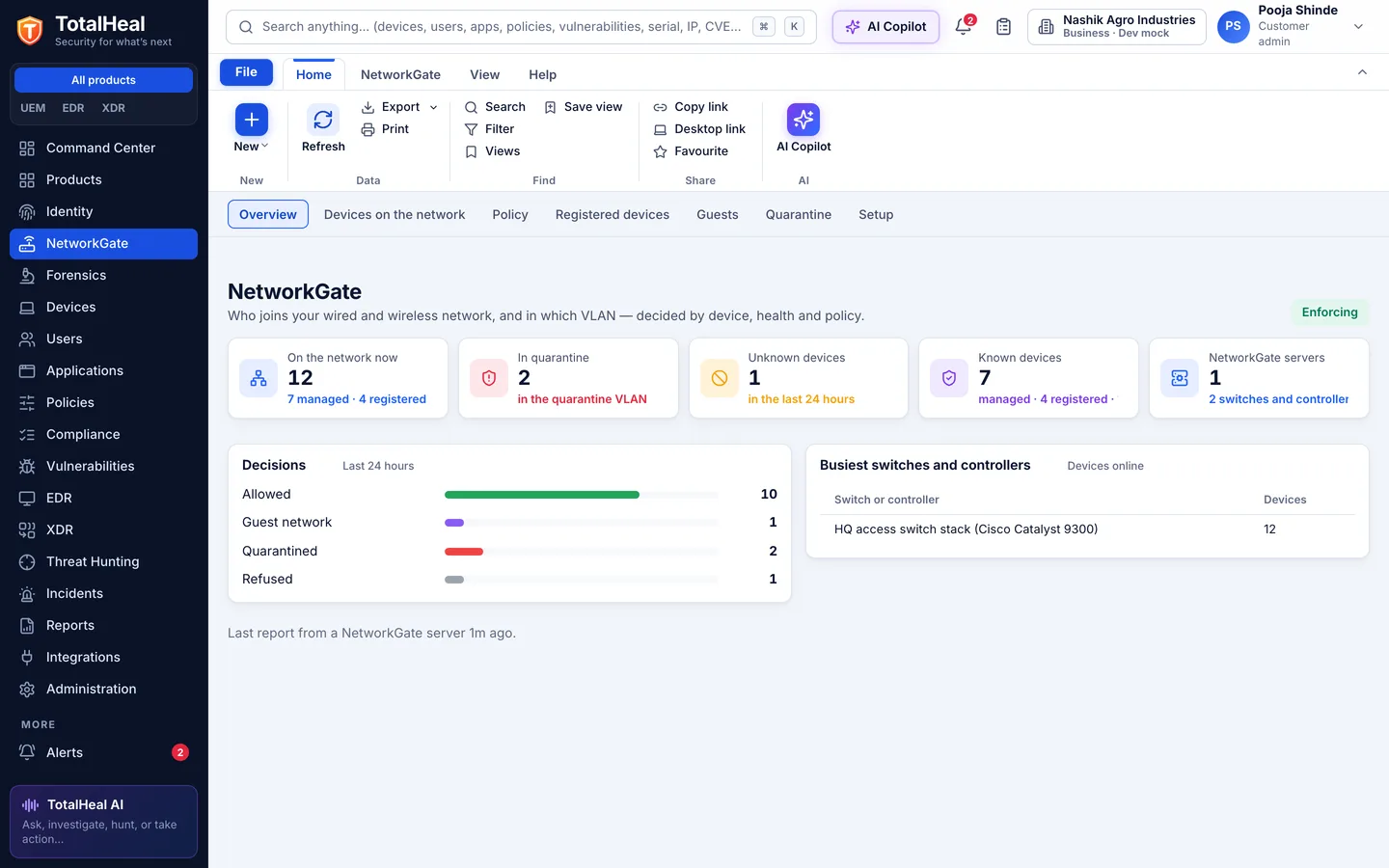
- Who is whereEvery device that asked: managed device or registration, switch, port, SSID, IP address from accounting, VLAN, rule and reason, online or offline, with its history of decisions and sessions.
- Runs at your siteThe RADIUS server runs in the TotalHeal server agent on a Linux server at each site, keeps its last policy on disk and keeps answering if the internet link to the cloud is down. Its EAP-TLS key never leaves it; its certificate is issued from its own signing request.
- Switch secrets handled carefullyEach switch or controller gets a generated shared secret, shown once, sealed at rest, delivered only to your NetworkGate servers and rotated in one click; requests from unknown addresses or with a wrong secret are dropped.
- Alerts in the same incident queueUnknown devices and quarantines join endpoint, identity and cloud alerts, and go on to your SIEM, ticketing and playbooks.
6Security and data handling
- Authentication stays localThe RADIUS server runs at your site and keeps its last policy: a cloud outage does not lock people out.
- Keys stay where they belongEach server’s EAP-TLS key never leaves it; switch secrets are shown once and sealed at rest; guest passwords are kept only as hashes.
- Nothing changes before you enforceMonitor mode admits every device unchanged while showing what enforcement would do.
- Every decision explainedEach device shows the rule, the reason, the switch, the port and the VLAN.
7Where it fits
8Deployment and system requirements
Protected platforms
- Ubuntu20.04, 22.04, 24.04
- Debian11, 12
- Red Hat Enterprise Linux8, 9
- Rocky Linux8, 9
- AlmaLinux8, 9
- RADIUS switches and controllersRFC 2865, 3580, 5176
On-premises server
- Operating system
- RHEL, Rocky Linux or AlmaLinux 8 / 9; Ubuntu 20.04, 22.04 or 24.04; Debian 11 / 12
- Processor
- 4 vCPU (tested configuration)
- Memory
- 8 GB recommended (6 GB minimum)
- Disk
- 10 GB free for software, releases and backups, plus data
- Sign-in
- Active Directory / LDAP, SAML 2.0 or OpenID Connect
- Software
- Nothing to pre-install: no container runtime, database, web server or Java
Network and access
- A Linux server at each site running the TotalHeal server agent with networkgate.enabled, reachable from the switches on UDP 1812 / 1813
- Switches and controllers configured with NetworkGate as their RADIUS server (802.1X and / or MAC authentication), and change of authorisation allowed from it
- For 802.1X: device certificates from your enterprise authority or the NetworkGate authority (UEM can deliver profiles)
Alerts and tickets to
- Splunk
- Microsoft Sentinel
- Elastic
- Syslog / CEF
- Jira
- ServiceNow
- Slack
- Microsoft Teams
9Technical specifications
| Features | Included | ||
|---|---|---|---|
| 802.1X with device certificates | Included | ||
| Devices TotalHeal already knows | Included | ||
| MAC authentication for what cannot do 802.1X | Included | ||
| Guests | Included | ||
| VLANs by policy | Included | ||
| Monitor before you enforce | Included | ||
| Quarantine that takes effect now | Included | ||
| Who is where | Included | ||
| Runs at your site | Included | ||
| Switch secrets handled carefully | Included | ||
| Alerts in the same incident queue | Included | ||
| Availability by tier | Essential | Professional | Elite |
| RADIUS at each site in the TotalHeal server agent; managed devices recognised from UEM inventory; MAC authentication by registration | Included | Included | Included |
| VLAN policy rules, monitor mode, who-is-where sessions and events, alerts in the incident queue | Included | Included | Included |
| 802.1X EAP-TLS with device certificates from your authority or the NetworkGate CA | — | Included | Included |
| Sponsored guest access with expiry | — | Included | Included |
| Quarantine that takes effect now (RADIUS change of authorisation): by hand, on EDR isolation, on open critical alerts | — | — | Included |
| List price per endpoint per year | US$15 · ₹1,430 | US$24 · ₹2,280 | US$36 · ₹3,430 |
| Platforms and coverage | |||
| NetworkGate server | TotalHeal server agent on Ubuntu, Debian, RHEL, Rocky Linux or AlmaLinux at each site (networkgate.enabled); UDP 1812 / 1813 | ||
| Switches and wireless controllers | Any with RADIUS (RFC 2865 / 2866), 802.1X, MAC authentication and VLAN assignment (RFC 3580); change of authorisation needs RFC 5176 (UDP 3799) | ||
| Devices | EAP-TLS supplicants (Windows, macOS, Linux, iOS, Android) with a device certificate; MAC authentication for printers, cameras and IoT | ||
| Console | TotalHeal web console | ||
| Deployment options | |||
| SaaS (India region) | AvailablePolicy and visibility in the cloud; the RADIUS server at your site. | ||
| On-premises control plane | AvailableDelivered with our team from the on-premises kit. | ||
| Air-gapped | AvailableOffline kit, offline licence file and offline update bundles. | ||
| Licensing | |||
| Priced per | Endpoint per year | ||
| Counted | Devices admitted to the network in the billing period | ||
| Trial | 30 days, up to 50 endpoints | ||
| Editions | NetworkGate is sold on its own, outside the editions. | ||
| Government profile | Government is a profile, not a separate tier or price list: the Elite tier with Government defaults switched on — data residency in India, four-eyes approval of policy changes, a distinct approver for every approval-level action, retention of at least 180 days, and the CERT-In and DPDP reporting clocks. | ||
| Procurement dossier | Compliance matrix, bill of materials, architecture and hardening, SLA and OEM authorisation letter, on request | ||
| On-premises server | |||
| Operating system | RHEL, Rocky Linux or AlmaLinux 8 / 9; Ubuntu 20.04, 22.04 or 24.04; Debian 11 / 12 | ||
| Processor | 4 vCPU (tested configuration) | ||
| Memory | 8 GB recommended (6 GB minimum) | ||
| Disk | 10 GB free for software, releases and backups, plus data | ||
| Sign-in | Active Directory / LDAP, SAML 2.0 or OpenID Connect | ||
| Software | Nothing to pre-install: no container runtime, database, web server or Java | ||
| Requirements | |||
| Requirement 1 | A Linux server at each site running the TotalHeal server agent with networkgate.enabled, reachable from the switches on UDP 1812 / 1813 | ||
| Requirement 2 | Switches and controllers configured with NetworkGate as their RADIUS server (802.1X and / or MAC authentication), and change of authorisation allowed from it | ||
| Requirement 3 | For 802.1X: device certificates from your enterprise authority or the NetworkGate authority (UEM can deliver profiles) | ||
10Getting started
- A Linux server at each site running the TotalHeal server agent with networkgate.enabled, reachable from the switches on UDP 1812 / 1813
- Switches and controllers configured with NetworkGate as their RADIUS server (802.1X and / or MAC authentication), and change of authorisation allowed from it
- For 802.1X: device certificates from your enterprise authority or the NetworkGate authority (UEM can deliver profiles)
Start a 30 days, up to 50 endpoints trial in the TotalHeal console with a Sttiz account. For a quote, an on-premises installation or the procurement dossier (compliance matrix, bill of materials, architecture and hardening, SLA, OEM authorisation letter), write to business@totalhealsecurity.com.