Patch Management
Patching in waves, inside working rules, with proof afterwards
See what is missing on every computer and roll updates out in waves — with proof afterwards.
Contents
- 1Executive summary
- 2The challenge
- 3Architecture
- 4How it works
- 5Capabilities in detail
- 6Security and data handling
- 7Where it fits
- 8Deployment and system requirements
- 9Technical specifications
- 10Getting started
1Executive summary
PatchPilot shows what is missing on every computer, rolls updates out in rings with maintenance windows and approvals, and records every install as a signed, audited command — so patching is fast, predictable and provable.
2The challenge
Unpatched operating systems and applications are the commonest way in. IT teams need to see what is missing on every computer, roll updates out in waves (test group first), respect working hours and prove afterwards that it was done.
The TotalHeal approach. Missing-updates reports, patch rings, maintenance windows and approvals for Windows, macOS and Linux — every install a signed, audited command.
3Architecture
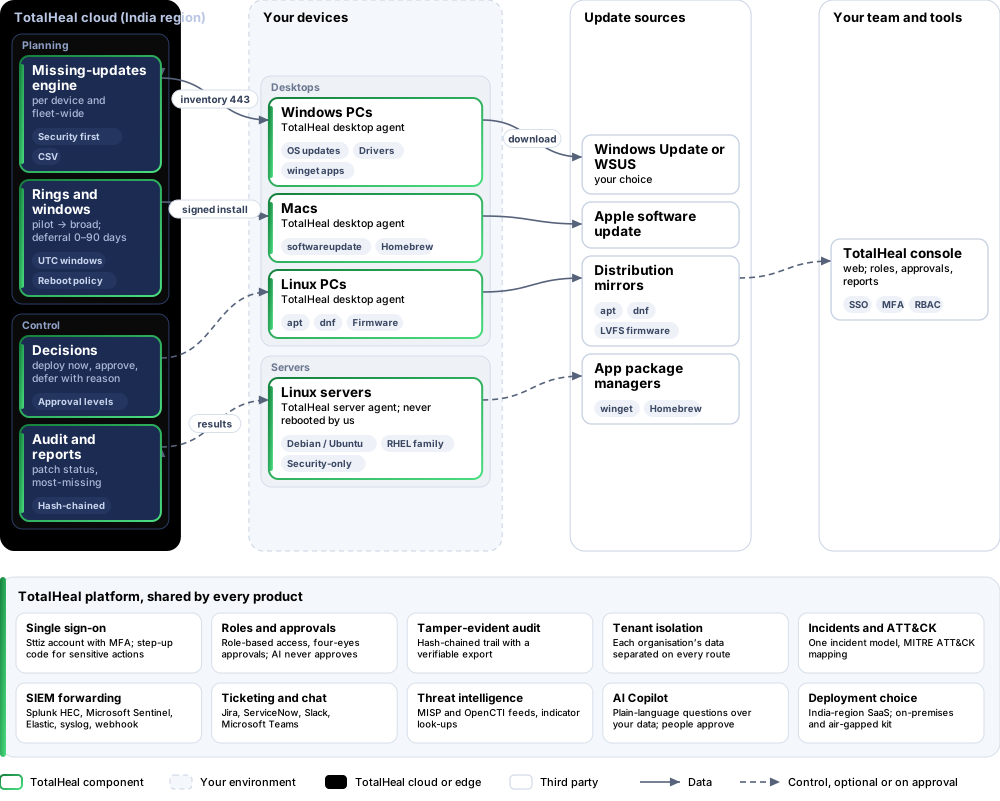
4How it works
- SeeMissing OS and application updates per device and fleet-wide, security updates first.
- PlanRings with deferral, target groups and a security-only option; maintenance windows and reboot policy.
- Roll outInstalls are queued when the deferral has passed and the window is open.
- DecideDeploy now with a reason, release early, or defer up to 90 days with a reason.
- ProvePatch status and most-missing reports, every install on the audit trail.
5Capabilities in detail
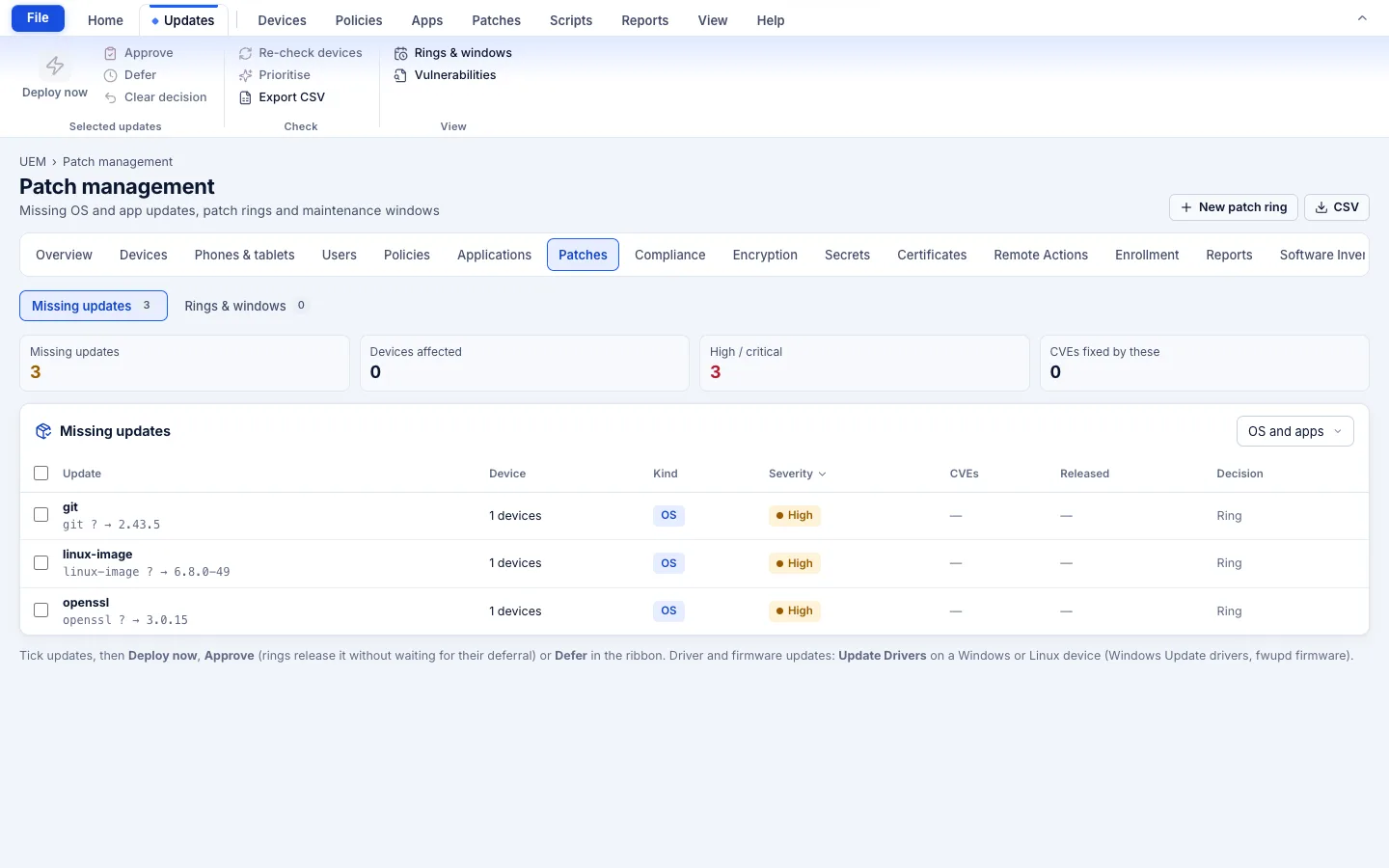
- Missing-updates reportFleet-wide and per device: OS and package updates, security updates flagged and sorted first, device counts per update, CSV export.
- Patch ringsPilot first, then broad: order, deferral of 0–90 days, target groups or devices, a security-only option.
- Maintenance windows and reboot policyDays, start time and 1–24 hour duration; reboot automatically in the window, ask the user, or never.
- Automatic ring deploymentInstalls are queued when the deferral has elapsed and the window is open, at most once per device per day.
- Deploy now, approve, deferDeploy selected updates with a mandatory reason, release one without waiting, or defer up to 90 days with a reason.
- Native installersWindows Update, macOS softwareupdate, and apt/dnf on Linux. Linux servers get security-only updates by default and are never rebooted by us.
- Drivers and firmwareWindows Update drivers and Linux firmware updates from the device page.
- Third-party appsUpdates through winget, Homebrew, apt and dnf for the apps in your organisation catalogue.
- Consent and proofEnd users can postpone a limited number of times (default 3). Every install goes through approval levels and the hash-chained audit; “Patch status” and “Most-missing updates” reports.
6Security and data handling
- Native installers onlyUpdates come from Windows Update, Apple and your distribution or package managers — never repackaged.
- Servers are not rebootedLinux servers get security-only updates by default and are never rebooted by TotalHeal.
- Every install is signed and auditedEach install is a signed command with an approval level and an audit entry.
7Where it fits
8Deployment and system requirements
Protected platforms
- Windows10 / 11 (x64)
- macOS11 and later
- Linux desktop.deb, AppImage
- Ubuntu20.04, 22.04, 24.04
- Debian11, 12
- Red Hat Enterprise Linux8, 9
- Rocky Linux8, 9
- AlmaLinux8, 9
On-premises server
- Operating system
- RHEL, Rocky Linux or AlmaLinux 8 / 9; Ubuntu 20.04, 22.04 or 24.04; Debian 11 / 12
- Processor
- 4 vCPU (tested configuration)
- Memory
- 8 GB recommended (6 GB minimum)
- Disk
- 10 GB free for software, releases and backups, plus data
- Sign-in
- Active Directory / LDAP, SAML 2.0 or OpenID Connect
- Software
- Nothing to pre-install: no container runtime, database, web server or Java
Network and access
- TotalHeal desktop agent or Linux server agent enrolled to your organisation
- Devices can reach their own update sources (Windows Update or WSUS, Apple, distribution mirrors)
- A TotalHeal DeviceSphere UEM entitlement (today)
Alerts and tickets to
- Splunk
- Microsoft Sentinel
- Elastic
- Syslog / CEF
- Jira
- ServiceNow
- Slack
- Microsoft Teams
9Technical specifications
| Features | Included | |
|---|---|---|
| Missing-updates report | Included | |
| Patch rings | Included | |
| Maintenance windows and reboot policy | Included | |
| Automatic ring deployment | Included | |
| Deploy now, approve, defer | Included | |
| Native installers | Included | |
| Drivers and firmware | Included | |
| Third-party apps | Included | |
| Consent and proof | Included | |
| Availability by edition | Business | Enterprise |
| Missing-updates report, deploy now, CSV | Included | Included |
| Rings, maintenance windows, reboot policy | Included today | Included |
| Approve / defer workflow | Included today | Included |
| Driver and firmware updates | Included today | Included |
| Platforms and coverage | ||
| Windows, macOS, Linux desktops | TotalHeal desktop agent | |
| Debian/Ubuntu and RHEL-family servers | TotalHeal Linux server agent | |
| iPhone, iPad, Android OS updates | Through TotalHeal DeviceSphere UEM, not this product | |
| Deployment options | ||
| SaaS (TotalHeal cloud, India region) | Available | |
| On-premises | AvailableDelivered with our team from the on-premises kit. | |
| Air-gapped | AvailableDevices update from your internal sources (WSUS or local mirrors). | |
| Licensing | ||
| Priced per | Managed device per year | |
| Counted | Devices with patching switched on | |
| Trial | 30 days | |
| Editions | The commercial plan moves rings, drivers/firmware and approval workflows to Enterprise later; the final split is still open. | |
| Government profile | Government is a profile, not a separate tier or price list: the Elite tier with Government defaults switched on — data residency in India, four-eyes approval of policy changes, a distinct approver for every approval-level action, retention of at least 180 days, and the CERT-In and DPDP reporting clocks. | |
| Procurement dossier | Compliance matrix, bill of materials, architecture and hardening, SLA and OEM authorisation letter, on request | |
| On-premises server | ||
| Operating system | RHEL, Rocky Linux or AlmaLinux 8 / 9; Ubuntu 20.04, 22.04 or 24.04; Debian 11 / 12 | |
| Processor | 4 vCPU (tested configuration) | |
| Memory | 8 GB recommended (6 GB minimum) | |
| Disk | 10 GB free for software, releases and backups, plus data | |
| Sign-in | Active Directory / LDAP, SAML 2.0 or OpenID Connect | |
| Software | Nothing to pre-install: no container runtime, database, web server or Java | |
| Requirements | ||
| Requirement 1 | TotalHeal desktop agent or Linux server agent enrolled to your organisation | |
| Requirement 2 | Devices can reach their own update sources (Windows Update or WSUS, Apple, distribution mirrors) | |
| Requirement 3 | A TotalHeal DeviceSphere UEM entitlement (today) | |
10Getting started
- TotalHeal desktop agent or Linux server agent enrolled to your organisation
- Devices can reach their own update sources (Windows Update or WSUS, Apple, distribution mirrors)
- A TotalHeal DeviceSphere UEM entitlement (today)
Start a 30 days trial in the TotalHeal console with a Sttiz account. For a quote, an on-premises installation or the procurement dossier (compliance matrix, bill of materials, architecture and hardening, SLA, OEM authorisation letter), write to business@totalhealsecurity.com.