Remote Access & Support
Remote support with consent, a second approver and a sealed recording
Consented, recorded remote support for Macs and Windows PCs, and audited shells on Linux servers.
Contents
- 1Executive summary
- 2The challenge
- 3Architecture
- 4How it works
- 5Capabilities in detail
- 6Security and data handling
- 7Where it fits
- 8Deployment and system requirements
- 9Technical specifications
- 10Getting started
1Executive summary
RemoteLink lets IT see and fix a Mac or Windows PC, or open a shell on a Linux server, without an open remote-desktop port or an unaudited third-party tool. The person at the device consents, a second approver can be required, and every session is recorded and sealed.
2The challenge
IT teams need to see and fix a user’s computer, or open a shell on a server, without a permanently open remote-desktop port or an unaudited third-party tool. Auditors want proof of who connected, why, with whose consent and what was done.
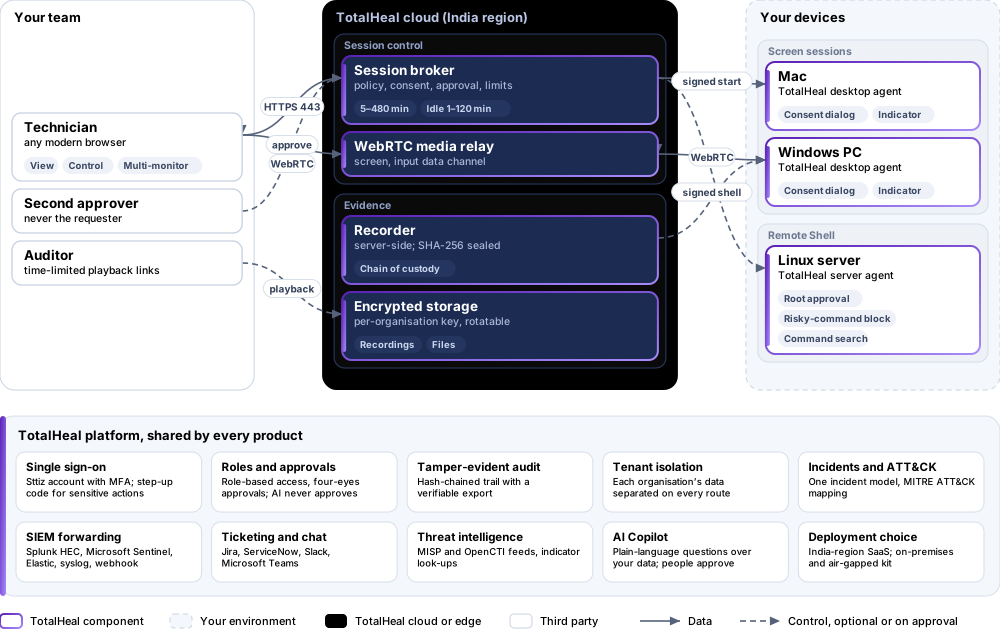
The TotalHeal approach. Screen view or full control from the web console, started only from a signed command over the device’s existing outbound channel — no inbound port on the device.
3Architecture
4How it works
- RequestA technician opens a session from the console with a reason.
- ApproveOptionally a second person approves; the requester never approves their own session.
- ConsentThe person at the device accepts in a native dialog; no answer in 60 seconds declines.
- WorkView or control, with an on-screen indicator and End session always visible.
- SealThe recording is sealed and encrypted, with time-limited playback for auditors.
5Capabilities in detail
- View or control from the browserScreen view or full control of an enrolled Mac or Windows PC from the web console.
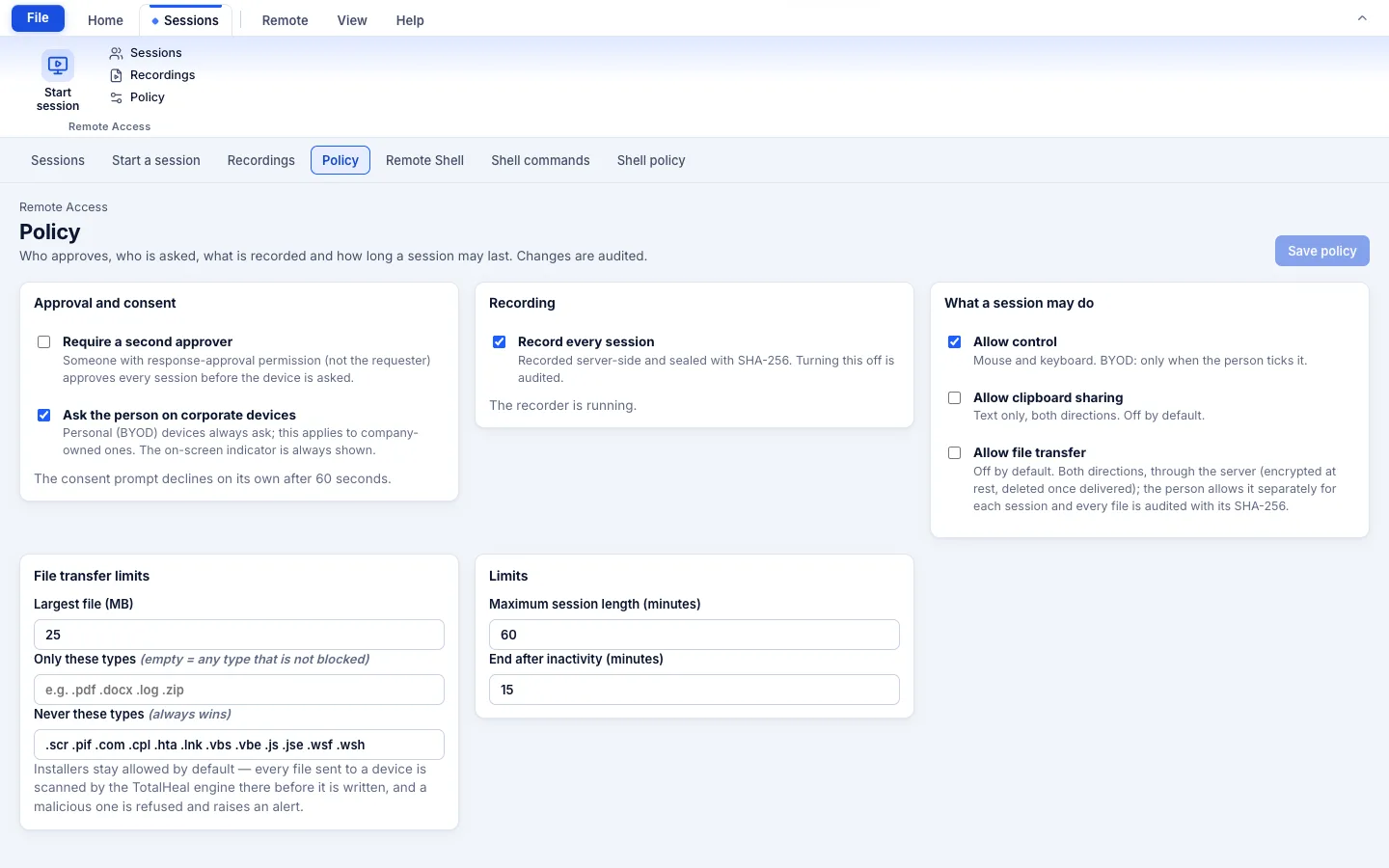
- Consent on the deviceA native consent dialog — always on personal devices, on corporate devices unless policy turns it off. No answer in 60 seconds declines.
- Optional second approverA second person must approve; the requester can never approve their own session.
- Sealed, encrypted recordingsServer-side recording, sealed with SHA-256 and encrypted at rest with a per-organisation key you can rotate, with chain of custody and time-limited playback links.
- Always visible to the personAn on-screen indicator with “End session” for the whole session; keystrokes are never injected into password fields.
- Files and clipboard, off by defaultFile transfer both ways is consented separately, size and type limited, scanned before it is written and encrypted at rest. Clipboard sharing is off by default.
- Remote Shell for serversLinux servers (and desktops if enabled): approval for production and root, risky-command blocking, recordings with integrity check and command search.
- Limits you setMaximum duration 5–480 minutes, idle timeout 1–120 minutes, one live screen session per device.
- Finds other remote toolsDetects other remote tools and OS sharing services on the device and offers to turn them off. Every step lands in the hash-chained audit.
6Security and data handling
- No inbound portSessions start only from a signed command over the device’s own outbound channel.
- Consent and visibilityConsent is always asked on personal devices; the person can end the session at any time.
- Sealed recordingsRecordings are sealed with SHA-256, encrypted per organisation and kept with chain of custody.
- Files off by defaultFile transfer and clipboard are off by default, consented separately and scanned.
7Where it fits
8Deployment and system requirements
Protected platforms
- macOS11 and later
- Windows10 / 11 (x64)
- Linux serversRemote Shell
Works with
- Any modern browser
On-premises server
- Operating system
- RHEL, Rocky Linux or AlmaLinux 8 / 9; Ubuntu 20.04, 22.04 or 24.04; Debian 11 / 12
- Processor
- 4 vCPU (tested configuration)
- Memory
- 8 GB recommended (6 GB minimum)
- Disk
- 10 GB free for software, releases and backups, plus data
- Sign-in
- Active Directory / LDAP, SAML 2.0 or OpenID Connect
- Software
- Nothing to pre-install: no container runtime, database, web server or Java
Network and access
- Enrolled device with the TotalHeal desktop agent (or server agent for shells)
- Outbound HTTPS/WebRTC from the device and the viewer
- The person at the device present to consent (unless the corporate-consent switch is off)
Alerts and tickets to
- Splunk
- Microsoft Sentinel
- Elastic
- Syslog / CEF
- Jira
- ServiceNow
- Slack
- Microsoft Teams
9Technical specifications
| Features | Included | |
|---|---|---|
| View or control from the browser | Included | |
| Consent on the device | Included | |
| Optional second approver | Included | |
| Sealed, encrypted recordings | Included | |
| Always visible to the person | Included | |
| Files and clipboard, off by default | Included | |
| Remote Shell for servers | Included | |
| Limits you set | Included | |
| Finds other remote tools | Included | |
| Availability by edition | Business | Enterprise |
| Screen sessions, consent, recording, approval, file transfer, clipboard, multi-monitor, Remote Shell | Included | Included |
| Recording retention options, dual-consent policies | — | Planned |
| Platforms and coverage | ||
| macOS and Windows desktops | Screen sessions — TotalHeal desktop agent 0.3.4 or later | |
| Linux servers | Remote Shell — TotalHeal server agent (off until enabled) | |
| Viewer | TotalHeal web console in a current browser | |
| Deployment options | ||
| SaaS (India region) | Available | |
| On-premises | AvailableDelivered with our team from the on-premises kit. | |
| Air-gapped | AvailableOffline kit, offline licence file and offline update bundles. | |
| Licensing | ||
| Priced per | Concurrent technician per year | |
| Counted | Concurrent sessions per technician seat; managed endpoints are not counted | |
| Trial | 30 days | |
| Editions | Today every Remote Access feature is open at Business; the Enterprise depth above is the commercial plan. | |
| Government profile | Government is a profile, not a separate tier or price list: the Elite tier with Government defaults switched on — data residency in India, four-eyes approval of policy changes, a distinct approver for every approval-level action, retention of at least 180 days, and the CERT-In and DPDP reporting clocks. | |
| Procurement dossier | Compliance matrix, bill of materials, architecture and hardening, SLA and OEM authorisation letter, on request | |
| On-premises server | ||
| Operating system | RHEL, Rocky Linux or AlmaLinux 8 / 9; Ubuntu 20.04, 22.04 or 24.04; Debian 11 / 12 | |
| Processor | 4 vCPU (tested configuration) | |
| Memory | 8 GB recommended (6 GB minimum) | |
| Disk | 10 GB free for software, releases and backups, plus data | |
| Sign-in | Active Directory / LDAP, SAML 2.0 or OpenID Connect | |
| Software | Nothing to pre-install: no container runtime, database, web server or Java | |
| Requirements | ||
| Requirement 1 | Enrolled device with the TotalHeal desktop agent (or server agent for shells) | |
| Requirement 2 | Outbound HTTPS/WebRTC from the device and the viewer | |
| Requirement 3 | The person at the device present to consent (unless the corporate-consent switch is off) | |
10Getting started
- Enrolled device with the TotalHeal desktop agent (or server agent for shells)
- Outbound HTTPS/WebRTC from the device and the viewer
- The person at the device present to consent (unless the corporate-consent switch is off)
Start a 30 days trial in the TotalHeal console with a Sttiz account. For a quote, an on-premises installation or the procurement dossier (compliance matrix, bill of materials, architecture and hardening, SLA, OEM authorisation letter), write to business@totalhealsecurity.com.