SaaS Security Posture Management (SSPM)
Your Microsoft 365 and Google Workspace settings, checked every few hours — and fixed with two people agreeing
Checks the security settings of your Microsoft 365 and Google Workspace tenants continuously — MFA, administrators, app consent, sharing, third-party apps — and fixes them with a second person’s approval.
Contents
- 1Executive summary
- 2The challenge
- 3Architecture
- 4How it works
- 5Capabilities in detail
- 6Security and data handling
- 7Where it fits
- 8Deployment and system requirements
- 9Technical specifications
- 10Getting started
1Executive summary
SaaSPosture reads the security settings of your Microsoft 365 / Entra ID and Google Workspace tenants with read-only access and checks them continuously: MFA, administrators, legacy authentication, app consent, guests, sharing and third-party apps. Every failing setting comes with the fix; drift raises an alert; and fixes TotalHeal applies need a second person’s approval.
2The challenge
Most breaches of Microsoft 365 and Google Workspace come from settings, not exploits: MFA that is registered but not required, legacy protocols that skip it, an administrator nobody uses, people allowed to grant any app access to their mailbox, files shared with links anyone can open. Settings drift as admins change them, and nobody notices until an attacker does.
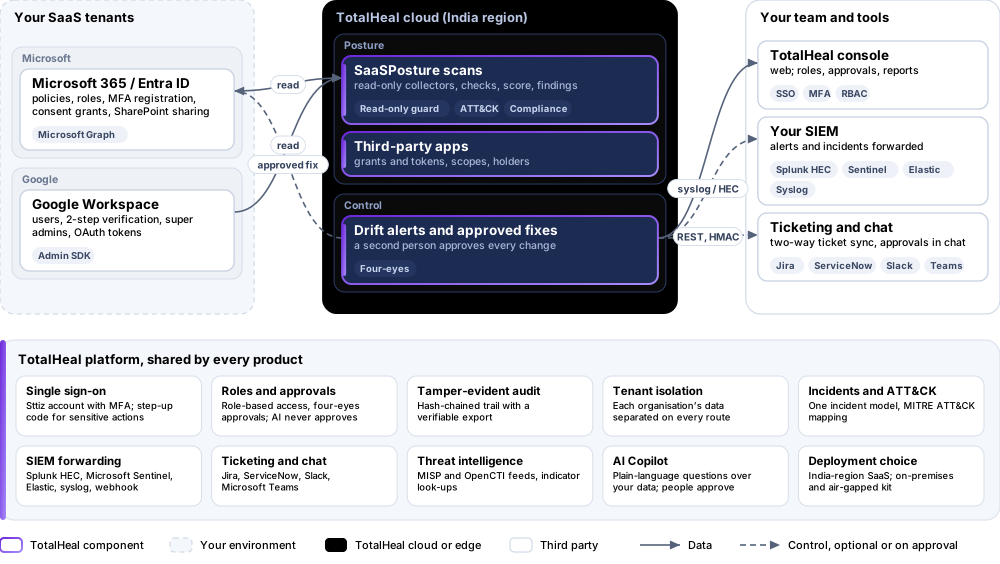
The TotalHeal approach. SaaSPosture reads the settings of your Microsoft 365 / Entra ID and Google Workspace tenants through the connectors you already have, with read-only access, and checks them continuously. Each failing setting is a finding with the fix, its MITRE ATT&CK techniques and the compliance controls it maps to. The Professional tier adds the third-party app inventory and drift alerts; the Elite tier applies fixes after a second person approves.
3Architecture
4How it works
- ConnectUse the Microsoft 365 or Google Workspace connector you already have, with the read permissions listed for each check.
- ScanSettings, administrators, MFA registration and third-party apps are read and checked; anything unreadable is named with its permission.
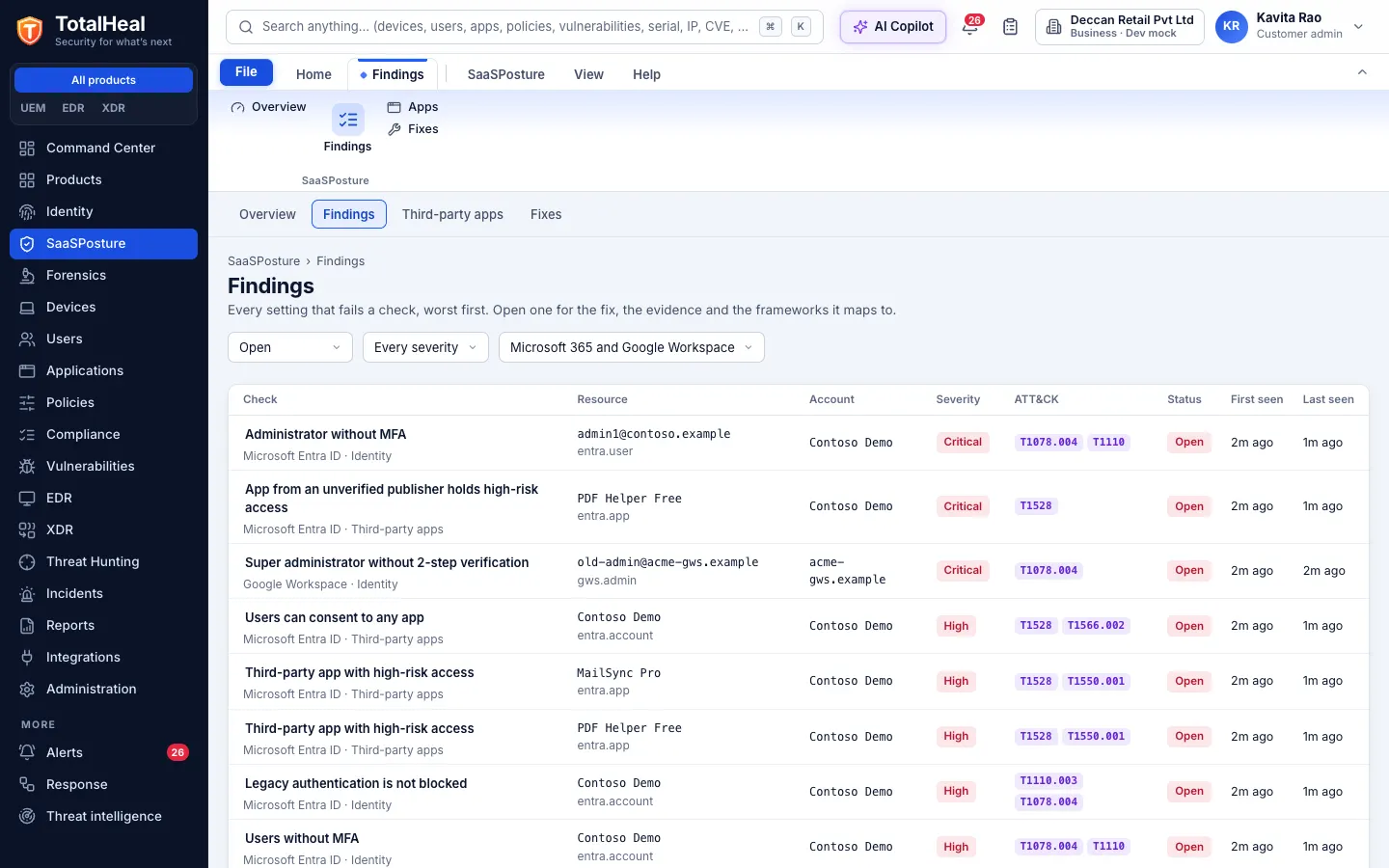
- PrioritiseFindings come worst first, with a score per tenant, the fix and the frameworks they map to.
- WatchScans repeat; a setting that drifts back raises an alert.
- FixFix it yourself from the steps, or request a fix that a second person approves before TotalHeal applies it.
5Capabilities in detail
- Microsoft 365 / Entra ID checksMFA enforced for all users (security defaults or Conditional Access), people and administrators without MFA, legacy authentication blocked, Global Administrator count from two to five, user consent to apps, guest invitations, user app registration and tenant creation, SharePoint and OneDrive Anyone links.
- Google Workspace checks2-step verification enforced and enrolled, super administrators without 2-step verification, super administrator count from two to four, super administrators unused for 90 days, third-party apps with high-risk access.
- Read-only by designScans use read permissions only, and every scan request is checked before it leaves TotalHeal: anything that is not a read is refused. A setting the connector may not read is reported as not evaluated with the permission it needs — never guessed.
- A score and a fix for every findingA severity-weighted score per tenant and overall, findings worst first, the steps to fix each one in the admin centre, and a trend. Accept a risk with a reason and an optional end date; it reopens by itself.
- Mapped to frameworksEach check maps to MITRE ATT&CK techniques and to controls of NIST 800-53, NIST CSF, ISO 27001, SOC 2, PCI DSS, CIS v8, DPDP and other packs in TotalHeal Compliance.
- Third-party app inventoryEvery app people granted delegated access (Microsoft 365) or OAuth tokens (Google Workspace): its publisher and whether it is verified, its scopes in plain words, and how many people — or everyone, by administrator consent — granted it. Apps that can read or send mail, read or change every file, or change the directory come first.
- Drift alertsAfter a clean scan, a critical or high setting that starts failing raises an alert in the same incident queue as endpoint, identity and cloud alerts, and goes on to your SIEM, ticketing and playbooks.
- Fixes with four-eyes approvalRequest a fix — stop users consenting to apps, allow only administrators and Guest Inviters to invite guests, revoke an app’s access — and a different person approves it before TotalHeal makes the change with the connector’s credentials. Both decisions are kept in the audit log, and the tenant is scanned again.
6Security and data handling
- Read-only scansEvery scan request is a read; anything else is refused before it leaves TotalHeal.
- Two people for every changeA fix runs only after someone other than the requester approves it, and both are audited.
- Nothing guessedA setting that cannot be read is reported as not evaluated, with the permission it needs.
- Your tenants onlyEach organisation’s findings, apps and fixes are visible to it alone.
7Where it fits
8Deployment and system requirements
Protected platforms
- Microsoft 365 / Entra ID
- Google Workspace
On-premises server
- Operating system
- RHEL, Rocky Linux or AlmaLinux 8 / 9; Ubuntu 20.04, 22.04 or 24.04; Debian 11 / 12
- Processor
- 4 vCPU (tested configuration)
- Memory
- 8 GB recommended (6 GB minimum)
- Disk
- 10 GB free for software, releases and backups, plus data
- Sign-in
- Active Directory / LDAP, SAML 2.0 or OpenID Connect
- Software
- Nothing to pre-install: no container runtime, database, web server or Java
Network and access
- A Microsoft Entra ID / Microsoft 365 or Google Workspace connector in TotalHeal with the read permissions above
- For fixes (Elite): the write permissions above, granted to the same app registration or service account
Alerts and tickets to
- Splunk
- Microsoft Sentinel
- Elastic
- Syslog / CEF
- Jira
- ServiceNow
- Slack
- Microsoft Teams
9Technical specifications
| Features | Included | ||
|---|---|---|---|
| Microsoft 365 / Entra ID checks | Included | ||
| Google Workspace checks | Included | ||
| Read-only by design | Included | ||
| A score and a fix for every finding | Included | ||
| Mapped to frameworks | Included | ||
| Third-party app inventory | Included | ||
| Drift alerts | Included | ||
| Fixes with four-eyes approval | Included | ||
| Availability by tier | Essential | Professional | Elite |
| Microsoft 365 / Entra ID and Google Workspace checks, read-only: MFA and 2-step verification, administrators, legacy authentication, consent, guests, tenant creation, SharePoint and OneDrive sharing | Included | Included | Included |
| Score per tenant, findings with the fix, MITRE ATT&CK and compliance controls; accept a risk with a reason and an end date | Included | Included | Included |
| Third-party app inventory: apps people granted access, their scopes, who holds them, high-risk access flagged | — | Included | Included |
| Drift alerts: a critical or high setting that starts failing raises an alert in the incident queue | — | Included | Included |
| Fixes TotalHeal applies after a second person approves: stop user consent, restrict guest invitations, revoke an app | — | — | Included |
| List price per user per year | US$12 · ₹1,140 | US$24 · ₹2,280 | US$36 · ₹3,430 |
| Platforms and coverage | |||
| Microsoft 365 / Entra ID | App registration with Microsoft Graph application permissions AuditLog.Read.All, Directory.Read.All, Policy.Read.All; SharePointTenantSettings.Read.All, DelegatedPermissionGrant.Read.All and Application.Read.All for sharing and apps | ||
| Google Workspace | Service account with domain-wide delegation for admin.directory.user.readonly and admin.directory.user.security | ||
| Fixes (Elite) | Policy.ReadWrite.Authorization and DelegatedPermissionGrant.ReadWrite.All (Microsoft 365); admin.directory.user.security (Google Workspace) | ||
| Console | TotalHeal web console | ||
| Deployment options | |||
| SaaS (India region) | AvailableScans run from the TotalHeal cloud against the providers’ APIs. | ||
| On-premises control plane | AvailableDelivered with our team from the on-premises kit. | ||
| Air-gapped | AvailableOffline kit, offline licence file and offline update bundles. | ||
| Licensing | |||
| Priced per | User per year | ||
| Counted | Member users of the connected Microsoft 365 and Google Workspace tenants | ||
| Trial | 30 days, up to 50 users | ||
| Editions | SaaSPosture is sold on its own, outside the editions. | ||
| Government profile | Government is a profile, not a separate tier or price list: the Elite tier with Government defaults switched on — data residency in India, four-eyes approval of policy changes, a distinct approver for every approval-level action, retention of at least 180 days, and the CERT-In and DPDP reporting clocks. | ||
| Procurement dossier | Compliance matrix, bill of materials, architecture and hardening, SLA and OEM authorisation letter, on request | ||
| On-premises server | |||
| Operating system | RHEL, Rocky Linux or AlmaLinux 8 / 9; Ubuntu 20.04, 22.04 or 24.04; Debian 11 / 12 | ||
| Processor | 4 vCPU (tested configuration) | ||
| Memory | 8 GB recommended (6 GB minimum) | ||
| Disk | 10 GB free for software, releases and backups, plus data | ||
| Sign-in | Active Directory / LDAP, SAML 2.0 or OpenID Connect | ||
| Software | Nothing to pre-install: no container runtime, database, web server or Java | ||
| Requirements | |||
| Requirement 1 | A Microsoft Entra ID / Microsoft 365 or Google Workspace connector in TotalHeal with the read permissions above | ||
| Requirement 2 | For fixes (Elite): the write permissions above, granted to the same app registration or service account | ||
10Getting started
- A Microsoft Entra ID / Microsoft 365 or Google Workspace connector in TotalHeal with the read permissions above
- For fixes (Elite): the write permissions above, granted to the same app registration or service account
Start a 30 days, up to 50 users trial in the TotalHeal console with a Sttiz account. For a quote, an on-premises installation or the procurement dossier (compliance matrix, bill of materials, architecture and hardening, SLA, OEM authorisation letter), write to business@totalhealsecurity.com.