SOAR & Automation
Automation with a person in the loop
Automate response with playbooks — and keep a person in the loop.
Contents
- 1Executive summary
- 2The challenge
- 3Architecture
- 4How it works
- 5Capabilities in detail
- 6Security and data handling
- 7Where it fits
- 8Deployment and system requirements
- 9Technical specifications
- 10Getting started
1Executive summary
ResponseFlow takes alerts from its own signed webhook or from other TotalHeal products and runs playbooks on them. Every action follows your response policy and approvals, and every step is on a tamper-evident audit chain — automation that does not act behind your back.
2The challenge
Alerts from many tools arrive faster than a team can open tickets, enrich them and act, and automation that acts on its own is a risk of its own.
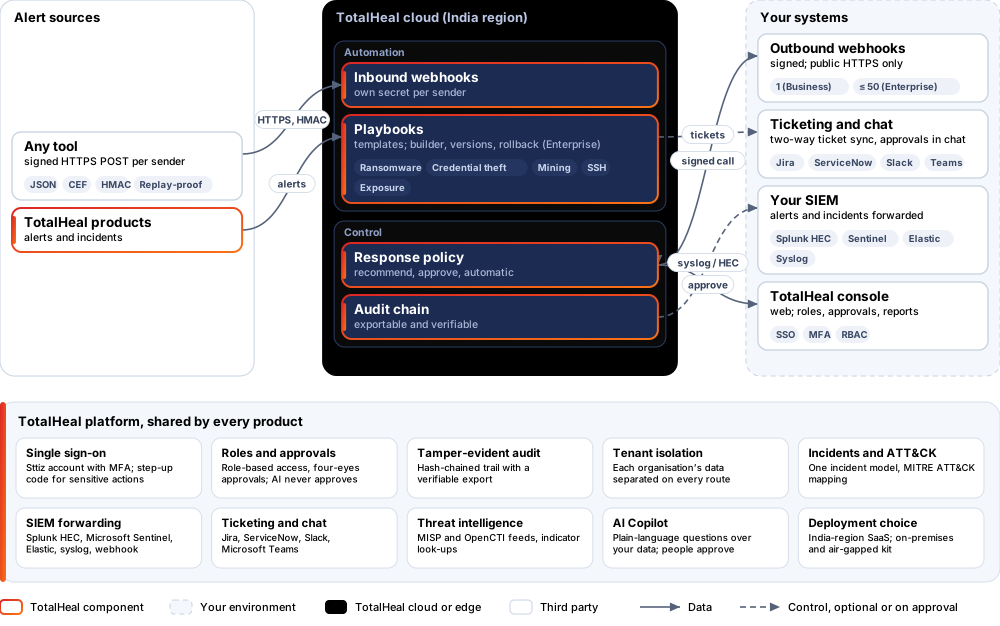
The TotalHeal approach. ResponseFlow takes alerts from its own signed webhook or from other TotalHeal products and runs playbooks on them. Every action goes through your response policy and its approvals, and every step is on a tamper-evident audit chain.
3Architecture
4How it works
- ReceiveA signed alert arrives; replays and old timestamps are refused.
- MatchA playbook matches on severity, type and your parameters.
- ApproveHigh-impact actions wait for a person.
- ActOpen a ticket, post to chat, isolate or notify.
- RecordRequest, approval and result on the audit chain.
5Capabilities in detail
- Its own alert sourceA signed inbound webhook per sending tool (JSON or CEF), each with its own secret; replays and old timestamps are refused. No SIEM or XDR licence is needed.
- Template playbooksReady playbooks for third-party alerts, ransomware, credential theft, crypto-mining, SSH compromise and exposures. On Business you set their parameters — severities, risk threshold, messages, case titles and the webhook they call.
- Custom playbooks (Enterprise)Build your own playbooks with conditions, versions and rollback.
- A person approvesActions follow the response policy: recommend, approve or automatic; high-impact actions such as webhooks and isolation always wait for approval.
- Signed outbound webhooksCalls to your ticketing or chat tool are signed and leave only to public HTTPS addresses. Business includes one endpoint; Enterprise up to 50.
- Audit you can verifyEvery request, approval and result is on a hash-chained audit log that can be exported and verified.
6Security and data handling
- Signed in, signed outInbound webhooks are signed per sender; outbound calls are signed.
- No private-network callsOutbound calls go only to public HTTPS addresses.
- People decide impactIsolation and webhooks always wait for approval.
7Where it fits
8Deployment and system requirements
Protected platforms
- Any HTTPS senderHMAC-signed
Works with
- Jira
- ServiceNow
- Slack
- Microsoft Teams
On-premises server
- Operating system
- RHEL, Rocky Linux or AlmaLinux 8 / 9; Ubuntu 20.04, 22.04 or 24.04; Debian 11 / 12
- Processor
- 4 vCPU (tested configuration)
- Memory
- 8 GB recommended (6 GB minimum)
- Disk
- 10 GB free for software, releases and backups, plus data
- Sign-in
- Active Directory / LDAP, SAML 2.0 or OpenID Connect
- Software
- Nothing to pre-install: no container runtime, database, web server or Java
Network and access
- An alert source: a tool that can send signed HTTPS requests, or other TotalHeal products
Alerts and tickets to
- Splunk
- Microsoft Sentinel
- Elastic
- Syslog / CEF
- Jira
- ServiceNow
- Slack
- Microsoft Teams
9Technical specifications
| Features | Included | |
|---|---|---|
| Its own alert source | Included | |
| Template playbooks | Included | |
| Custom playbooks (Enterprise) | Included | |
| A person approves | Included | |
| Signed outbound webhooks | Included | |
| Audit you can verify | Included | |
| Availability by edition | Business | Enterprise |
| Inbound alert webhooks, template playbooks with parameters, approvals, audit | Included | Included |
| Outbound webhook endpoints | 1 | Up to 50 |
| Custom playbooks, builder, versions and rollback | — | Included |
| Platforms and coverage | ||
| Senders | Any tool that can send an HTTPS POST with an HMAC signature | |
| Console | TotalHeal web console | |
| Deployment options | ||
| SaaS (India region) | AvailableSingle-region service. | |
| On-premises control plane | AvailableDelivered with our team from the on-premises kit. | |
| Air-gapped | AvailableOffline kit, offline licence file and offline update bundles. | |
| Licensing | ||
| Priced per | Analyst per year | |
| Counted | People who run or approve playbooks | |
| Trial | 30 days | |
| Government profile | Government is a profile, not a separate tier or price list: the Elite tier with Government defaults switched on — data residency in India, four-eyes approval of policy changes, a distinct approver for every approval-level action, retention of at least 180 days, and the CERT-In and DPDP reporting clocks. | |
| Procurement dossier | Compliance matrix, bill of materials, architecture and hardening, SLA and OEM authorisation letter, on request | |
| On-premises server | ||
| Operating system | RHEL, Rocky Linux or AlmaLinux 8 / 9; Ubuntu 20.04, 22.04 or 24.04; Debian 11 / 12 | |
| Processor | 4 vCPU (tested configuration) | |
| Memory | 8 GB recommended (6 GB minimum) | |
| Disk | 10 GB free for software, releases and backups, plus data | |
| Sign-in | Active Directory / LDAP, SAML 2.0 or OpenID Connect | |
| Software | Nothing to pre-install: no container runtime, database, web server or Java | |
| Requirements | ||
| Requirement 1 | An alert source: a tool that can send signed HTTPS requests, or other TotalHeal products | |
10Getting started
- An alert source: a tool that can send signed HTTPS requests, or other TotalHeal products
Start a 30 days trial in the TotalHeal console with a Sttiz account. For a quote, an on-premises installation or the procurement dossier (compliance matrix, bill of materials, architecture and hardening, SLA, OEM authorisation letter), write to business@totalhealsecurity.com.