Vulnerability Management
Fixing the vulnerabilities that are actually being exploited, first
Know which installed software carries a known, exploited vulnerability — without a scanner appliance.
Contents
- 1Executive summary
- 2The challenge
- 3Architecture
- 4How it works
- 5Capabilities in detail
- 6Security and data handling
- 7Where it fits
- 8Deployment and system requirements
- 9Technical specifications
- 10Getting started
1Executive summary
VulnSight matches the software inventory TotalHeal agents already report against a mirrored vulnerability knowledge base. Every finding has a confidence level and an explained 0–100 risk score built from exploitation evidence, so teams fix what attackers use — without a scanner appliance or stored credentials.
2The challenge
Teams cannot patch everything. They need to know which installed software on which device carries a known vulnerability, which are actually being exploited, and which open a path to their most important systems — without deploying a scanner appliance or handing out admin credentials.
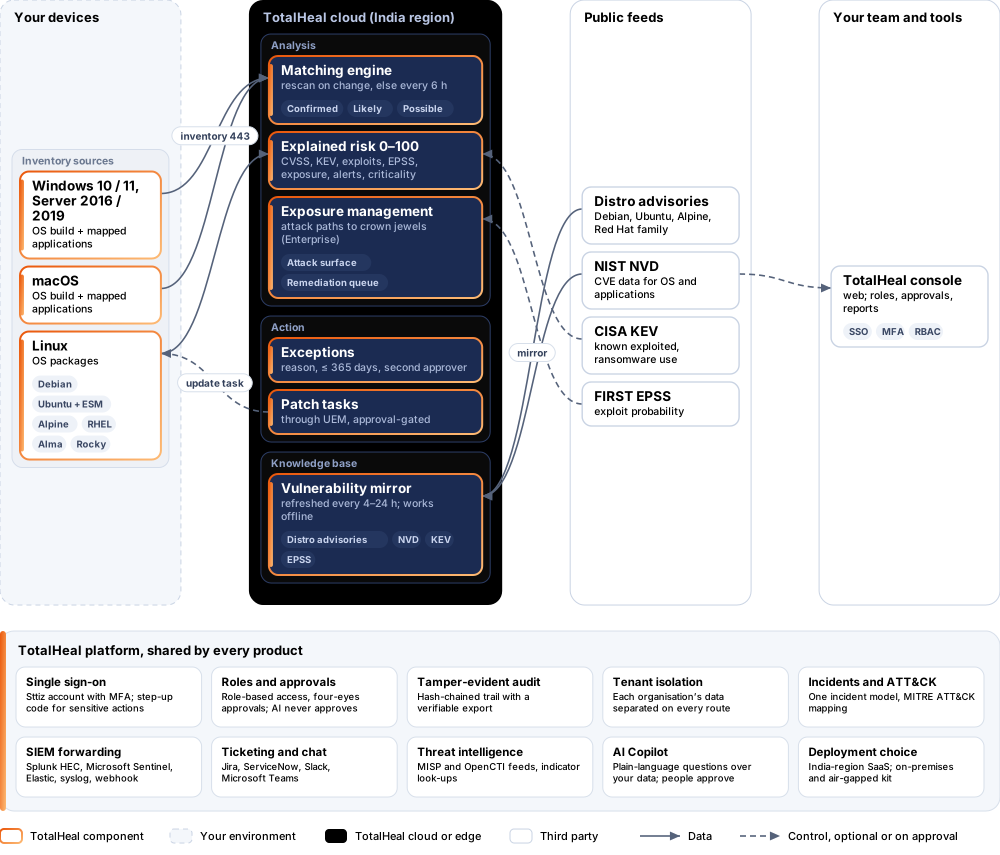
The TotalHeal approach. Agentless matching on the TotalHeal server: the software inventory the TotalHeal agent already reports is matched against a mirrored vulnerability knowledge base. Nothing extra runs on the endpoint and no scanning credentials are stored.
3Architecture
4How it works
- InventoryAgents report installed OS packages and applications.
- MatchSoftware is matched to distro advisories and NVD data, with a confidence level.
- RankAn explained 0–100 risk from CVSS, KEV, exploits, EPSS, exposure, live alerts and asset criticality.
- ActCreate a patch task through UEM, or accept the risk with a second person’s approval.
- CloseFindings resolve on their own when no longer matched.
5Capabilities in detail
- Linux distro advisoriesDebian, Ubuntu (including Ubuntu Pro ESM fixes), Alpine, Red Hat, AlmaLinux and Rocky Linux packages matched against distro advisories.
- Windows, macOS and desktop appsOS builds and about 98 curated desktop applications matched against NVD data. Unmapped apps are reported as “not assessed”, never guessed.
- Confidence on every findingConfirmed, likely or possible — “possible” is shown apart and never counted.
- An explained 0–100 risk scoreCVSS, CISA KEV (including ransomware use), public exploits, FIRST EPSS, internet exposure, live alerts naming the CVE and asset criticality.
- Explore and graphCVE explorer, per-device view, CVE detail and a graph from device to software to CVE to ATT&CK technique.
- Risk acceptance with a second personExceptions need a reason and an expiry of at most 365 days, are approved by a different person, revocable and audited.
- From finding to fix“Create patch task” raises an update request through UEM — nothing changes automatically. Findings resolve by themselves when no longer matched.
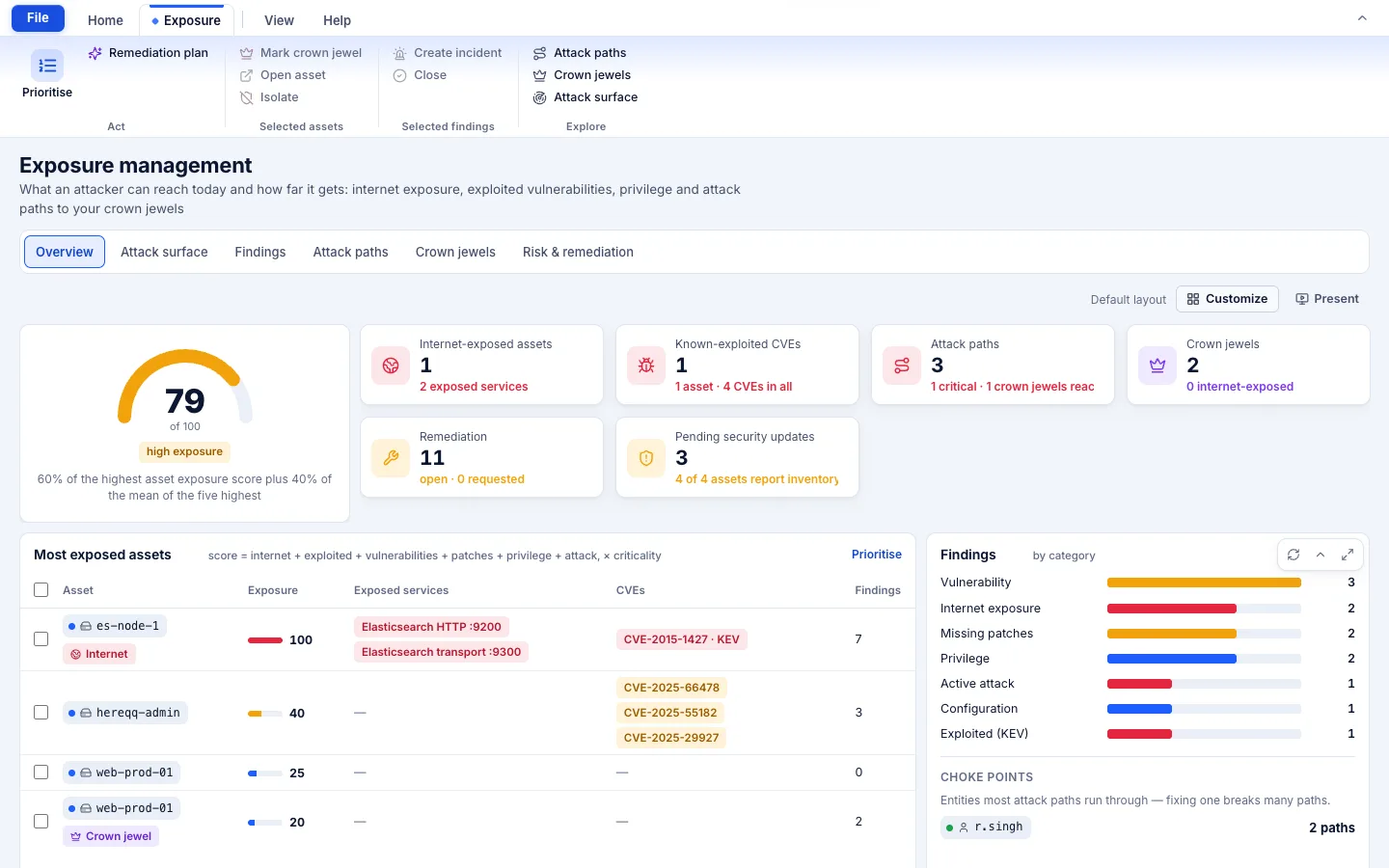
- Exposure management (Enterprise)Asset exposure score, attack surface, attack paths to crown jewels, crown-jewel tagging and a remediation queue.
6Security and data handling
- No scan credentialsNothing is scanned remotely and no administrator credentials are stored.
- Never guessedUnmapped applications are reported as not assessed; possible matches are shown apart and never counted.
- Nothing changes on its ownPatch tasks go through approval; exceptions need a second person and expire.
7Where it fits
8Deployment and system requirements
Protected platforms
- Windows10 / 11 (x64)
- Windows Server2016 / 2019
- macOS11 and later
- Ubuntu20.04, 22.04, 24.04
- Debian11, 12
- Red Hat Enterprise Linux8, 9
- Rocky Linux8, 9
- AlmaLinux8, 9
- Alpine
On-premises server
- Operating system
- RHEL, Rocky Linux or AlmaLinux 8 / 9; Ubuntu 20.04, 22.04 or 24.04; Debian 11 / 12
- Processor
- 4 vCPU (tested configuration)
- Memory
- 8 GB recommended (6 GB minimum)
- Disk
- 10 GB free for software, releases and backups, plus data
- Sign-in
- Active Directory / LDAP, SAML 2.0 or OpenID Connect
- Software
- Nothing to pre-install: no container runtime, database, web server or Java
Network and access
- A software-inventory source: today the TotalHeal agent (desktop or Linux server) with its UEM module enabled
- Recommended: Patch Management to act on findings
- A Sttiz account for each console user
Alerts and tickets to
- Splunk
- Microsoft Sentinel
- Elastic
- Syslog / CEF
- Jira
- ServiceNow
- Slack
- Microsoft Teams
9Technical specifications
| Features | Included | |
|---|---|---|
| Linux distro advisories | Included | |
| Windows, macOS and desktop apps | Included | |
| Confidence on every finding | Included | |
| An explained 0–100 risk score | Included | |
| Explore and graph | Included | |
| Risk acceptance with a second person | Included | |
| From finding to fix | Included | |
| Exposure management (Enterprise) | Included | |
| Availability by edition | Business | Enterprise |
| CVE matching, confidence, explained risk, KEV / EPSS / CVSS | Included | Included |
| CVE explorer, device view, graph, data sources | Included | Included |
| Exceptions with second-person approval | Included | Included |
| Patch task through UEM | Included (needs UEM) | Included (needs UEM) |
| Exposure score, attack surface, attack paths, crown jewels, remediation queue | — | Included |
| Platforms and coverage | ||
| Linux: Debian, Ubuntu, Alpine, RHEL, AlmaLinux, Rocky | OS packages | |
| Windows 10/11, Windows Server 2016/2019 | OS build and mapped applications | |
| macOS | OS build and mapped applications | |
| iOS, Android, network devices, containers, language packages | Not assessed | |
| Deployment options | ||
| SaaS (India region) | Available | |
| On-premises | AvailableDelivered with our team from the on-premises kit. | |
| Air-gapped | AvailableThe vulnerability feeds and the control plane run offline. | |
| Licensing | ||
| Priced per | Asset per year | |
| Counted | Devices reporting a software inventory | |
| Trial | 30 days | |
| Government profile | Government is a profile, not a separate tier or price list: the Elite tier with Government defaults switched on — data residency in India, four-eyes approval of policy changes, a distinct approver for every approval-level action, retention of at least 180 days, and the CERT-In and DPDP reporting clocks. | |
| Procurement dossier | Compliance matrix, bill of materials, architecture and hardening, SLA and OEM authorisation letter, on request | |
| On-premises server | ||
| Operating system | RHEL, Rocky Linux or AlmaLinux 8 / 9; Ubuntu 20.04, 22.04 or 24.04; Debian 11 / 12 | |
| Processor | 4 vCPU (tested configuration) | |
| Memory | 8 GB recommended (6 GB minimum) | |
| Disk | 10 GB free for software, releases and backups, plus data | |
| Sign-in | Active Directory / LDAP, SAML 2.0 or OpenID Connect | |
| Software | Nothing to pre-install: no container runtime, database, web server or Java | |
| Requirements | ||
| Requirement 1 | A software-inventory source: today the TotalHeal agent (desktop or Linux server) with its UEM module enabled | |
| Requirement 2 | Recommended: Patch Management to act on findings | |
| Requirement 3 | A Sttiz account for each console user | |
10Getting started
- A software-inventory source: today the TotalHeal agent (desktop or Linux server) with its UEM module enabled
- Recommended: Patch Management to act on findings
- A Sttiz account for each console user
Start a 30 days trial in the TotalHeal console with a Sttiz account. For a quote, an on-premises installation or the procurement dossier (compliance matrix, bill of materials, architecture and hardening, SLA, OEM authorisation letter), write to business@totalhealsecurity.com.