Zero Trust Network Access (ZTNA)
Replacing the VPN with access that shrinks the moment risk rises
Access to named apps and servers only, re-checked continuously — not the whole subnet.
Contents
- 1Executive summary
- 2The challenge
- 3Architecture
- 4How it works
- 5Capabilities in detail
- 6Security and data handling
- 7Where it fits
- 8Deployment and system requirements
- 9Technical specifications
- 10Getting started
1Executive summary
A VPN checks a device once and then trusts it with a whole subnet. ZeroGate grants each user and device access to named applications and servers only, re-evaluates device health and risk continuously, and cuts or narrows access within seconds when a device turns risky — with no inbound port on your network.
2The challenge
A classic VPN puts a user on the whole subnet and checks the device once, at login. A compromised laptop keeps its access until someone notices.
The TotalHeal approach. Each user and device gets access only to the applications and servers a policy allows, and device health and risk are re-evaluated continuously. When a device’s risk rises, its access shrinks or is cut within seconds.
3Architecture
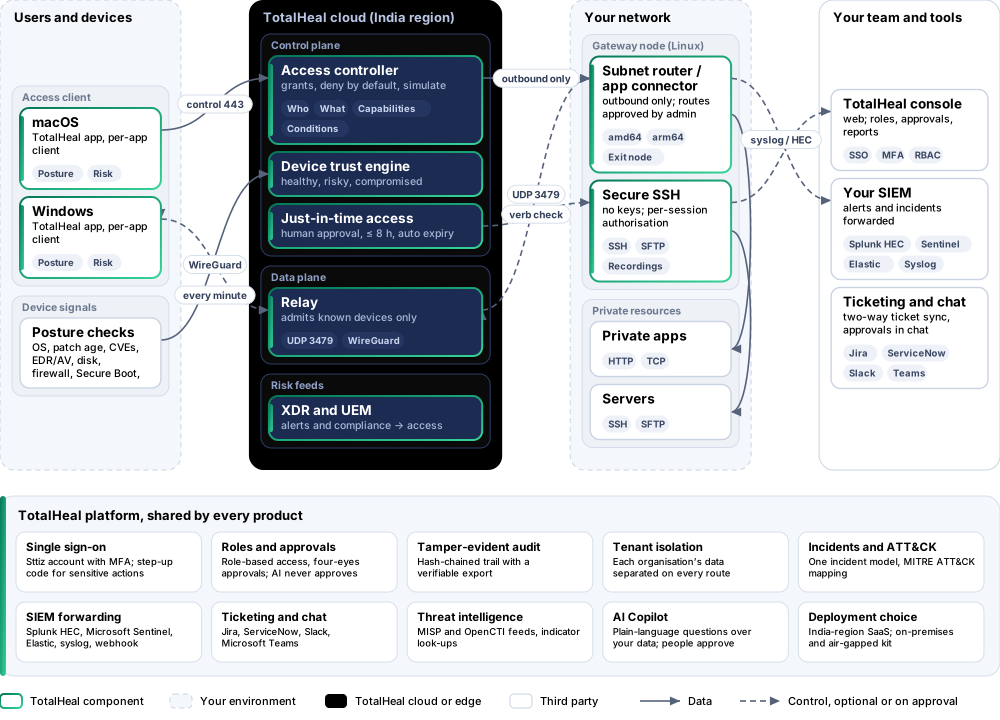
4How it works
- EnrolUsers install the TotalHeal app and enrol with a profile key; devices can wait for manual approval and are refused on bad posture.
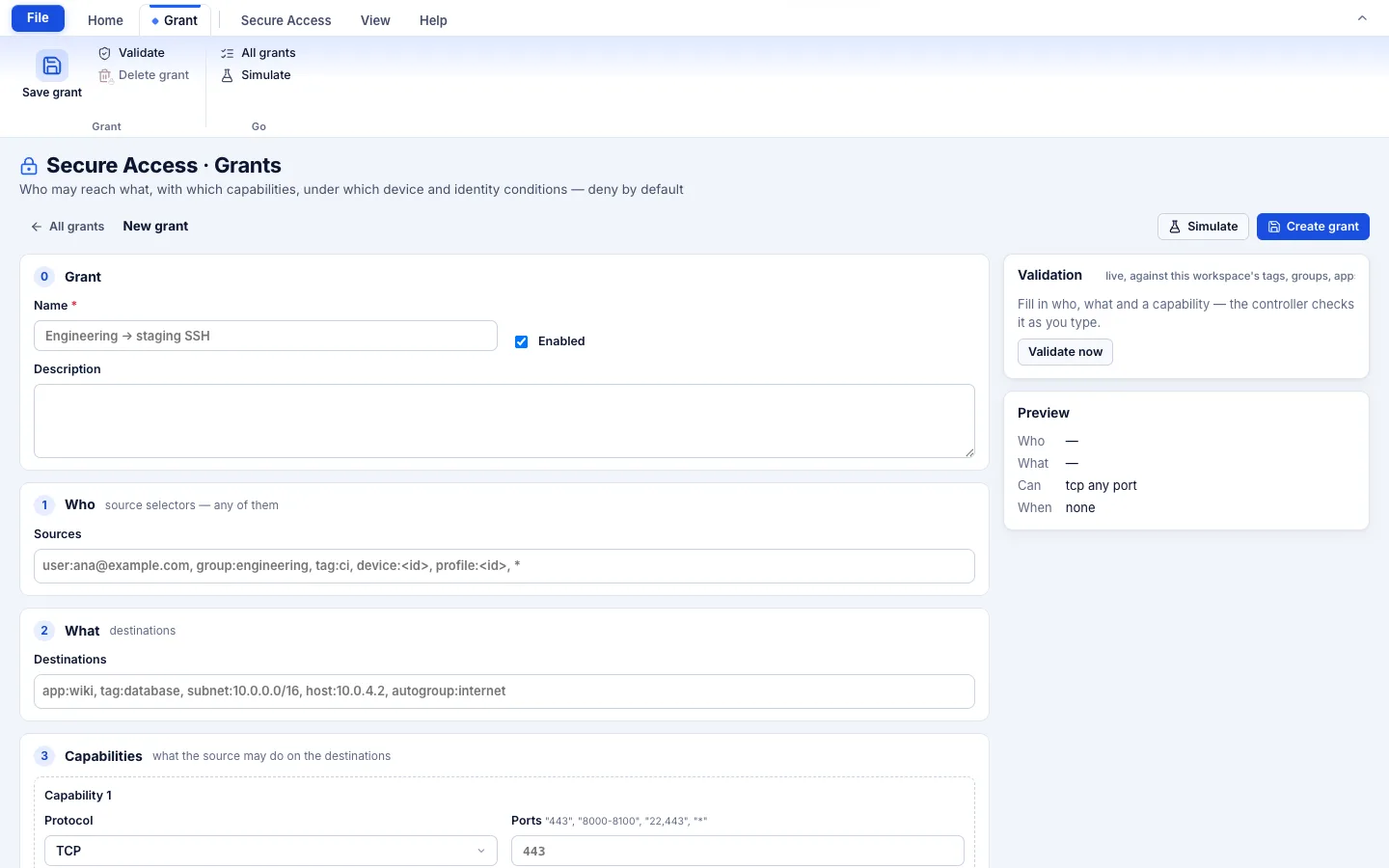
- GrantWrite who may reach which app or server, with which ports, verbs and logins, under which conditions — validate and simulate before saving.
- ConnectThe client gets only the peers and routes it is granted, over an encrypted overlay, direct or relayed.
- Re-checkPosture and risk are re-evaluated continuously; access narrows, isolates or ends as risk rises.
- AuditEvery grant, session, SSH command and just-in-time approval lands in the tamper-evident audit.
5Capabilities in detail
- Grants, deny by defaultWho (user, group, tag, device, profile) may reach what (app, tag, device, subnet, host), with which capabilities (protocol, ports, HTTP verbs, SSH logins) and under which conditions (posture, risk, MFA age, time, country). Validate and simulate before you save.
- A private encrypted network per organisationEach organisation has its own overlay network; a device only sees the peers and routes it is granted.
- Device postureOS supported, patch age, critical CVEs, rooted, EDR and AV healthy, disk encryption, firewall, Secure Boot, UEM enrolment, certificate and MFA give a healthy, risky or compromised verdict.
- Risk-adaptive accessFull, restricted, sensitive apps blocked, isolated or quarantined as risk rises. In our tests a high-risk device lost its connections in under a second.
- Enrolment profiles and approvalNine profile kinds, one-time or reusable keys, a manual approval queue and automatic rejection on bad posture.
- Just-in-time accessRequest, automated risk analysis, human approval (never your own), a time-boxed grant (default up to 8 hours) and automatic expiry.
- Gateways for private appsA Linux node as subnet router, exit node or app connector for private HTTP/TCP apps; routes approved by an admin.
- Secure SSHIdentity-based SSH and SFTP with no distributed keys, per-session authorisation, recordings (always on for root) and a searchable command audit.
- Micro-segmentation and responseDeny guards between tags, environments and departments. XDR can revoke access or quarantine a device while a forensic channel stays open.
6Security and data handling
- Deny by defaultA device sees nothing it has not been granted; an empty policy is no access.
- No inbound portsGateways and clients dial out; nothing on your network listens to the internet.
- Your own network per organisationEach organisation has its own encrypted overlay; relays admit only known devices.
- Humans approve elevationJust-in-time access needs a different person’s approval and expires on its own.
7Where it fits
8Deployment and system requirements
Protected platforms
- macOS11 and later
- Windows10 / 11 (x64)
- Linux gatewayamd64, arm64
On-premises server
- Operating system
- RHEL, Rocky Linux or AlmaLinux 8 / 9; Ubuntu 20.04, 22.04 or 24.04; Debian 11 / 12
- Processor
- 4 vCPU (tested configuration)
- Memory
- 8 GB recommended (6 GB minimum)
- Disk
- 10 GB free for software, releases and backups, plus data
- Sign-in
- Active Directory / LDAP, SAML 2.0 or OpenID Connect
- Software
- Nothing to pre-install: no container runtime, database, web server or Java
Network and access
- TotalHeal desktop app on macOS or Windows for users
- A Linux host for each gateway or connector
- Outbound HTTPS and UDP 3479 to the relay
- A Sttiz account per user
Alerts and tickets to
- Splunk
- Microsoft Sentinel
- Elastic
- Syslog / CEF
- Jira
- ServiceNow
- Slack
- Microsoft Teams
9Technical specifications
| Features | Included | ||
|---|---|---|---|
| Grants, deny by default | Included | ||
| A private encrypted network per organisation | Included | ||
| Device posture | Included | ||
| Risk-adaptive access | Included | ||
| Enrolment profiles and approval | Included | ||
| Just-in-time access | Included | ||
| Gateways for private apps | Included | ||
| Secure SSH | Included | ||
| Micro-segmentation and response | Included | ||
| Availability by tier | Essential | Professional | Elite |
| Grants with deny by default, a private encrypted network per organisation, gateways for private apps, policy simulation | Included | Included | Included |
| Enrolment profiles and approval, device posture, risk-adaptive access, quarantine and release, network map, audit log | Included | Included | Included |
| Just-in-time access: request, risk analysis, human approval (never your own), time-boxed grant | — | Included | Included |
| Step-up MFA, device risk and location set by your team | — | Included | Included |
| Secure SSH and SFTP with per-session authorisation, recordings and command audit | — | — | Included |
| Revoke a device at every gateway and restore it; audit-chain verification | — | — | Included |
| List price per user per year | US$72 · ₹6,850 | US$108 · ₹10,280 | US$156 · ₹14,840 |
| Platforms and coverage | |||
| macOS and Windows | Desktop client in the TotalHeal app (per-app mode) | ||
| Linux (amd64, arm64) | Node for gateway roles and Secure SSH | ||
| Controller | SaaS, India region | ||
| Deployment options | |||
| SaaS (controller and India relay run by TotalHeal) | Available | ||
| Hybrid (your Linux node as router, connector or exit node) | PartialAvailable as a binary; no package or appliance image yet. | ||
| On-premises controller | AvailableDelivered with our team from the on-premises kit. | ||
| Air-gapped | AvailableOffline kit, offline licence file and offline update bundles. | ||
| Licensing | |||
| Priced per | User per year | ||
| Counted | Distinct users with an access client or session in 30 days | ||
| Trial | 30 days | ||
| Editions | Organisations that have ZeroGate today through Enterprise or the Secure Access add-on keep every tier. | ||
| Government profile | Government is a profile, not a separate tier or price list: the Elite tier with Government defaults switched on — data residency in India, four-eyes approval of policy changes, a distinct approver for every approval-level action, retention of at least 180 days, and the CERT-In and DPDP reporting clocks. | ||
| Procurement dossier | Compliance matrix, bill of materials, architecture and hardening, SLA and OEM authorisation letter, on request | ||
| On-premises server | |||
| Operating system | RHEL, Rocky Linux or AlmaLinux 8 / 9; Ubuntu 20.04, 22.04 or 24.04; Debian 11 / 12 | ||
| Processor | 4 vCPU (tested configuration) | ||
| Memory | 8 GB recommended (6 GB minimum) | ||
| Disk | 10 GB free for software, releases and backups, plus data | ||
| Sign-in | Active Directory / LDAP, SAML 2.0 or OpenID Connect | ||
| Software | Nothing to pre-install: no container runtime, database, web server or Java | ||
| Requirements | |||
| Requirement 1 | TotalHeal desktop app on macOS or Windows for users | ||
| Requirement 2 | A Linux host for each gateway or connector | ||
| Requirement 3 | Outbound HTTPS and UDP 3479 to the relay | ||
| Requirement 4 | A Sttiz account per user | ||
10Getting started
- TotalHeal desktop app on macOS or Windows for users
- A Linux host for each gateway or connector
- Outbound HTTPS and UDP 3479 to the relay
- A Sttiz account per user
Start a 30 days trial in the TotalHeal console with a Sttiz account. For a quote, an on-premises installation or the procurement dossier (compliance matrix, bill of materials, architecture and hardening, SLA, OEM authorisation letter), write to business@totalhealsecurity.com.