Next-Generation Firewall (NGFW)
One firewall policy for every office — and a change that cannot strand a branch
The firewall of every office, on BranchEdge appliances you manage from one console: rules by application and person, threat intelligence, IPS, HTTPS inspection, antivirus on downloads, and a cloud firewall for branches.
Contents
- 1Executive summary
- 2The challenge
- 3Architecture
- 4How it works
- 5Capabilities in detail
- 6Security and data handling
- 7Where it fits
- 8Deployment and system requirements
- 9Technical specifications
- 10Getting started
1Executive summary
FireWarden runs the same policy on every BranchEdge appliance: rules by application and person, threat intelligence both ways, IPS, HTTPS inspection and antivirus on downloads, with every change versioned and rolled back automatically if an appliance loses the cloud.
2The challenge
Branch firewalls are bought one by one, configured one by one and forgotten: rules nobody remembers adding, a different policy at every site, threat intelligence that never reaches them, and a change made at night that cuts the office off until someone drives there.
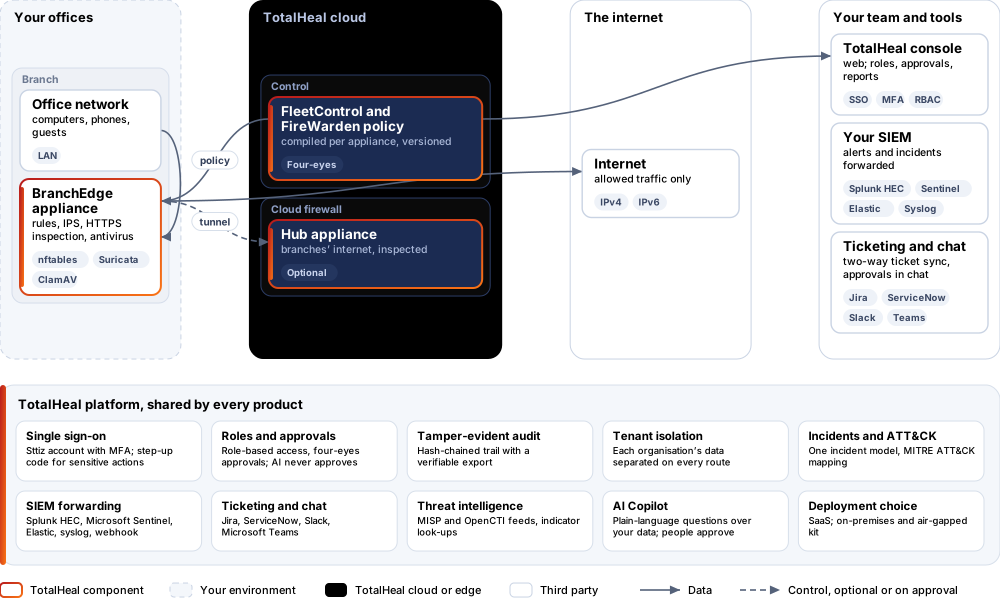
The TotalHeal approach. FireWarden runs on TotalHeal BranchEdge appliances — any Linux box with two or more ports, set up with one installer command — and every appliance runs the same policy from the TotalHeal console. Each change is compiled for each appliance, versioned, and applied in one transaction; an appliance that cannot reach the cloud after a change goes back to the last good policy on its own after five minutes.
3Architecture
4How it works
- InstallTurn any Linux box with two ports into a BranchEdge appliance with one installer command.
- PlaceGive it a site and its ports — or register its serial number and let it set itself up.
- WriteWrite one policy: rules, applications, groups, IPS, inspection.
- ApplyEach appliance gets its compiled version within 30 seconds, applied in one transaction.
- WatchHit counts, blocks and IPS and malware alerts arrive in the console.
5Capabilities in detail
- Rules by what and whoOrdered rules by zone (WAN, LAN, guest, the other offices), address and service objects, applications — 31 built in, from Microsoft 365 and Zoom to BitTorrent and Tor, recognised by the names they resolve, their address ranges and ports — and people’s groups, from who signed in through NetworkGate and SurfGuard groups.
- Threat intelligence both waysEvery active IP indicator from your TotalHeal threat intelligence is blocked in and out on every appliance; add your own addresses with a reason. SYN-flood and connection limits per address stop simple floods.
- Know what each rule doesEach rule has its own hit counter on every appliance, summed in the console; rules at least 30 days old that matched nothing for 30 days are listed as unused.
- IPSOn the Professional tier, Suricata inspects the traffic of rules you mark — detecting and alerting, or blocking — with TotalHeal rules (EICAR, Log4Shell, path traversal, PowerShell download cradles, SSH brute force …) and your own Suricata rules. Alerts arrive in TotalHeal with the source, target and signature.
- HTTPS inspectionOn the Professional tier, allow rules marked Decrypt send web traffic through an inspection proxy on the appliance that presents certificates from your organisation’s TotalHeal root and checks each site’s real certificate. Online banking and the categories and domains you exempt pass through untouched.
- Antivirus in transitOn the Elite tier, files people download — programs, archives, documents — are checked with ClamAV on the appliance before they are delivered; malware is replaced by a page naming it and raises a high alert.
- Cloud firewall for branchesA branch can send its internet through the tunnel to a hub appliance — in the TotalHeal cloud or your data centre — where FireWarden decides and takes it out, so small offices need only a basic box.
- Safe changesOn the Professional tier a policy change can wait for a second administrator; every version is kept, an appliance can be pinned to an older one, and an unconfirmed change can be rolled back from the console.
6Security and data handling
- All or nothingA policy is applied in one transaction: the old one stays in force until the new one is complete.
- Never strandedAn appliance that cannot reach the cloud within five minutes of a change goes back to the last good policy by itself.
- Exempt is exemptSites and categories exempt from inspection are passed through untouched.
- Keys stay out of historyYour inspection root travels to the appliance on its own and is never stored with the policy versions.
7Where it fits
8Deployment and system requirements
Protected platforms
- BranchEdge applianceDebian 12 or Ubuntu 22.04+, x86-64 or arm64, two or more network ports
- Virtual or cloudAny hypervisor or cloud instance running the same Linux
On-premises server
- Operating system
- RHEL, Rocky Linux or AlmaLinux 8 / 9; Ubuntu 20.04, 22.04 or 24.04; Debian 11 / 12
- Processor
- 4 vCPU (tested configuration)
- Memory
- 8 GB recommended (6 GB minimum)
- Disk
- 10 GB free for software, releases and backups, plus data
- Sign-in
- Active Directory / LDAP, SAML 2.0 or OpenID Connect
- Software
- Nothing to pre-install: no container runtime, database, web server or Java
Network and access
- A BranchEdge appliance at each site (installer: --branchedge, with --with-ips and --with-av for the IPS and antivirus)
- The TotalHeal root trusted on devices for HTTPS inspection
Alerts and tickets to
- Splunk
- Microsoft Sentinel
- Elastic
- Syslog / CEF
- Jira
- ServiceNow
- Slack
- Microsoft Teams
9Technical specifications
| Features | Included | ||
|---|---|---|---|
| Rules by what and who | Included | ||
| Threat intelligence both ways | Included | ||
| Know what each rule does | Included | ||
| IPS | Included | ||
| HTTPS inspection | Included | ||
| Antivirus in transit | Included | ||
| Cloud firewall for branches | Included | ||
| Safe changes | Included | ||
| Availability by tier | Essential | Professional | Elite |
| Stateful rules by zone, address and service objects, applications (domain, address and port) and people’s groups; NAT and port forwards | Included | Included | Included |
| TotalHeal threat intelligence blocked both ways; SYN-flood and connection limits; your own blocked addresses | Included | Included | Included |
| Hit count per rule, unused-rule report; every policy version kept; automatic roll-back when an appliance loses the cloud after a change | Included | Included | Included |
| Cloud firewall: branches’ internet through a hub appliance (TotalHeal cloud or your data centre) | Included | Included | Included |
| IPS (Suricata) in detect or block mode with TotalHeal rules and your own; alerts in TotalHeal | — | Included | Included |
| HTTPS inspection with exempt categories (online banking by default) and domains | — | Included | Included |
| Country blocking; policy changes approved by a second administrator | — | Included | Included |
| Antivirus on files in transit (ClamAV); malware blocked with a page and an alert | — | — | Included |
| Blocks from TotalHeal responses reach the appliances; high-availability pairs (VRRP) | — | — | Included |
| List price per appliance per year | US$240 · ₹22,840 | US$420 · ₹39,970 | US$600 · ₹57,100 |
| Platforms and coverage | |||
| Appliance | Any x86-64 or arm64 box with two or more network ports, Debian 12 or Ubuntu 22.04+ (hardware, virtual machine or cloud instance) | ||
| Data plane | nftables (one table, applied in a single transaction), Suricata for the IPS, ClamAV for files in transit | ||
| Console | TotalHeal web console: FireWarden and FleetControl | ||
| Deployment options | |||
| SaaS | AvailablePolicy and FleetControl in the TotalHeal cloud; appliances at your sites. | ||
| On-premises control plane | AvailableDelivered with our team from the on-premises kit. | ||
| Air-gapped | AvailableOffline kit, offline licence file and offline update bundles. | ||
| Licensing | |||
| Priced per | appliance per year | ||
| Counted | BranchEdge appliances running FireWarden | ||
| Trial | 30 days, up to 2 appliances | ||
| Editions | FireWarden is sold on its own, per appliance; FleetControl is included. | ||
| Government profile | Government is a profile, not a separate tier or price list: the Elite tier with Government defaults switched on — data residency in India, four-eyes approval of policy changes, a distinct approver for every approval-level action, retention of at least 180 days, and the CERT-In and DPDP reporting clocks. | ||
| Procurement dossier | Compliance matrix, bill of materials, architecture and hardening, SLA and OEM authorisation letter, on request | ||
| On-premises server | |||
| Operating system | RHEL, Rocky Linux or AlmaLinux 8 / 9; Ubuntu 20.04, 22.04 or 24.04; Debian 11 / 12 | ||
| Processor | 4 vCPU (tested configuration) | ||
| Memory | 8 GB recommended (6 GB minimum) | ||
| Disk | 10 GB free for software, releases and backups, plus data | ||
| Sign-in | Active Directory / LDAP, SAML 2.0 or OpenID Connect | ||
| Software | Nothing to pre-install: no container runtime, database, web server or Java | ||
| Requirements | |||
| Requirement 1 | A BranchEdge appliance at each site (installer: --branchedge, with --with-ips and --with-av for the IPS and antivirus) | ||
| Requirement 2 | The TotalHeal root trusted on devices for HTTPS inspection | ||
10Getting started
- A BranchEdge appliance at each site (installer: --branchedge, with --with-ips and --with-av for the IPS and antivirus)
- The TotalHeal root trusted on devices for HTTPS inspection
Start a 30 days, up to 2 appliances trial in the TotalHeal console with a Sttiz account. For a quote, an on-premises installation or the procurement dossier (compliance matrix, bill of materials, architecture and hardening, SLA, OEM authorisation letter), write to business@totalhealsecurity.com.