TotalHealCampusGridSwitch and Wi-Fi management (SD-LAN)
Your switches, access points and controllers in one place: every port, what is plugged in where, PoE draw, and port profiles applied with each vendor’s own commands.
Trial: 30 days, up to 10 network devices. You sign in to the TotalHeal console with a Sttiz account and activate CampusGrid SD-LAN. No card.
Switches are configured port by port over SSH, by whoever has the password; nobody knows which port the conference-room phone is on, how much PoE is left, or which firmware each switch runs, and a typo on one port is found weeks later.
CampusGrid reads every switch, access point and controller over SNMP from a TotalHeal agent at the site, and applies port profiles over SSH as the commands an engineer would type for that vendor — shown before they are sent, with the switch’s answer kept.
CampusGrid SD-LAN, feature by feature.
Every port
Model, firmware, uptime, and for each port its state, speed, VLAN, errors and PoE, read every minute over SNMP v2c.
What is plugged in where
The topology from LLDP: which switch and port each neighbour is on.
Port profiles
Access VLAN, voice VLAN for phones, PoE on or off, 802.1X with MAB through NetworkGate, a description, shut down — applied to ticked ports as Cisco IOS / IOS-XE, Aruba AOS-CX or Juniper Junos commands.
Nothing hidden
The exact commands are shown before they are sent; the switch’s answer is kept; a refused command fails the change; the switch’s SSH key is pinned on first use.
Wi-Fi
On the Professional tier, clients per wireless network and per access point from NetworkGate sign-ins.
Four-eyes
On the Elite tier every switch change waits for a second administrator.
How CampusGrid SD-LAN works.
CampusGrid reads every switch, access point and controller over SNMP and applies port profiles over SSH in each vendor’s own commands, shown before they are sent and kept after.
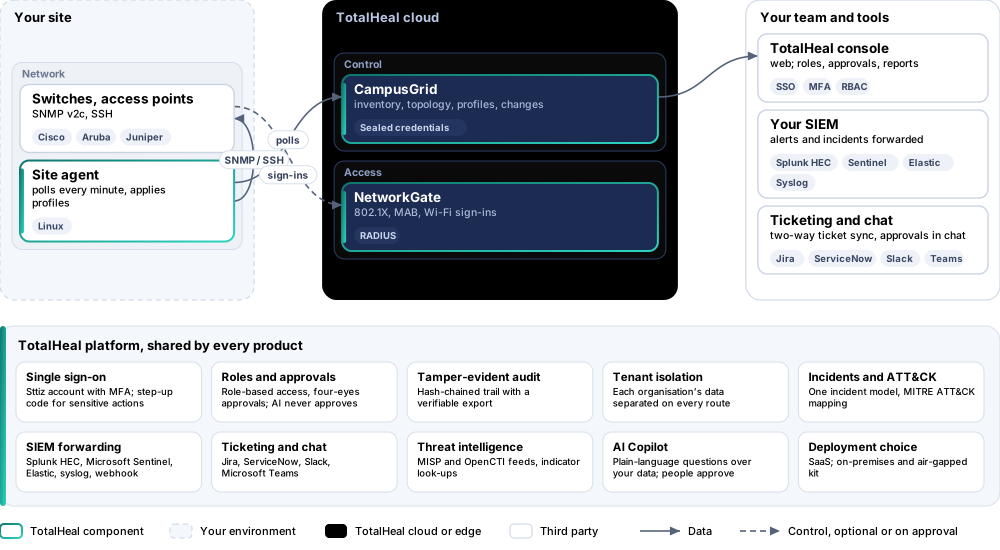
- AddAdd a switch with its address, SNMP community and the site agent that polls it.
- SeePorts, VLANs, PoE, firmware and neighbours appear within a minute.
- ProfileMake port profiles: VLAN, voice VLAN, PoE, 802.1X.
- ApplyTick ports, preview the commands, apply; the switch’s answer is kept.
- SecureNetworkGate signs devices in on the profiled ports.
Platforms and deployment
Platforms
| Platform | How it is covered |
|---|---|
| Devices | Any switch, access point or controller with SNMP v2c; profiles for Cisco IOS / IOS-XE, Aruba AOS-CX, Juniper Junos |
| Site agent | TotalHeal server agent on Linux with the campusgrid module |
| Console | TotalHeal web console: CampusGrid |
Deployment
| Profile | Status |
|---|---|
| SaaS | AvailableInventory and changes in the TotalHeal cloud; the polling agent at your site. |
| On-premises control plane | AvailableDelivered with our team from the on-premises kit. |
| Air-gapped | AvailableOffline kit, offline licence file and offline update bundles. |
Essential, Professional or Elite.
Priced per network device per year. Counted: switches, access points and controllers added to CampusGrid.
| Feature | EssentialUS$60per network device per year | ProfessionalUS$108per network device per year | EliteUS$156per network device per year |
|---|---|---|---|
| Switches, access points and controllers over SNMP: model, firmware, uptime, ports, VLANs, errors, PoE | |||
| Topology from LLDP neighbours | |||
| Port profiles applied over SSH (Cisco IOS / IOS-XE, Aruba AOS-CX, Juniper Junos) with a preview and the transcript; host keys pinned | |||
| Wi-Fi clients per network and access point from NetworkGate sign-ins | |||
| Every switch change approved by a second administrator |
List prices per network device per year; minimum 5 network devices. Each tier includes everything in the tier before it. Volume, multi-product and partner pricing on request.
CampusGrid is sold on its own, per network device; FleetControl is included.
Government profile. Government is a profile, not a separate tier or price list: the Elite tier with Government defaults switched on — data residency in India, four-eyes approval of policy changes, a distinct approver for every approval-level action, retention of at least 180 days, and the CERT-In and DPDP reporting clocks.
What you need
- SNMP v2c read access on the devices
- An SSH login on the switches for changes
- A TotalHeal server agent at the site
Procurement documents for CampusGrid SD-LAN
The datasheet is public. The full dossier is sent on request, so we can match it to your tender.
- Datasheet. What the product does, platforms, deployment profiles, tiers and honest limits.
- Compliance matrix. Each requirement marked comply, partial or no, with an evidence reference — CERT-In directions, DPDP, ISO 27001 controls touched, accessibility of the console, data residency.
- Bill of materials. SKUs per sizing, the unit and quantity formula, customer-side components and services.
- Architecture and hardening. How the product is deployed and the hardening guidance for each component.
- SLA. Support tiers, response targets the team can meet, update cadence and end-of-life policy.
- OEM authorisation letter. A MAF template for resellers and system integrators, with product names exactly as on the SKU.
Works well with
Get a quote for CampusGrid SD-LAN.
Tell us how many network devices you need and how you want to deploy. We reply with a quote and the procurement documents you ask for.
Or email business@totalhealsecurity.com.