Switch and Wi-Fi management (SD-LAN)
Every switch port known — and changed the same way everywhere
Your switches, access points and controllers in one place: every port, what is plugged in where, PoE draw, and port profiles applied with each vendor’s own commands.
Contents
- 1Executive summary
- 2The challenge
- 3Architecture
- 4How it works
- 5Capabilities in detail
- 6Security and data handling
- 7Where it fits
- 8Deployment and system requirements
- 9Technical specifications
- 10Getting started
1Executive summary
CampusGrid reads every switch, access point and controller over SNMP and applies port profiles over SSH in each vendor’s own commands, shown before they are sent and kept after.
2The challenge
Switches are configured port by port over SSH, by whoever has the password; nobody knows which port the conference-room phone is on, how much PoE is left, or which firmware each switch runs, and a typo on one port is found weeks later.
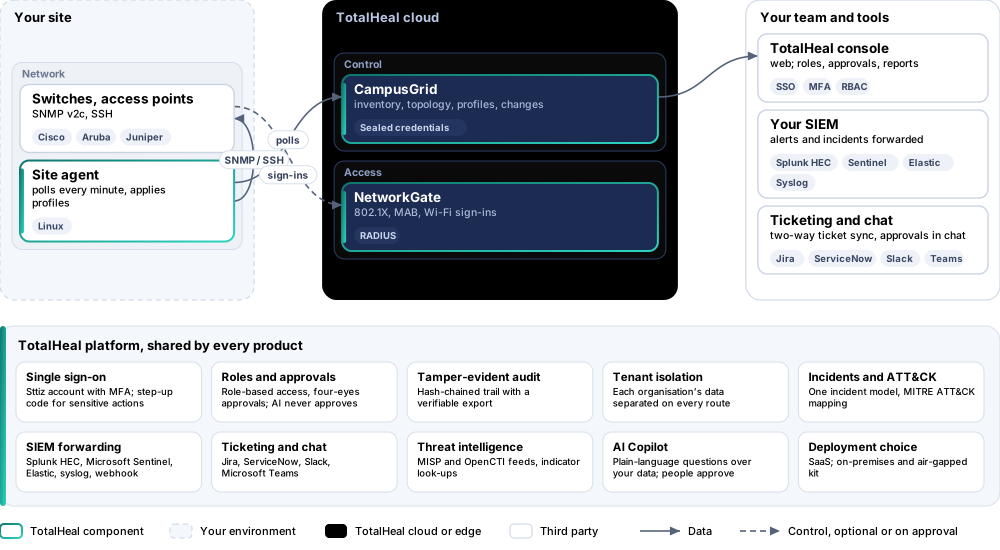
The TotalHeal approach. CampusGrid reads every switch, access point and controller over SNMP from a TotalHeal agent at the site, and applies port profiles over SSH as the commands an engineer would type for that vendor — shown before they are sent, with the switch’s answer kept.
3Architecture
4How it works
- AddAdd a switch with its address, SNMP community and the site agent that polls it.
- SeePorts, VLANs, PoE, firmware and neighbours appear within a minute.
- ProfileMake port profiles: VLAN, voice VLAN, PoE, 802.1X.
- ApplyTick ports, preview the commands, apply; the switch’s answer is kept.
- SecureNetworkGate signs devices in on the profiled ports.
5Capabilities in detail
- Every portModel, firmware, uptime, and for each port its state, speed, VLAN, errors and PoE, read every minute over SNMP v2c.
- What is plugged in whereThe topology from LLDP: which switch and port each neighbour is on.
- Port profilesAccess VLAN, voice VLAN for phones, PoE on or off, 802.1X with MAB through NetworkGate, a description, shut down — applied to ticked ports as Cisco IOS / IOS-XE, Aruba AOS-CX or Juniper Junos commands.
- Nothing hiddenThe exact commands are shown before they are sent; the switch’s answer is kept; a refused command fails the change; the switch’s SSH key is pinned on first use.
- Wi-FiOn the Professional tier, clients per wireless network and per access point from NetworkGate sign-ins.
- Four-eyesOn the Elite tier every switch change waits for a second administrator.
6Security and data handling
- You see the commandsExactly what is typed on the switch is shown before it is sent.
- Credentials sealedCommunities and passwords are sealed and never shown again.
- The right switchA switch’s SSH key is pinned on first use; a different key is refused.
- Refusals fail loudlyA command the switch refuses fails the change with its answer.
7Where it fits
8Deployment and system requirements
Protected platforms
- Switches and controllersAny device with SNMP v2c; profiles for Cisco IOS / IOS-XE, Aruba AOS-CX, Juniper Junos
- Site agentTotalHeal server agent on Linux
On-premises server
- Operating system
- RHEL, Rocky Linux or AlmaLinux 8 / 9; Ubuntu 20.04, 22.04 or 24.04; Debian 11 / 12
- Processor
- 4 vCPU (tested configuration)
- Memory
- 8 GB recommended (6 GB minimum)
- Disk
- 10 GB free for software, releases and backups, plus data
- Sign-in
- Active Directory / LDAP, SAML 2.0 or OpenID Connect
- Software
- Nothing to pre-install: no container runtime, database, web server or Java
Network and access
- SNMP v2c read access on the devices
- An SSH login on the switches for changes
- A TotalHeal server agent at the site
Alerts and tickets to
- Splunk
- Microsoft Sentinel
- Elastic
- Syslog / CEF
- Jira
- ServiceNow
- Slack
- Microsoft Teams
9Technical specifications
| Features | Included | ||
|---|---|---|---|
| Every port | Included | ||
| What is plugged in where | Included | ||
| Port profiles | Included | ||
| Nothing hidden | Included | ||
| Wi-Fi | Included | ||
| Four-eyes | Included | ||
| Availability by tier | Essential | Professional | Elite |
| Switches, access points and controllers over SNMP: model, firmware, uptime, ports, VLANs, errors, PoE | Included | Included | Included |
| Topology from LLDP neighbours | Included | Included | Included |
| Port profiles applied over SSH (Cisco IOS / IOS-XE, Aruba AOS-CX, Juniper Junos) with a preview and the transcript; host keys pinned | Included | Included | Included |
| Wi-Fi clients per network and access point from NetworkGate sign-ins | — | Included | Included |
| Every switch change approved by a second administrator | — | — | Included |
| List price per network device per year | US$60 · ₹5,710 | US$108 · ₹10,280 | US$156 · ₹14,840 |
| Platforms and coverage | |||
| Devices | Any switch, access point or controller with SNMP v2c; profiles for Cisco IOS / IOS-XE, Aruba AOS-CX, Juniper Junos | ||
| Site agent | TotalHeal server agent on Linux with the campusgrid module | ||
| Console | TotalHeal web console: CampusGrid | ||
| Deployment options | |||
| SaaS | AvailableInventory and changes in the TotalHeal cloud; the polling agent at your site. | ||
| On-premises control plane | AvailableDelivered with our team from the on-premises kit. | ||
| Air-gapped | AvailableOffline kit, offline licence file and offline update bundles. | ||
| Licensing | |||
| Priced per | network device per year | ||
| Counted | Switches, access points and controllers added to CampusGrid | ||
| Trial | 30 days, up to 10 network devices | ||
| Editions | CampusGrid is sold on its own, per network device; FleetControl is included. | ||
| Government profile | Government is a profile, not a separate tier or price list: the Elite tier with Government defaults switched on — data residency in India, four-eyes approval of policy changes, a distinct approver for every approval-level action, retention of at least 180 days, and the CERT-In and DPDP reporting clocks. | ||
| Procurement dossier | Compliance matrix, bill of materials, architecture and hardening, SLA and OEM authorisation letter, on request | ||
| On-premises server | |||
| Operating system | RHEL, Rocky Linux or AlmaLinux 8 / 9; Ubuntu 20.04, 22.04 or 24.04; Debian 11 / 12 | ||
| Processor | 4 vCPU (tested configuration) | ||
| Memory | 8 GB recommended (6 GB minimum) | ||
| Disk | 10 GB free for software, releases and backups, plus data | ||
| Sign-in | Active Directory / LDAP, SAML 2.0 or OpenID Connect | ||
| Software | Nothing to pre-install: no container runtime, database, web server or Java | ||
| Requirements | |||
| Requirement 1 | SNMP v2c read access on the devices | ||
| Requirement 2 | An SSH login on the switches for changes | ||
| Requirement 3 | A TotalHeal server agent at the site | ||
10Getting started
- SNMP v2c read access on the devices
- An SSH login on the switches for changes
- A TotalHeal server agent at the site
Start a 30 days, up to 10 network devices trial in the TotalHeal console with a Sttiz account. For a quote, an on-premises installation or the procurement dossier (compliance matrix, bill of materials, architecture and hardening, SLA, OEM authorisation letter), write to business@totalhealsecurity.com.