TotalHealDatasheet · 27 October 2026
TotalHealCampusGrid
Switch and Wi-Fi management (SD-LAN)
Your switches, access points and controllers in one place: every port, what is plugged in where, PoE draw, and port profiles applied with each vendor’s own commands.
- Cloud (SaaS)
- On-premises
- Air-gapped
The challenge
Switches are configured port by port over SSH, by whoever has the password; nobody knows which port the conference-room phone is on, how much PoE is left, or which firmware each switch runs, and a typo on one port is found weeks later.
The answer
CampusGrid reads every switch, access point and controller over SNMP from a TotalHeal agent at the site, and applies port profiles over SSH as the commands an engineer would type for that vendor — shown before they are sent, with the switch’s answer kept.
- Status
- Available
- Deploys as
- Cloud (SaaS) · On-premises · Air-gapped
- Runs on
- Devices; Site agent
- Priced per
- network device per year
- Trial
- 30 days, up to 10 network devices
- Licence
- Sold on its own; one TotalHeal console
Supported platforms
- Switches and controllersAny device with SNMP v2c; profiles for Cisco IOS / IOS-XE, Aruba AOS-CX, Juniper Junos
- Site agentTotalHeal server agent on Linux
How it works
- AddAdd a switch with its address, SNMP community and the site agent that polls it.
- SeePorts, VLANs, PoE, firmware and neighbours appear within a minute.
- ProfileMake port profiles: VLAN, voice VLAN, PoE, 802.1X.
- ApplyTick ports, preview the commands, apply; the switch’s answer is kept.
- SecureNetworkGate signs devices in on the profiled ports.
Reference architecture
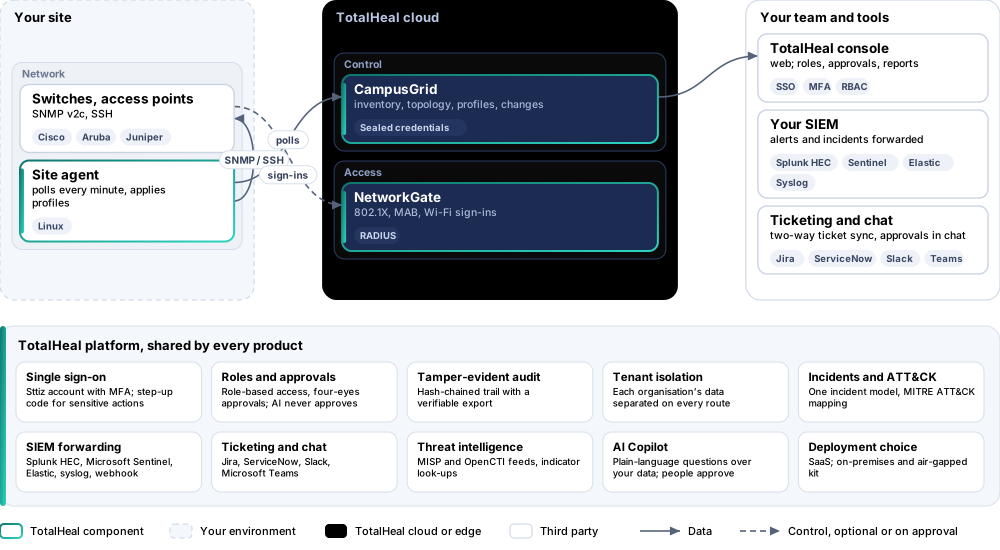
Key capabilities
- Every portModel, firmware, uptime, and for each port its state, speed, VLAN, errors and PoE, read every minute over SNMP v2c.
- What is plugged in whereThe topology from LLDP: which switch and port each neighbour is on.
- Port profilesAccess VLAN, voice VLAN for phones, PoE on or off, 802.1X with MAB through NetworkGate, a description, shut down — applied to ticked ports as Cisco IOS / IOS-XE, Aruba AOS-CX or Juniper Junos commands.
- Nothing hiddenThe exact commands are shown before they are sent; the switch’s answer is kept; a refused command fails the change; the switch’s SSH key is pinned on first use.
- Wi-FiOn the Professional tier, clients per wireless network and per access point from NetworkGate sign-ins.
- Four-eyesOn the Elite tier every switch change waits for a second administrator.
Deployment options
Cloud (SaaS)AvailableInventory and changes in the TotalHeal cloud; the polling agent at your site.
On-premisesAvailableDelivered with our team from the on-premises kit.
Air-gappedAvailableOffline kit, offline licence file and offline update bundles.
System requirements
Protected platforms
- Switches and controllersAny device with SNMP v2c; profiles for Cisco IOS / IOS-XE, Aruba AOS-CX, Juniper Junos
- Site agentTotalHeal server agent on Linux
On-premises server
- Operating system
- RHEL, Rocky Linux or AlmaLinux 8 / 9; Ubuntu 20.04, 22.04 or 24.04; Debian 11 / 12
- Processor
- 4 vCPU (tested configuration)
- Memory
- 8 GB recommended (6 GB minimum)
- Disk
- 10 GB free for software, releases and backups, plus data
- Sign-in
- Active Directory / LDAP, SAML 2.0 or OpenID Connect
- Software
- Nothing to pre-install: no container runtime, database, web server or Java
Network and access
- SNMP v2c read access on the devices
- An SSH login on the switches for changes
- A TotalHeal server agent at the site
Alerts and tickets to
- Splunk
- Microsoft Sentinel
- Elastic
- Syslog / CEF
- Jira
- ServiceNow
- Slack
- Microsoft Teams
Technical specifications
| Features | Included | ||
|---|---|---|---|
| Every port | Included | ||
| What is plugged in where | Included | ||
| Port profiles | Included | ||
| Nothing hidden | Included | ||
| Wi-Fi | Included | ||
| Four-eyes | Included | ||
| Availability by tier | Essential | Professional | Elite |
| Switches, access points and controllers over SNMP: model, firmware, uptime, ports, VLANs, errors, PoE | Included | Included | Included |
| Topology from LLDP neighbours | Included | Included | Included |
| Port profiles applied over SSH (Cisco IOS / IOS-XE, Aruba AOS-CX, Juniper Junos) with a preview and the transcript; host keys pinned | Included | Included | Included |
| Wi-Fi clients per network and access point from NetworkGate sign-ins | — | Included | Included |
| Every switch change approved by a second administrator | — | — | Included |
| List price per network device per year | US$60 · ₹5,710 | US$108 · ₹10,280 | US$156 · ₹14,840 |
| Platforms and coverage | |||
| Devices | Any switch, access point or controller with SNMP v2c; profiles for Cisco IOS / IOS-XE, Aruba AOS-CX, Juniper Junos | ||
| Site agent | TotalHeal server agent on Linux with the campusgrid module | ||
| Console | TotalHeal web console: CampusGrid | ||
| Deployment options | |||
| SaaS | AvailableInventory and changes in the TotalHeal cloud; the polling agent at your site. | ||
| On-premises control plane | AvailableDelivered with our team from the on-premises kit. | ||
| Air-gapped | AvailableOffline kit, offline licence file and offline update bundles. | ||
| Licensing | |||
| Priced per | network device per year | ||
| Counted | Switches, access points and controllers added to CampusGrid | ||
| Trial | 30 days, up to 10 network devices | ||
| Editions | CampusGrid is sold on its own, per network device; FleetControl is included. | ||
| Government profile | Government is a profile, not a separate tier or price list: the Elite tier with Government defaults switched on — data residency in India, four-eyes approval of policy changes, a distinct approver for every approval-level action, retention of at least 180 days, and the CERT-In and DPDP reporting clocks. | ||
| Procurement dossier | Compliance matrix, bill of materials, architecture and hardening, SLA and OEM authorisation letter, on request | ||
| On-premises server | |||
| Operating system | RHEL, Rocky Linux or AlmaLinux 8 / 9; Ubuntu 20.04, 22.04 or 24.04; Debian 11 / 12 | ||
| Processor | 4 vCPU (tested configuration) | ||
| Memory | 8 GB recommended (6 GB minimum) | ||
| Disk | 10 GB free for software, releases and backups, plus data | ||
| Sign-in | Active Directory / LDAP, SAML 2.0 or OpenID Connect | ||
| Software | Nothing to pre-install: no container runtime, database, web server or Java | ||
| Requirements | |||
| Requirement 1 | SNMP v2c read access on the devices | ||
| Requirement 2 | An SSH login on the switches for changes | ||
| Requirement 3 | A TotalHeal server agent at the site | ||