Secure Web Gateway (SWG)
Every web request checked against the person’s own policy — and a page that says why
Every web request your people make, checked against their own policy — malware, phishing, your threat intelligence and about 57 content categories — in the TotalHeal cloud or on a proxy in your office.
Contents
- 1Executive summary
- 2The challenge
- 3Architecture
- 4How it works
- 5Capabilities in detail
- 6Security and data handling
- 7Where it fits
- 8Deployment and system requirements
- 9Technical specifications
- 10Getting started
1Executive summary
SurfGuard checks every web request against the policy of the person who made it: the DNSGuard security engine first, then about 57 content categories, then your lists. Blocks explain themselves and can be appealed; approved sites reach every proxy within a minute.
2The challenge
Most attacks still start with a click: a phishing page that looks like the bank, a download from a look-alike site, a link in an SMS. DNS filtering stops many of them but sees only the name, not the person or the file, and gives the user no explanation. Content rules differ by team — the newsroom needs social networks, accounts does not — and when a site is blocked by mistake there is no simple way to ask for it.
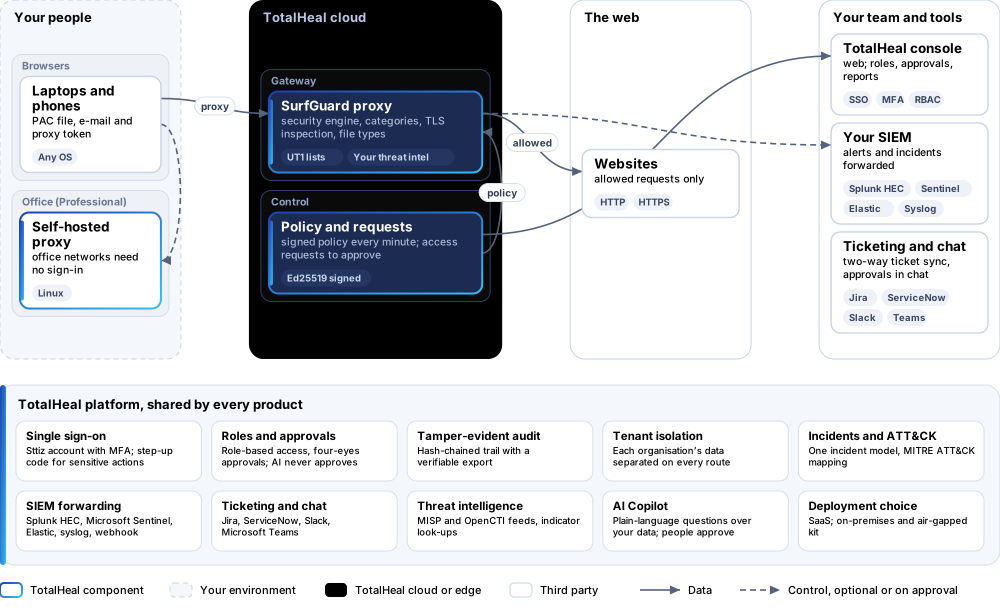
The TotalHeal approach. SurfGuard is a secure web gateway. Browsers send their web traffic to it — the TotalHeal cloud proxy or a proxy in your office — and each person signs in with their e-mail and a proxy token. Every request is checked against that person’s policy: the security checks of DNSGuard first, then content categories, then your own lists. A blocked or warned site shows a page that says why, with a button to request access.
3Architecture
4How it works
- ConnectBrowsers take the PAC file; people sign in with their e-mail and a proxy token.
- DecideSecurity checks, content categories and your lists decide each request for that person’s policy.
- ExplainBlocked and warned sites show the reason; a warning can be continued for an hour.
- AskPeople request access from the page; an administrator approves for them or for the policy.
- RecordEvery block is logged and security blocks raise alerts in the incident queue.
5Capabilities in detail
- A policy per personEach person gets their own policy, the policy of the first group rule that matches, or the default. Allow, warn or block each content category; add sites to always allow or always block; turn on safe search for Google, Bing, YouTube and DuckDuckGo.
- Security firstMalware and phishing hosts (URLhaus), your own threat intelligence, analyst blocks from incident response and look-alike domains of your brands and Indian banks are decided by the same engine as DNSGuard, before any category. Security blocks raise alerts in the incident queue with MITRE ATT&CK.
- 57 content categoriesAdult, gambling, piracy, proxies and anonymisers, social networks, streaming, shopping, games, webmail and more — about 5 million domains from the Université Toulouse Capitole (UT1) lists, rebuilt daily. A site in several categories is decided by all of them.
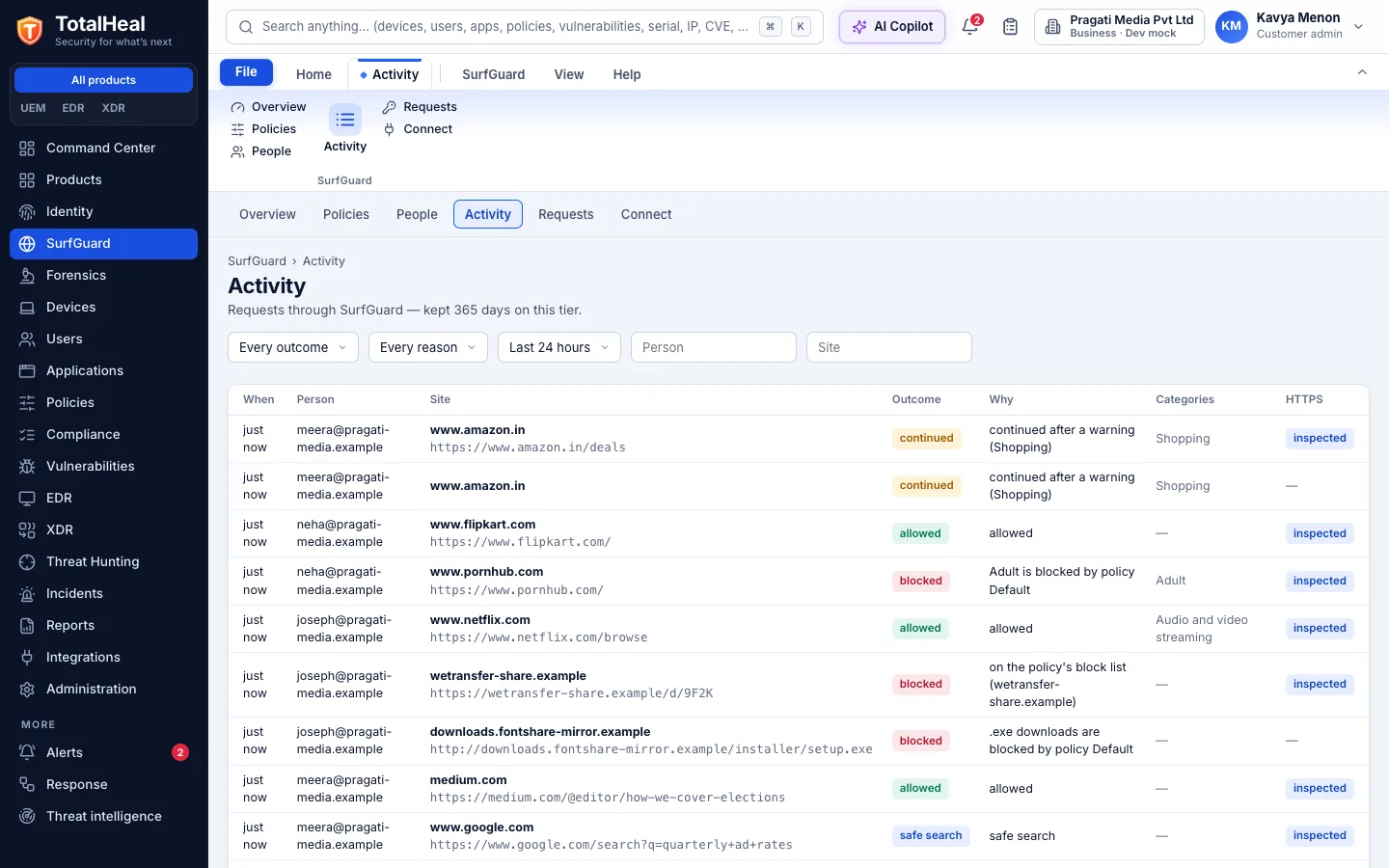
- Pages that explainBlocked and warned sites show a page with the reason — on HTTPS too, when devices trust the organisation’s SurfGuard root. A warning lets the person continue for an hour; a block lets them request access with a reason.
- Access requestsRequests arrive in the console with the site, its categories and the reason. Approve for that person only, or add the site to their policy’s allow list for everyone; the proxies have it within a minute.
- TLS inspectionOn the Professional tier, allowed HTTPS sites can be decrypted with the organisation’s root, except the categories and sites you exempt (online banking and finance by default), so the activity shows full addresses and downloads can be checked.
- File typesOn the Professional tier, downloads of chosen file types — exe, msi, apk, iso — are blocked, by name and by the file name the server sends.
- Cloud or officeThe TotalHeal cloud proxy serves people anywhere; on the Professional tier a self-hosted proxy runs in the office, where listed office networks need no sign-in. Both take the same signed policy and keep working on the last good one if the cloud cannot be reached.
- Work hoursOn the Elite tier, categories can be blocked only inside work hours — for example streaming and games from 09:30 to 18:30 on weekdays, in your time zone.
6Security and data handling
- Signed policyProxies run only a policy signed by TotalHeal and keep the last good one if the cloud cannot be reached.
- Tokens are never storedSurfGuard keeps only a fingerprint of each person’s proxy token.
- Exempt is exemptSites and categories you exempt from inspection are never decrypted.
- No silent blocksEvery block says why and who to ask.
7Where it fits
8Deployment and system requirements
Protected platforms
- Any browser with a PAC file or proxy settingWindows, macOS, Linux, ChromeOS, Android, iOS
- Self-hosted proxyLinux x86-64 / arm64
On-premises server
- Operating system
- RHEL, Rocky Linux or AlmaLinux 8 / 9; Ubuntu 20.04, 22.04 or 24.04; Debian 11 / 12
- Processor
- 4 vCPU (tested configuration)
- Memory
- 8 GB recommended (6 GB minimum)
- Disk
- 10 GB free for software, releases and backups, plus data
- Sign-in
- Active Directory / LDAP, SAML 2.0 or OpenID Connect
- Software
- Nothing to pre-install: no container runtime, database, web server or Java
Network and access
- Browsers set to the SurfGuard PAC file (by Group Policy, MDM or TotalHeal UEM)
- The SurfGuard root trusted on devices for pages on HTTPS and for inspection
Alerts and tickets to
- Splunk
- Microsoft Sentinel
- Elastic
- Syslog / CEF
- Jira
- ServiceNow
- Slack
- Microsoft Teams
9Technical specifications
| Features | Included | ||
|---|---|---|---|
| A policy per person | Included | ||
| Security first | Included | ||
| 57 content categories | Included | ||
| Pages that explain | Included | ||
| Access requests | Included | ||
| TLS inspection | Included | ||
| File types | Included | ||
| Cloud or office | Included | ||
| Work hours | Included | ||
| Availability by tier | Essential | Professional | Elite |
| Cloud proxy with a PAC file; each person signs in with their e-mail and a proxy token; policy by person, group rule or default | Included | Included | Included |
| Malware, phishing, your threat intelligence, analyst blocks and typo-squats (the DNSGuard engine); your allow and block lists; safe search | Included | Included | Included |
| About 57 content categories from the UT1 lists (5 million domains, updated daily): allow, warn or block each | Included | Included | Included |
| Block and warning pages on HTTP and HTTPS (with the SurfGuard root trusted), continue for an hour, request access; approve for a person or a policy | Included | Included | Included |
| Alerts from security blocks in the incident queue; activity search | Included | Included | Included |
| TLS inspection with exempt categories and sites; full addresses in the activity | — | Included | Included |
| File-type blocking of downloads (exe, msi, apk …) | — | Included | Included |
| Self-hosted proxies in your office; office networks that need no sign-in | — | Included | Included |
| Work-hours rules: categories blocked only inside the hours, in your time zone | — | — | Included |
| Activity kept 30 days (Essential), 90 days (Professional), one year (Elite) | Included | Included | Included |
| List price per user per year | US$30 · ₹2,850 | US$54 · ₹5,140 | US$78 · ₹7,420 |
| Platforms and coverage | |||
| Browsers | Any browser that takes a PAC file or a proxy setting (Windows, macOS, Linux, ChromeOS, Android, iOS) | ||
| Self-hosted proxy | Linux x86-64 or arm64 with systemd (Professional) | ||
| Category data | Université Toulouse Capitole blacklists (UT1), CC BY-SA 4.0, rebuilt daily | ||
| Console | TotalHeal web console | ||
| Deployment options | |||
| SaaS | AvailableThe cloud proxy runs in the TotalHeal cloud; a self-hosted proxy runs in your office (Professional). | ||
| On-premises control plane | AvailableDelivered with our team from the on-premises kit. | ||
| Air-gapped | AvailableOffline kit, offline licence file and offline update bundles. | ||
| Licensing | |||
| Priced per | user per year | ||
| Counted | People who sign in to SurfGuard | ||
| Trial | 30 days, up to 25 people | ||
| Editions | SurfGuard is sold on its own, outside the editions. | ||
| Government profile | Government is a profile, not a separate tier or price list: the Elite tier with Government defaults switched on — data residency in India, four-eyes approval of policy changes, a distinct approver for every approval-level action, retention of at least 180 days, and the CERT-In and DPDP reporting clocks. | ||
| Procurement dossier | Compliance matrix, bill of materials, architecture and hardening, SLA and OEM authorisation letter, on request | ||
| On-premises server | |||
| Operating system | RHEL, Rocky Linux or AlmaLinux 8 / 9; Ubuntu 20.04, 22.04 or 24.04; Debian 11 / 12 | ||
| Processor | 4 vCPU (tested configuration) | ||
| Memory | 8 GB recommended (6 GB minimum) | ||
| Disk | 10 GB free for software, releases and backups, plus data | ||
| Sign-in | Active Directory / LDAP, SAML 2.0 or OpenID Connect | ||
| Software | Nothing to pre-install: no container runtime, database, web server or Java | ||
| Requirements | |||
| Requirement 1 | Browsers set to the SurfGuard PAC file (by Group Policy, MDM or TotalHeal UEM) | ||
| Requirement 2 | The SurfGuard root trusted on devices for pages on HTTPS and for inspection | ||
10Getting started
- Browsers set to the SurfGuard PAC file (by Group Policy, MDM or TotalHeal UEM)
- The SurfGuard root trusted on devices for pages on HTTPS and for inspection
Start a 30 days, up to 25 people trial in the TotalHeal console with a Sttiz account. For a quote, an on-premises installation or the procurement dossier (compliance matrix, bill of materials, architecture and hardening, SLA, OEM authorisation letter), write to business@totalhealsecurity.com.