Extended Detection & Response (XDR)
One incident per attack, across every tool you already have
One incident across endpoint, network, identity, email and cloud — with or without our EDR.
Contents
- 1Executive summary
- 2The challenge
- 3Architecture
- 4How it works
- 5Capabilities in detail
- 6Security and data handling
- 7Where it fits
- 8Deployment and system requirements
- 9Technical specifications
- 10Getting started
1Executive summary
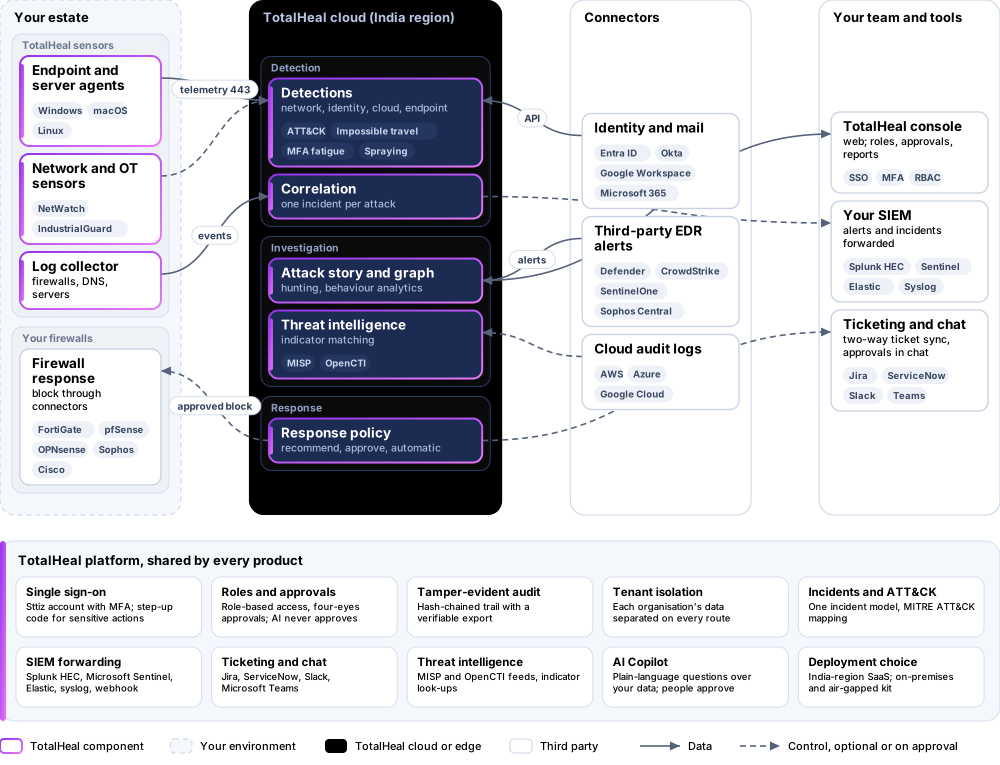
ThreatFusion joins alerts from TotalHeal products, your firewalls and DNS servers (through the collector) and your identity, cloud and endpoint providers (through connectors) into one incident with an attack story. It does not need TotalHeal EDR.
2The challenge
An attack touches a firewall, a sign-in and a laptop, but each tool raises its own alert and nobody sees that they are one story.
The TotalHeal approach. ThreatFusion joins alerts from TotalHeal products, your firewalls and DNS servers (through the collector) and your identity and cloud providers (through connectors) into one incident with an attack story — it does not need TotalHeal EDR.
3Architecture
4How it works
- ConnectAdd any source: TotalHeal agents, the collector or a connector.
- DetectNetwork, identity and cloud rules mapped to MITRE ATT&CK.
- CorrelateAlerts about the same person or host join one incident.
- InvestigateAttack story, security graph and hunting in the console.
- RespondActions run through your response policy and approvals.
5Capabilities in detail
- Any event sourceTotalHeal endpoints, the log collector, or connectors for Microsoft Entra ID, Okta, Google Workspace, Microsoft 365, the AWS, Azure and Google Cloud audit logs, and alerts from Defender for Endpoint, CrowdStrike, SentinelOne and Sophos Central.
- One incident per attackAlerts about the same person from network logs, sign-ins, mail and endpoints are joined into one incident; tested with a firewall scan and a sign-in brute force against the same user, on an organisation without TotalHeal EDR.
- Network detection rulesThe same firewall and DNS rules as LogIntelligence: scans, denied-connection bursts, threat-intelligence hits, algorithm-like domains and brute force, mapped to MITRE ATT&CK.
- Identity and cloud detectionsImpossible travel, MFA fatigue, password spraying, brute force, privileged role grants, risky OAuth consent and cloud control-plane changes.
- InvestigationAttack story, security graph, threat hunting and behaviour analytics in the console.
6Security and data handling
- Works without our EDRFirewall, DNS and identity alerts join one incident on their own.
- People approve impactHigh-impact response always waits for approval.
- Audit you can verifyEvery action on a hash-chained audit trail.
7Where it fits
8Deployment and system requirements
Protected platforms
- Windows10 / 11 (x64)
- macOS11 and later
- Linuxx86_64, aarch64, systemd
- FortiGate
- Palo Alto Networks
Works with
- Microsoft Entra ID
- Okta
- Google Workspace
- Microsoft 365
- Microsoft Defender
- CrowdStrike
- SentinelOne
- Sophos Central
- AWS
- Microsoft Azure
- Google Cloud
On-premises server
- Operating system
- RHEL, Rocky Linux or AlmaLinux 8 / 9; Ubuntu 20.04, 22.04 or 24.04; Debian 11 / 12
- Processor
- 4 vCPU (tested configuration)
- Memory
- 8 GB recommended (6 GB minimum)
- Disk
- 10 GB free for software, releases and backups, plus data
- Sign-in
- Active Directory / LDAP, SAML 2.0 or OpenID Connect
- Software
- Nothing to pre-install: no container runtime, database, web server or Java
Network and access
- At least one event source: TotalHeal endpoints, the collector or a connector
Alerts and tickets to
- Splunk
- Microsoft Sentinel
- Elastic
- Syslog / CEF
- Jira
- ServiceNow
- Slack
- Microsoft Teams
9Technical specifications
| Features | Included | |
|---|---|---|
| Any event source | Included | |
| One incident per attack | Included | |
| Network detection rules | Included | |
| Identity and cloud detections | Included | |
| Investigation | Included | |
| Availability by edition | Business | Enterprise |
| Correlated incidents, attack story, network / identity / cloud detections | Included | Included |
| Saved searches and scheduled rules | Up to 10 scheduled | Included |
| Full security graph, correlation studio, detection engineering | — | Included |
| Microsoft 365 and Google Workspace email signals | — | Included |
| Platforms and coverage | ||
| Sources | TotalHeal agents, the TotalHeal collector (Linux), API connectors (identity, cloud, mail and third-party EDR alerts) | |
| Console | TotalHeal web console | |
| Deployment options | ||
| SaaS (India region) | AvailableSingle-region service. | |
| On-premises control plane | AvailableDelivered with our team from the on-premises kit. | |
| Air-gapped | AvailableOffline kit, offline licence file and offline update bundles. | |
| Licensing | ||
| Priced per | Endpoint equivalent per year | |
| Counted | Event sources (devices, collectors and connectors) in endpoint equivalents | |
| Trial | 30 days | |
| Government profile | Government is a profile, not a separate tier or price list: the Elite tier with Government defaults switched on — data residency in India, four-eyes approval of policy changes, a distinct approver for every approval-level action, retention of at least 180 days, and the CERT-In and DPDP reporting clocks. | |
| Procurement dossier | Compliance matrix, bill of materials, architecture and hardening, SLA and OEM authorisation letter, on request | |
| On-premises server | ||
| Operating system | RHEL, Rocky Linux or AlmaLinux 8 / 9; Ubuntu 20.04, 22.04 or 24.04; Debian 11 / 12 | |
| Processor | 4 vCPU (tested configuration) | |
| Memory | 8 GB recommended (6 GB minimum) | |
| Disk | 10 GB free for software, releases and backups, plus data | |
| Sign-in | Active Directory / LDAP, SAML 2.0 or OpenID Connect | |
| Software | Nothing to pre-install: no container runtime, database, web server or Java | |
| Requirements | ||
| Requirement 1 | At least one event source: TotalHeal endpoints, the collector or a connector | |
10Getting started
- At least one event source: TotalHeal endpoints, the collector or a connector
Start a 30 days trial in the TotalHeal console with a Sttiz account. For a quote, an on-premises installation or the procurement dossier (compliance matrix, bill of materials, architecture and hardening, SLA, OEM authorisation letter), write to business@totalhealsecurity.com.